
Your AI Needs an Org Chart
Graph engineering went from a joke on X to paid courses in six days. Here's what's actually real underneath it, and how to build one without writing code.
The Word That Appeared Overnight
On July 18, 2026, a developer named Peter Steinberger posted a half-joking line on X: "Are we still talking loops or did we shift to graphs yet?"
About four and a half hours later, Hamel Husain played along with an article titled "Loop Engineering Is Dead. Enter Graph Engineering." Within a day there were think pieces. Within six days there were paid courses.
That's the honest origin of graph engineering, and I'm telling you first because it sets the right posture for everything that follows. If you've been seeing the term everywhere and quietly worrying you missed a memo, you didn't. The label is about two weeks old. The thing it describes is roughly a decade old.
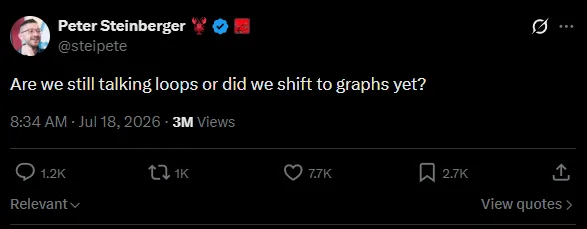 The post that started it, 18 July 2026. Three million views for a one-line joke.
The best proof came two days later. Harrison Chase, the person who built LangGraph, which is the single most popular tool for doing exactly this, replied in public:
So why write a tutorial about it at all?
Because underneath the naming circus, something genuinely did change in how people build with AI. The way you get useful work out of a model in 2026 looks nothing like the way you did it in 2023, and the change happened in four distinct steps. Graph engineering is the fourth one. Understanding the ladder is worth more than memorizing the buzzword, and by the end of this you'll know exactly which rung you're standing on.
What you'll get from this: a working mental model for all four stages of AI engineering, the three building blocks of any agent graph, the five patterns you'll actually use, a no-code way to build one this week, and an honest answer to whether you should bother.
Four Ways to Get Work Out of AI
Picture a small newsroom. This analogy is going to carry the whole article, so it's worth thirty seconds of your attention.
You want a story written. There are four increasingly hands-off ways to make that happen, and they map exactly onto the four eras of AI engineering.
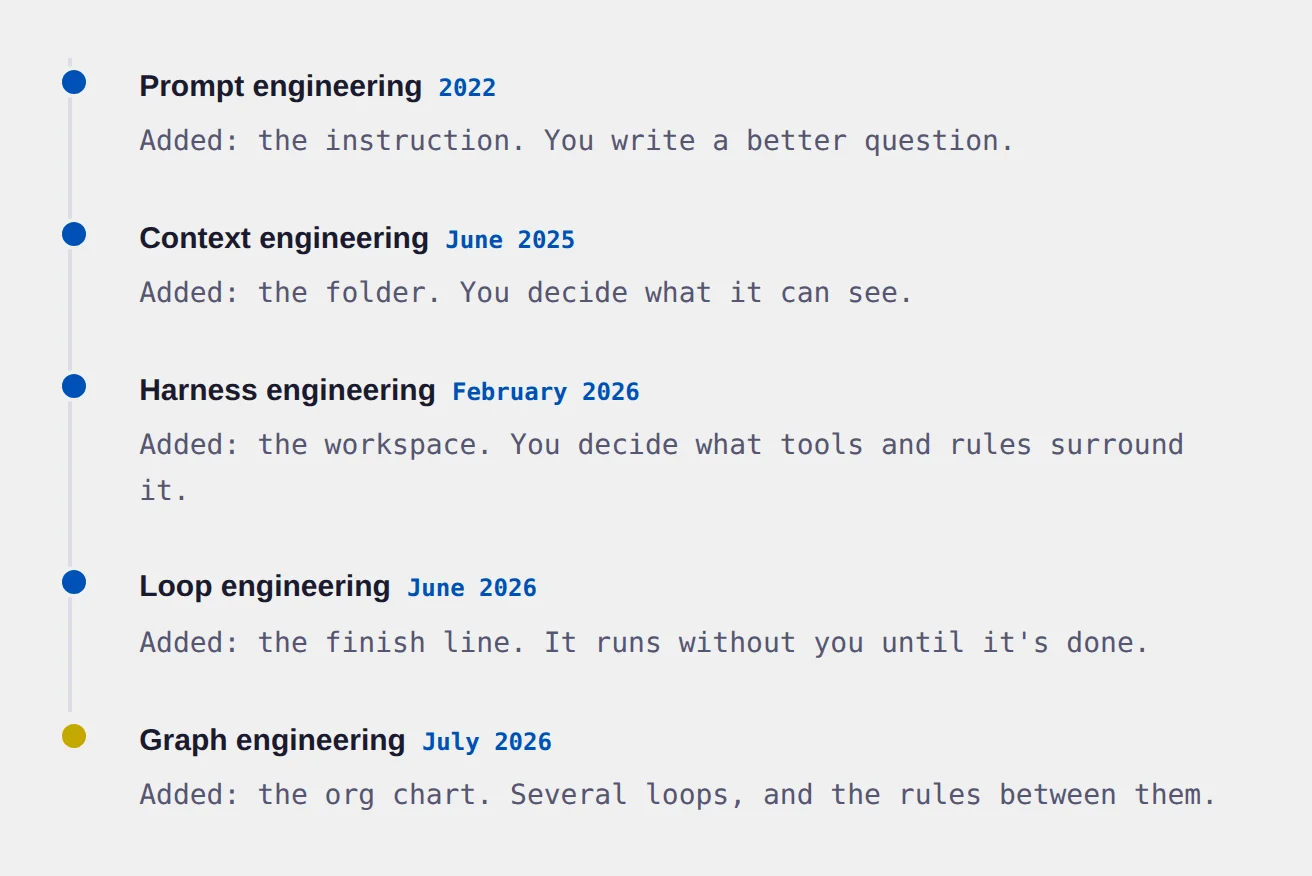
You hand one reporter a clear assignment. That's prompt engineering.
You also hand them background, prior coverage, contacts, and the style guide. That's context engineering.
"Keep working, check it against these criteria, come back when it passes." That's loop engineering.
Researcher, two writers, a fact-checker who can send work back, an editor who signs off. That's graph engineering.
Notice that each step contains the ones before it. The reporters in your newsroom still need good briefs and full folders. Nothing got replaced. The work just kept moving outward, away from the sentence you type and toward the system around it.
Stage one: prompt engineering (2022 to 2023)
The whole field started here, and it started with a genuinely magical finding. In 2022, researchers found that adding four words to a question, "Let's think step by step," made models dramatically better at reasoning. Nothing about the model changed. Only the instruction did.
That result set the tone for two years. Everyone hunted for magic words. And prompt engineering absolutely still works. Anthropic's current guidance is recognizably the same craft: split your instructions into labeled sections, give the model the minimal set of information that fully outlines your expected behavior, and be specific about the output you want.
What broke it: a perfectly worded prompt about your refund policy still fails if the model has never seen your refund policy. Prompt quality has a ceiling, and that ceiling is information.
Stage two: context engineering (2025)
Shopify's CEO Tobi Lütke used the phrase first, on 19 June 2025, describing it as "the art of providing all the context for the task to be plausibly solvable." Six days later Andrej Karpathy amplified it with a post that read, in part, "+1 for 'context engineering' over 'prompt engineering'." His argument was that people hear "prompt" and think of a short question, when what serious AI applications actually do is deliberately decide what fills the model's memory.
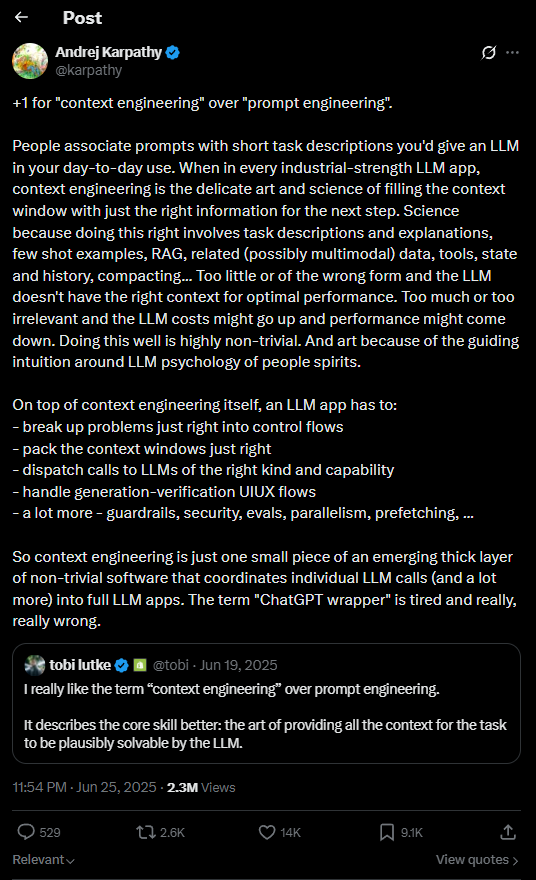 Karpathy’s post, 25 June 2025, quoting Tobi Lütke’s original from six days earlier.
The scope widens from "the prompt" to everything the model can see: your instructions, the tools it has, documents you pulled in, the conversation so far, and every result it got back.
Two ideas from this era are worth carrying with you forever.
Context rot. Models get less accurate as their memory fills up. It's a gradual slide, not a cliff, but material buried in the middle of a very long conversation gets less attention than material at either end. More context is not automatically better context.
The attention budget. Anthropic frames a model's context as working memory with a finite budget. Every token you add spends some of it. The goal, in their words, is "finding the smallest possible set of high-signal tokens that maximize the likelihood of some desired outcome."
The most common mistake users make right now: pasting everything into one giant chat and wondering why quality drops after twenty minutes. That's context rot. The fix isn't a better prompt. It's less in the window.
What broke it: you can curate a perfect context and still be the bottleneck, because you're the one hitting send every single turn.
Stage three: loop engineering (June 2026)
Google engineer Addy Osmani named this one on June 7, 2026, with the cleanest definition anyone has written:
Instead of a conversation, you define a goal and a finish line, and the AI iterates on its own until it crosses it. No human between turns.
The single thing that determines whether a loop works or burns your money is the stop condition, and the word that matters is mechanical. "All the tests pass and the spell check is clean" is a stop condition. "The article is good" is not, because you've just asked a model to grade its own homework and models are generous graders.
The line worth remembering: a loop that can't mechanically tell the difference between done and stuck doesn't fail loudly. It just keeps spending your money.
Osmani also wrote the warning that should sit above every AI automation ever built: "Two people can build the exact same loop and get completely opposite results. One uses it to move faster on work they understand deeply. The other uses it to avoid understanding the work at all."
What broke it: one loop can't specialize. It can't use a cheap fast model for sorting and an expensive careful one for writing. It can't work on six things at once. And critically, it struggles to grade itself honestly, because the thing that wrote the draft is the worst possible judge of the draft.
Stage four: graph engineering (July 2026)
So you connect several loops together and write down the rules for how work moves between them. That's it. That's the whole idea.
A loop, in fact, is already a graph. It's just a graph with one box and an arrow pointing back at itself. Which is why the "loops versus graphs" framing you'll see online is a bit silly. Graphs contain loops.
| Can you do this? | One loop | A graph |
|---|---|---|
| Work on several things at once | No | Yes |
| Use different models for different steps | Awkward | Yes, natively |
| Have an independent reviewer | Hard | Yes, natively |
| See exactly why it took a path | It's in the AI's head | It's in your rules |
| Retry one broken step | No, restart it all | Yes |
| Pause for a human to approve | Bolted on | It's a box in the diagram |
That last row is the one small business owners tend to care about most, and we'll come back to it.
Nothing got replaced
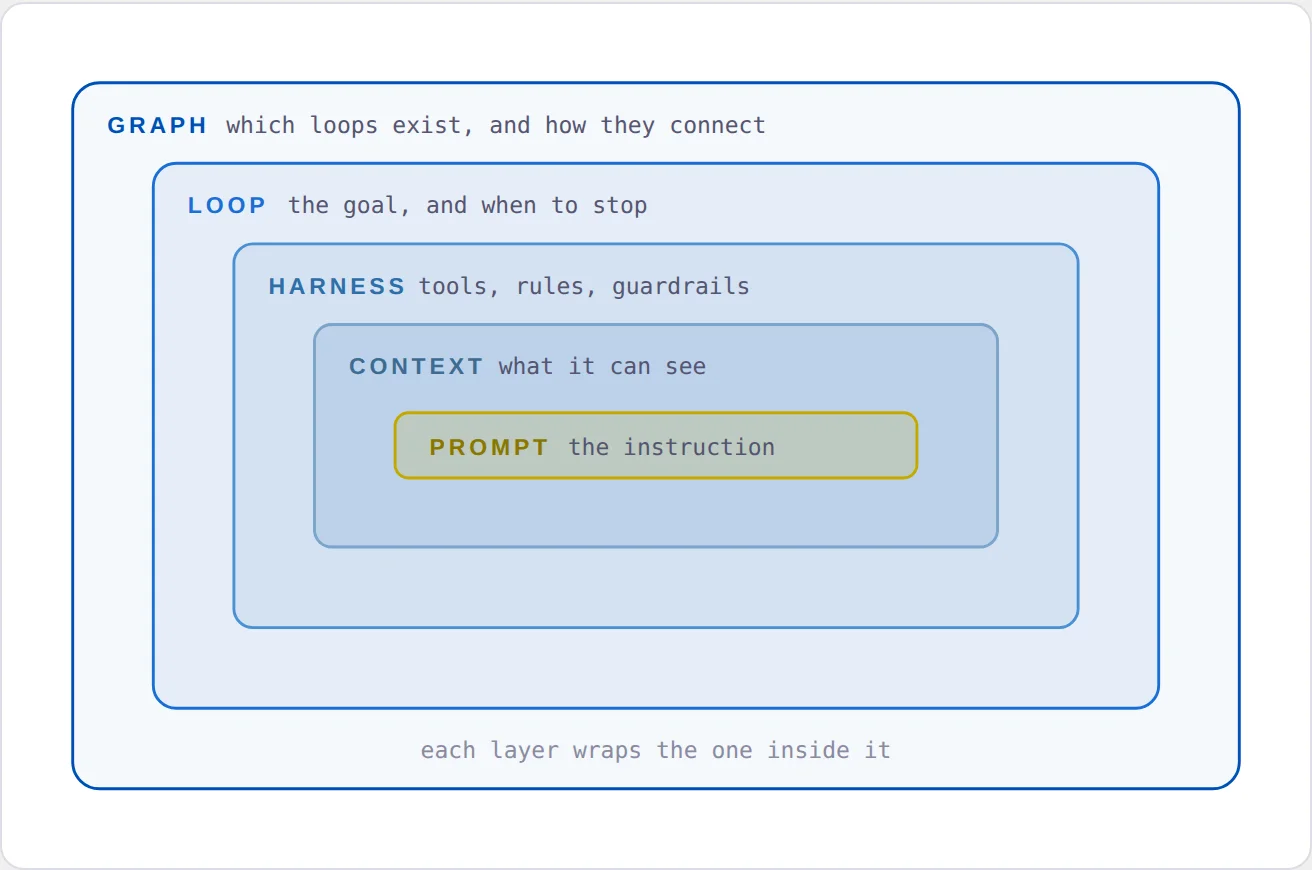
This is the part people miss when they hear a new term and assume the old one died. The four stages sit inside each other like nesting dolls.
 A weak prompt inside a beautiful graph is still a weak prompt. Problems at the inner layers multiply as you add outer ones.
Nodes, Edges, and State
Every agent graph ever built, in any tool, is made of three things. Learn these three words and you can read any diagram in this field.
Nodes are the desks. A node is one unit of work. It might be a full AI agent with tools, a single quick model call, a plain piece of code that does math or formatting, a database lookup, or a human clicking Approve.
Edges are the hand-offs. An edge is a rule about what happens next. "Always go to the writer." "Go to the writer if the score is above 7, otherwise go back to research." "Go to all three of these at once."
State is the folder. State is the package of information that travels along the edges. The task, the notes gathered so far, the current draft, the reviewer's verdict, how many attempts we've made.
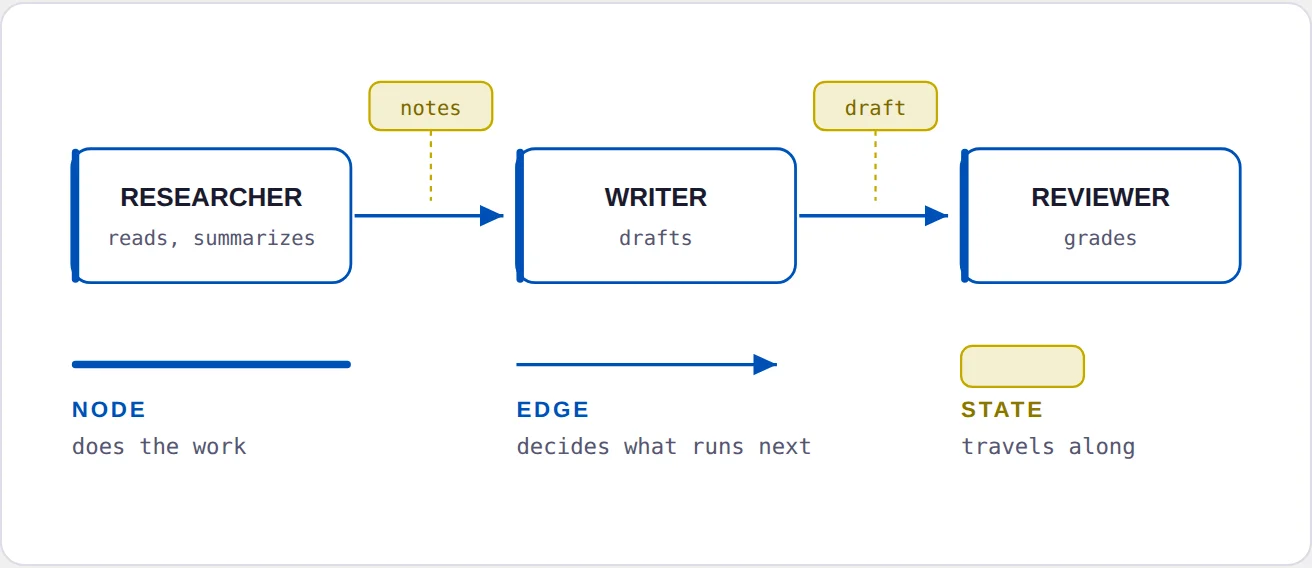 Three desks, two hand-offs, and a folder that changes as it moves. Every agent graph is this, repeated.
The one sentence that explains why this works at all
Here's the rule that makes graphs better than one enormous prompt:
Context does not cross a node boundary unless an edge carries it.
Read that again with the newsroom in mind. Your researcher reads forty web pages. It does not dump forty web pages onto the writer's desk. It hands over a two-paragraph summary. The writer stays sharp because the writer's memory stayed small.
That's context engineering, applied at the level of a team instead of a person. It's also why "just use one really long chat" stops working around the twenty-minute mark, and why splitting the job fixes it.
The most underrated node type
New builders put an AI in every single box. Experienced ones are stingy about it.
Every step you can express as ordinary logic instead of a model call is a step that cannot hallucinate, costs nothing, and finishes instantly. Deciding whether a number is above 7 is not a job for an AI. Formatting a date is not a job for an AI. Google's guidance for its own agent toolkit says essentially this: code should handle predictable routing, and models should handle the parts that need judgment.
Pro Tip: when your automation feels slow and expensive, count how many boxes call an AI. Usually a third of them don't need to.
The Shapes You'll Actually Build
You are not going to invent a new structure. There are roughly a dozen, they're well documented, and five of them cover almost everything a small business would want.
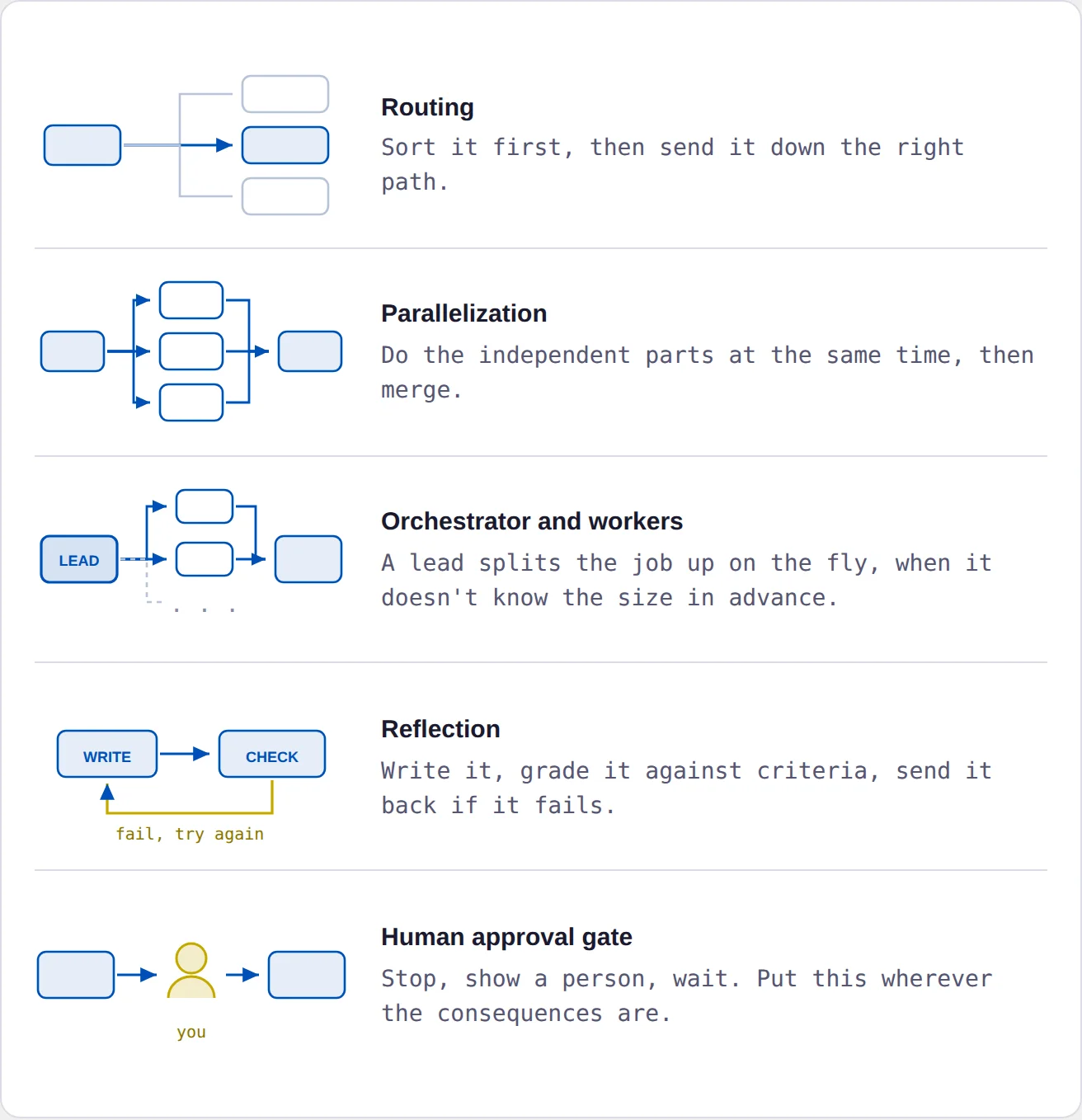
Anthropic documented most of these back in December 2024, well before the term "graph engineering" existed. Here are the five shapes, and then what each one is for.
 Five shapes cover almost everything a small business would want to build.
1. Routing (classify, then send)
One cheap model reads the incoming thing and decides which specialized path it goes down.
Real use: incoming customer emails get sorted into refund requests, technical questions, and sales enquiries, each handled differently. This is also the cheapest cost saving available to you, because easy cases can go to a small fast model and only the hard ones reach the expensive one.
2. Parallelization (do several at once)
Split independent work across several nodes running simultaneously, then merge the results.
Real use: one product, five marketing channels. Generate the Instagram caption, the email subject line, the ad copy, the blog intro, and the SMS blast all at the same time rather than in sequence.
3. Orchestrator and workers (split it up on the fly)
A lead node looks at the job, decides at that moment how many pieces it has, and dispatches a worker per piece.
Real use: "research these competitors" where you don't know until you look whether there are three or eleven. This is the workhorse pattern for anything research-shaped.
4. Reflection (write, critique, rewrite)
A generator produces something. A separate evaluator grades it against criteria. If it fails, the critique goes back to the generator and it tries again.
Real use: almost all content production. And this is where graphs earn their keep over loops, because the evaluator is genuinely separate.
5. The human approval gate
A node that stops, shows you what's about to happen, and waits.
Real use: before anything gets published, sent to a customer, posted publicly, or charged to a card. Put this exactly where the consequences are.
Best practice: the safest second AI in any system is a critic, not a co-author. Every serious piece of evidence in this field points the same direction. If you only ever add one extra node to your setup, make it the one that checks the work.
One trick that makes reviewers much better
Give the reviewer a clean slate. Do not show it the research notes or the writer's reasoning, only the task and the finished draft.
This feels wrong and it isn't. The engineering team at Cognition, who build the AI developer Devin, found exactly this in production: their review agent "having a completely clean context also helps it go deeper into areas the original coding agent may not."
A reviewer that watched you build the thing will forgive the thing. A reviewer seeing it cold will not.
Build One Without Writing Code
You do not need to be a programmer to do this. Two tools let you build real graphs by dragging boxes, and both are free to self-host.
Its Agentflow V2 builder is the closest visual match to how real code frameworks work. It has proper branching, loops, and human input nodes. Best if you want the concepts to carry over later.
Better if you're automation-first and need to connect to hundreds of existing apps. Its AI Agent node handles the model side while the canvas handles the wiring.
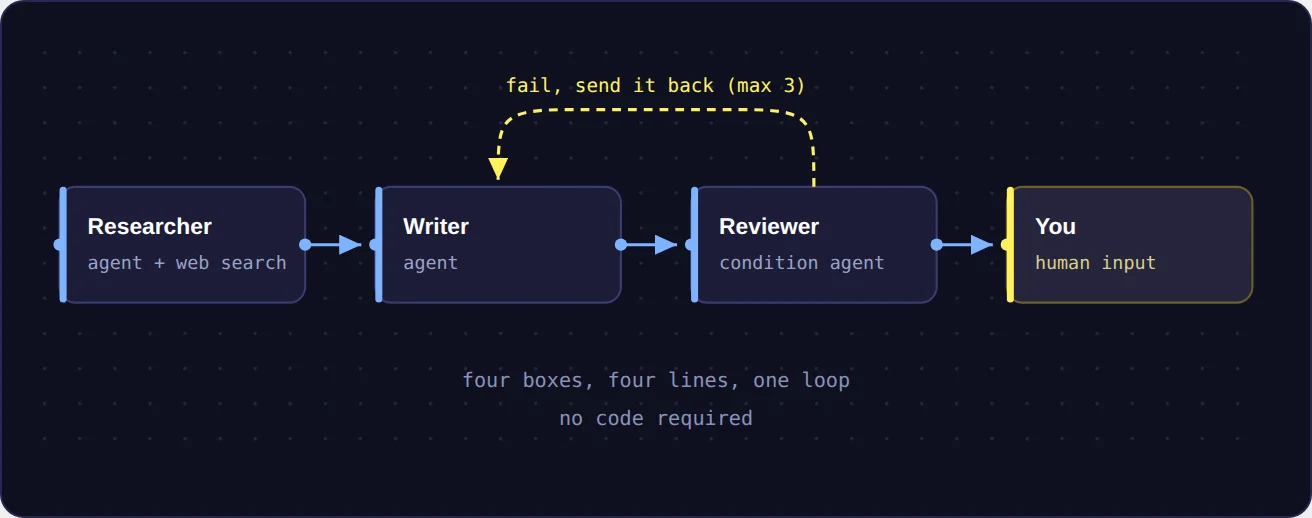
In either one, you drag boxes onto a canvas and draw lines between them. What you end up looking at is roughly this:
 Every visual builder looks a little different, but the parts are always the same: boxes, lines, and a folder of information moving between them.
The starter graph worth building first
Build this one. It teaches four of the five patterns at once and it produces something you can actually use.
 START
 │
 ▼
 RESEARCHER gathers sources,
 │ returns a summary
 ▼
 WRITER produces a draft
 │
 ▼
 REVIEWER grades it
 │ (clean context,
 │ read-only)
 │
 ├─ fail ──▶ back to WRITER
 │ (max 3 tries)
 │
 ▼ pass
 YOU approve or reject
 │
 ▼
 DONE
Four nodes, one loop, one approval gate. Start here.
Now the details that separate a working version from a frustrating one.
Decide what's in the folder before you build anything
Write down, on paper, every piece of information that travels between your boxes, and who is allowed to change each one. For the graph above:
| What travels | Who writes it |
|---|---|
| The task | You, once, at the start |
| The research notes | Researcher only |
| The draft | Writer only |
| The verdict and critique | Reviewer only |
| Attempt count | Writer, plus one each pass |
Fifteen minutes on this table will save you a week. The most common way these systems become unmaintainable is two nodes quietly overwriting the same piece of information, and nobody being able to work out which one won.
Cap the loop yourself
See that "under 3 tries" in the diagram? Put it in.
Never rely on the tool to stop you. In LangGraph, for instance, the built-in safety limit used to be 25 steps, which is why half the tutorials online still say 25. It's now 1,000. By the time that fires, you've already paid for it.
Watch out: a reflection loop with no attempt limit and a picky reviewer will run until something stops it. Set a hard cap, and accept the third draft even if it isn't perfect. It usually is.
Give the reviewer real teeth
Two rules, both load-bearing. Clean context, as covered above. And read-only: the reviewer grades and comments, it never edits. The moment a reviewer can rewrite the draft, it has become a second writer and you've lost your check.
Put a human where the money is
Nothing goes out the door unreviewed on day one. Publish, send, post, charge: every one of those gets a gate. You can remove them later once you trust the thing, and you'll remove them in that order, cautious first.
What This Looks Like Under the Hood
You don't need this section to build anything. But seeing the code once makes the visual tools much less mysterious, because you'll recognize that the boxes you're dragging are the same three ideas with different names.
This is LangGraph, the most widely used framework for this. Here's the reflection loop from Section 04, in full:
# 1. Define the folder that travels between boxes
class State(TypedDict):
 draft: str
 critique: str
 attempts: int

# 2. Define the boxes. Each one is just a function.
def generate(state):
 return {"draft": write_something(state),
 "attempts": state["attempts"] + 1}

def reflect(state):
 return {"critique": grade_it(state["draft"])}

# 3. Define the rule for what happens next
def should_continue(state):
 if state["critique"] == "good" or state["attempts"] >= 3:
 return END
 return "generate"

# 4. Wire it together
builder.add_edge(START, "generate")
builder.add_edge("generate", "reflect")
builder.add_conditional_edges("reflect", should_continue)
The whole idea, in about twenty lines. Nodes, edges, state.
That's it. Step 1 is your folder. Step 2 is your desks. Steps 3 and 4 are your hand-offs. Notice attempts >= 3 sitting right there in the routing rule, not left to the AI's judgment.
Here's the same thing side by side, so the mapping is obvious:
 Four lines of wiring produce the reflection loop from Section 04. The visual builders generate this same structure when you draw it.
One more concept worth knowing by name even if you never write a line of code: checkpointing. Good frameworks save the state of the folder after every single step. That one feature is what gives you memory across days, recovery when something crashes at step 14 of 20, the ability to pause for human approval at all, and the ability to go back to step 9, change something, and re-run from there.
If you're comparing tools, ask whether they do this. It's the difference between an automation you can trust with a long job and one you can't.
When You Should Not Build One
This is the section most articles about graph engineering skip, and it will probably save you more money than everything above it.
The honest research picture is more skeptical than the hype suggests, and it points somewhere useful.
What the evidence actually says
When you match the budget, one AI usually wins. A study published in April 2026 found that single AI systems consistently match or beat multi-agent setups on reasoning tasks once you hold the amount of thinking constant. A June 2026 audit of six automated multi-agent systems found they often cost around ten times as much for negligible gains, with some of them essentially rediscovering simple techniques dressed up as clever graphs.
In other words, a lot of "multi-agent wins" results were just spending more money and calling it intelligence.
But breadth and speed are real. Anthropic's research system, which uses a lead model spawning parallel helpers, cut research time by up to 90% on complex queries. That's genuine. You're buying speed and coverage with money. You're not buying accuracy.
Most failures are information problems. A Berkeley study analyzed over 1,600 recordings of multi-agent systems failing. Roughly 42% of failures were bad system design and specification, and 37% were agents misunderstanding each other. My read of that split: about four in five failures come down to an agent not having the right information at the right moment. That's a context problem long before it's an intelligence problem.
The rule that ties it all together
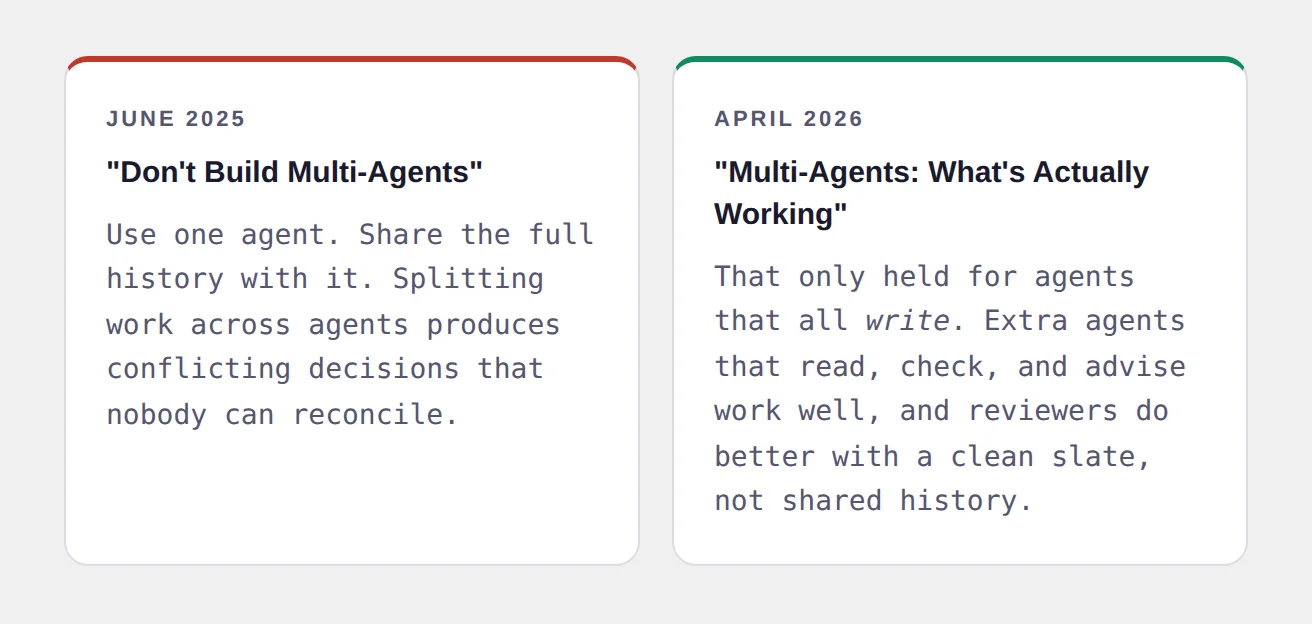
Cognition, the team behind the AI developer Devin, published a post in June 2025 titled "Don't Build Multi-Agents" that became gospel. Then, in April 2026, they quietly walked it back. Almost nobody has picked this up, and it matters more than anything else in this article.
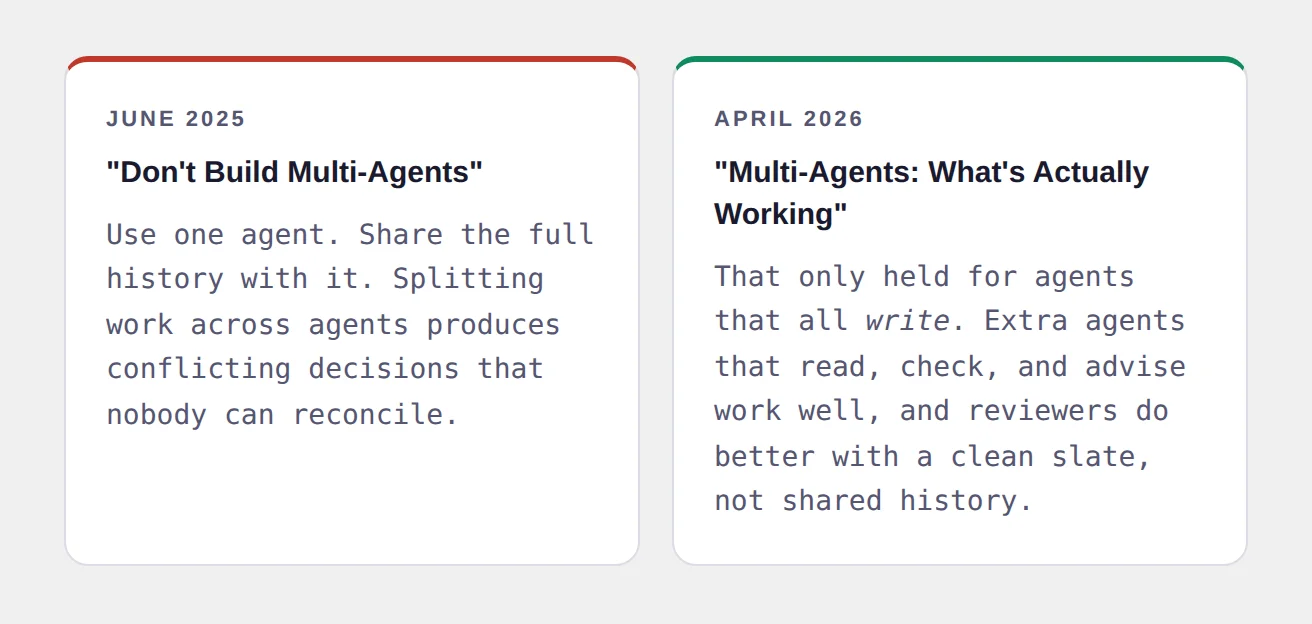 Cognition published the case against multi-agent systems, then revised it ten months later.
Their revised conclusion is the single most useful sentence in the entire field:
In plain English: have many AIs read, research, and check. Have one AI write.
Five agents gathering information and one agent writing the report is a good design. Five agents all editing the same document is a bad design, and it will produce something incoherent that nobody can debug.
The checklist
Build a graph only if you can tick at least two of these:
- The work splits into genuinely different specialties
- You need several things to run at once and then come together
- Different steps need different models or different tools
- You need to see and audit exactly why it made a decision
- One step failing shouldn't ruin the whole run
- Something needs an independent reviewer
- Something irreversible happens and a human must approve it
Zero or one tick? Build a loop. You can always graduate later, and graduating is much easier than untangling.
The trap nobody warns you about: five AIs running the same model on the same information tend to agree with each other. You get the feeling of independent confirmation without any of the substance. If you want a real second opinion, give each checker a genuinely different angle, or explicitly tell them to try to disprove the work rather than assess it.
The anti-patterns, quickly
| Mistake | What you'll see | Fix |
|---|---|---|
| Building a graph too early | Five boxes to summarize a PDF | Collapse it to one loop |
| Steps as nodes | Boxes named "format output" | Nodes are specialties, not steps |
| Weak nodes, pretty wiring | Great diagram, bad output | Fix the individual agents first |
| Nobody owns the data | The draft mysteriously reverts | Write the ownership table |
| Self-review | Everything passes | Separate reviewer, clean context |
| No attempt limit | A surprise bill | Hard cap in the routing rule |
| No grounding | Confident and wrong | Add one real check: a test, a rule, a human |
That last one deserves a moment. Carlos Perez, who wrote the first serious essay on graph engineering, also wrote its best warning: "Every loop watches another loop, and no loop touches the ground."
If every box in your system is an AI judging another AI, you haven't built a quality system. You've built a very well organized opinion. Somewhere in there, at least one node's verdict needs to come from reality: a real test, a real rule, a real number, or a real person.
Which Rung Are You On?
Forget the terminology for a second. Here's the practical question.
| If this sounds like you | You're doing | Do this next |
|---|---|---|
| You chat, tweak the wording, chat again | Prompt engineering | Start pasting in your real documents and examples |
| You paste in docs and it degrades over long sessions | Context engineering | Split the job. Stop using one long chat. |
| You've set something to run on its own | Loop engineering | Check your stop condition is mechanical, not vibes |
| Your one automation is doing too many unrelated jobs | Ready for a graph | Build the four-node starter graph in Section 05 |
Most people reading this are somewhere between rung two and rung three, and the most valuable move available to them is not building a graph. It's splitting one bloated chat into two focused steps and putting a real check at the end.
One last thing about the word
Five names have come and gone in four years:
 Five names in four years. Each one added a layer rather than replacing the last.
There will be a sixth. When it arrives, and someone tells you the last one is dead, you'll now have a way to check.
Ask what actually changed about the work. Not the label, the work. In this case the answer is real: the unit you design went from a sentence, to a briefing pack, to an environment, to an autonomous cycle, to a network of cycles. Every step moved the hard problem further away from the model and closer to the system around it. That trend is not going to reverse.
The label is optional. The skill isn't.
Your next step this week
Don't build a graph. Take one AI workflow you already run, and do these two things:
1. Split it in half. Whatever it does, find the seam and make it two steps that hand off to each other, with the first one passing a summary rather than everything it saw.
2. Add a checker at the end that sees only the output and the original brief, and can send it back once.
That's a two-node graph with a reflection loop. You've just done graph engineering, and you'll feel the quality difference immediately. Everything else in this article is that same move, repeated.