
Build a Company OS on Kimi K3
Kimi K3 holds a million tokens of context for $3. Here's how to turn that into a system that runs your business, plus the cost math nobody else is showing you.
Most people using AI for their business are doing the same thing over and over: opening a chat window, pasting in some context, explaining who they are and what they sell, getting an answer, closing the tab, and then repeating all of it tomorrow.
That is not a system. That is a very expensive way to have the same conversation every day.
A Company OS fixes that. It is a setup where your business context lives somewhere permanent, your tools are connected once, and your repeatable work runs on a schedule instead of on your memory. And with Kimi K3, the model Moonshot AI released in July 2026, building one just got a lot more practical for people who are not running an engineering team.
This guide walks through what a Company OS actually is, what K3 is genuinely good and genuinely bad at, the one capability that makes it different from everything else, the real cost math (which is not what the pricing page suggests), and a build order you can start on this weekend.
What a Company OS actually is
The phrase gets thrown around loosely, so here is a definition tight enough to build against.
A Company OS is a persistent, addressable layer holding your business context, tools, and repeatable processes, so any capable AI model can do work inside it without you re-explaining the company every single time.
Three tests separate a real Company OS from a folder full of saved prompts.
Here is the whole thing at a glance. You do not build all seven at once, and you definitely do not build them in order of how interesting they sound.
Notice where the model sits. Dead last, at the bottom, as one replaceable component. That is deliberate. The model you pick today will be beaten by something in three months. Your accumulated business context will not be.
What Kimi K3 actually is
Moonshot AI, a Beijing lab, put the K3 API live on July 16, 2026, and released the full weights eleven days later on July 27. The specs are genuinely unusual.
| Property | Kimi K3 |
|---|---|
| Total parameters | 2.8 trillion, the largest open-weight model ever released |
| Active per token | About 104 billion (16 of 896 experts fire on any given token) |
| Context window | 1,048,576 tokens, roughly 750,000 words |
| Vision | Yes, built in |
| API price | $3 per million input, $0.30 cached, $15 per million output |
| Weights | Downloadable, 1.56 TB, under a custom license |
Now the part most articles get wrong. K3 is very good. It is not the best model available. On the Artificial Analysis intelligence index it sits fourth at 57, behind Claude Opus 5 at 61, Claude Fable 5 at 60, and GPT-5.6 Sol at 59. It leads the next group, with Grok 4.5 at 54 and GLM-5.2 at 51. Moonshot says as much themselves in their own launch post, which is more honesty than most labs manage on release day.
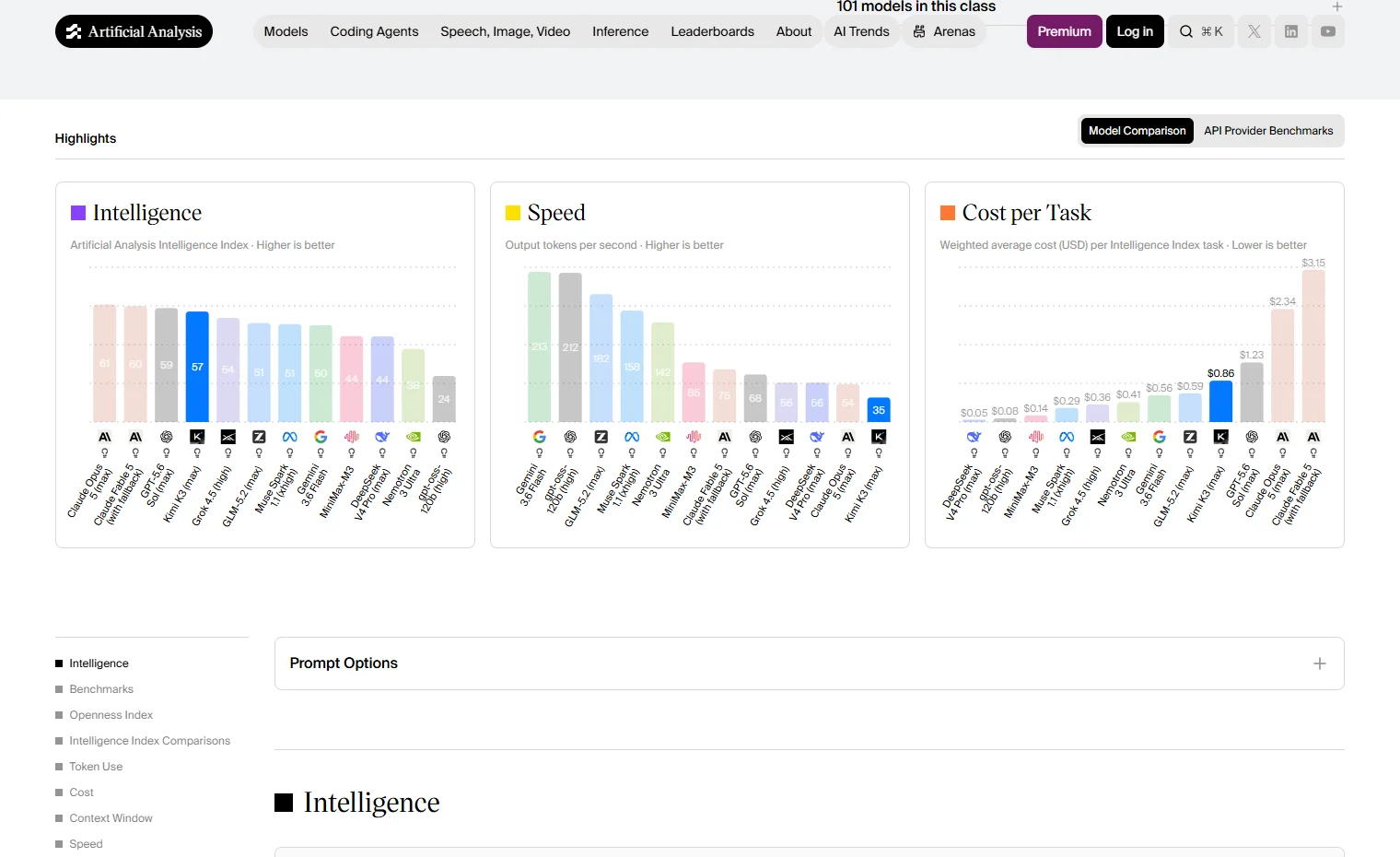 Kimi K3 sits fourth on intelligence, last on speed, and second-cheapest per task among the frontier models.
What matters more than the overall ranking is the shape of K3's strengths, because you do not need a model that is best at everything. You need one that is best at the work you actually run.
Where K3 leads
- Frontend Code Arena: ranked first at 1,679 points, ahead of Claude Fable 5
- Agentic work index: 50.1, versus Grok 4.5 at 45.7 and Gemini 3.1 Pro at 21.4
- Coding index: 76.2, versus Grok 4.5 at 72.5
- BrowseComp (web research tasks): 91.2, ahead of both GPT-5.6 Sol and Fable 5
- SWE Marathon (long-running coding jobs): 42.0, the best of the group
- MCP Atlas (tool use): 84.2, second out of 29 models tested
Where K3 falls down badly
One number tells the whole story. On AA-Omniscience, which measures how reliably a model knows things, K3 scores 18.4. Gemini 3.1 Pro scores 32.9. Worse, when K3 gives a wrong answer, 51% of the time it is a confident hallucination rather than an admission of uncertainty. Its own predecessor, K2.6, was at 39%. It got worse, not better.
Read this as a job description. K3 is excellent at reasoning over documents you hand it, calling tools, and running long multi-step jobs. It is unreliable as an oracle of facts. Which is fine, because in a Company OS the model should be working from your retrieved files, never from its own memory.
Moonshot is unusually candid about the rest. Their own docs list "sensitivity to thinking history", "excessive proactiveness", and a "noticeable gap in user experience" against competitors. Users report getting 70 to 90% of what they wanted rather than the full thing. Plan for that.
The one thing K3 does that nothing else can
This is the section to pay attention to, because it is the actual reason to build on K3 rather than on Claude or GPT.
Two numbers combine into something new:
- A 1,048,576-token context window, about five times what Claude offers
- Automatic prompt caching at a 90% discount, dropping repeated input from $3 to $0.30 per million
Put those together and a pattern becomes affordable that was not affordable before: load your entire business into context on every single call, permanently.
Here is the math. Say your complete company context (brand voice guide, product catalogue, pricing, ideal customer profiles, tone rules, legal red lines, and your decision history) comes to 200,000 tokens. That is a lot. Roughly 150,000 words, or about two full-length business books.
First call of the day 200,000 tokens x $3.00/M = $0.60
Every call after that 200,000 tokens x $0.30/M = $0.06

100 calls in a working day $0.60 + (99 x $0.06) = $6.54
Across ~21 working days = ~$140/month
For about $140 a month, every agent call in your business runs with complete knowledge of your business. No retrieval misses. No chunks cut in half at the wrong sentence. No embeddings quietly drifting out of date. No vector database to build, tune, or maintain.
If you have ever set up a RAG pipeline and watched it confidently retrieve the wrong three paragraphs, you will understand why this matters. Most of that machinery existed because context windows were small and expensive. K3 changes both variables at once.
The rule that makes or breaks this: caching works by matching the prefix of your prompt, byte for byte. If you interpolate today's date, a session ID, or a random greeting into the top of your system prompt, you break the cache on every call and pay ten times more forever, silently, with no error message. Stable content first, volatile content after.
Structure the context by how often it changes
Do not throw everything into the cached block. Sort it into three zones:
The cost math nobody is showing you
Everyone assumes K3 is dramatically cheaper than the American frontier models. Compare like for like and a good chunk of that advantage evaporates.
Artificial Analysis measures the weighted average cost of running one task through each model, which is the number that actually matters. Rate cards do not account for how many tokens a model burns getting to the answer.
| Model | Listed output price | Real cost per task |
|---|---|---|
| Kimi K3 | $15 / M | $0.86 |
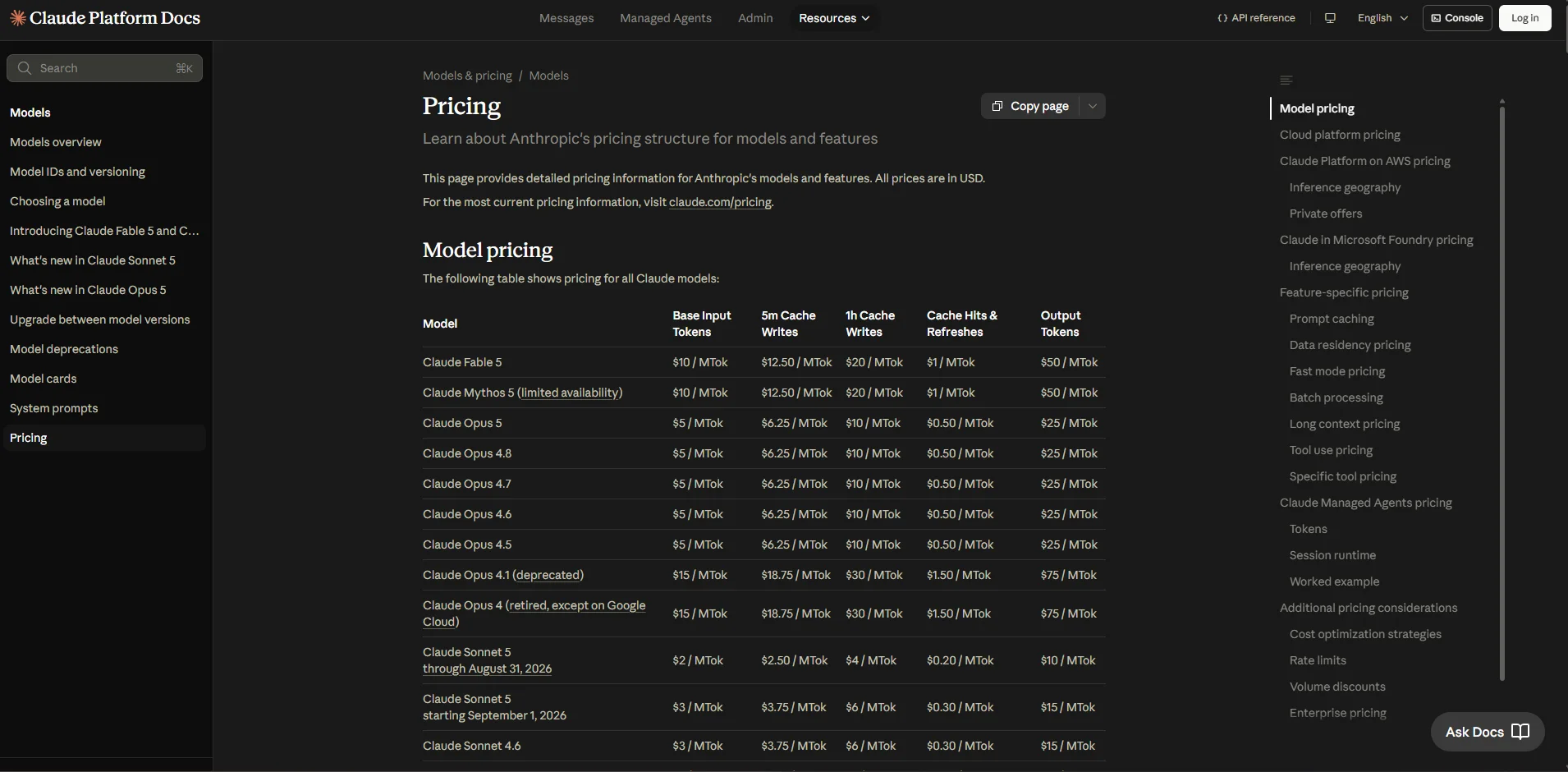
| Claude Opus 5 | $25 / M | $1.23 |
| GPT-5.6 Sol | $30 / M | $2.34 |
| Claude Fable 5 | $50 / M | $3.15 |
Look at the K3 versus Opus 5 line. On the rate card K3 is 40% cheaper. In practice it works out about 30% cheaper per task. Real, but not the order-of-magnitude saving people assume when they hear "open Chinese model."
The gap between the two numbers has a simple cause. K3 always reasons, and those thinking tokens bill as output at $15 per million. You can set the effort level to low, high, or max, but the default is max and there is no off switch. Across a full benchmark run K3 burned roughly 130 million output tokens where Claude Fable 5 used 87 million for the same work. Every trivial classification job you send it carries a reasoning tax.
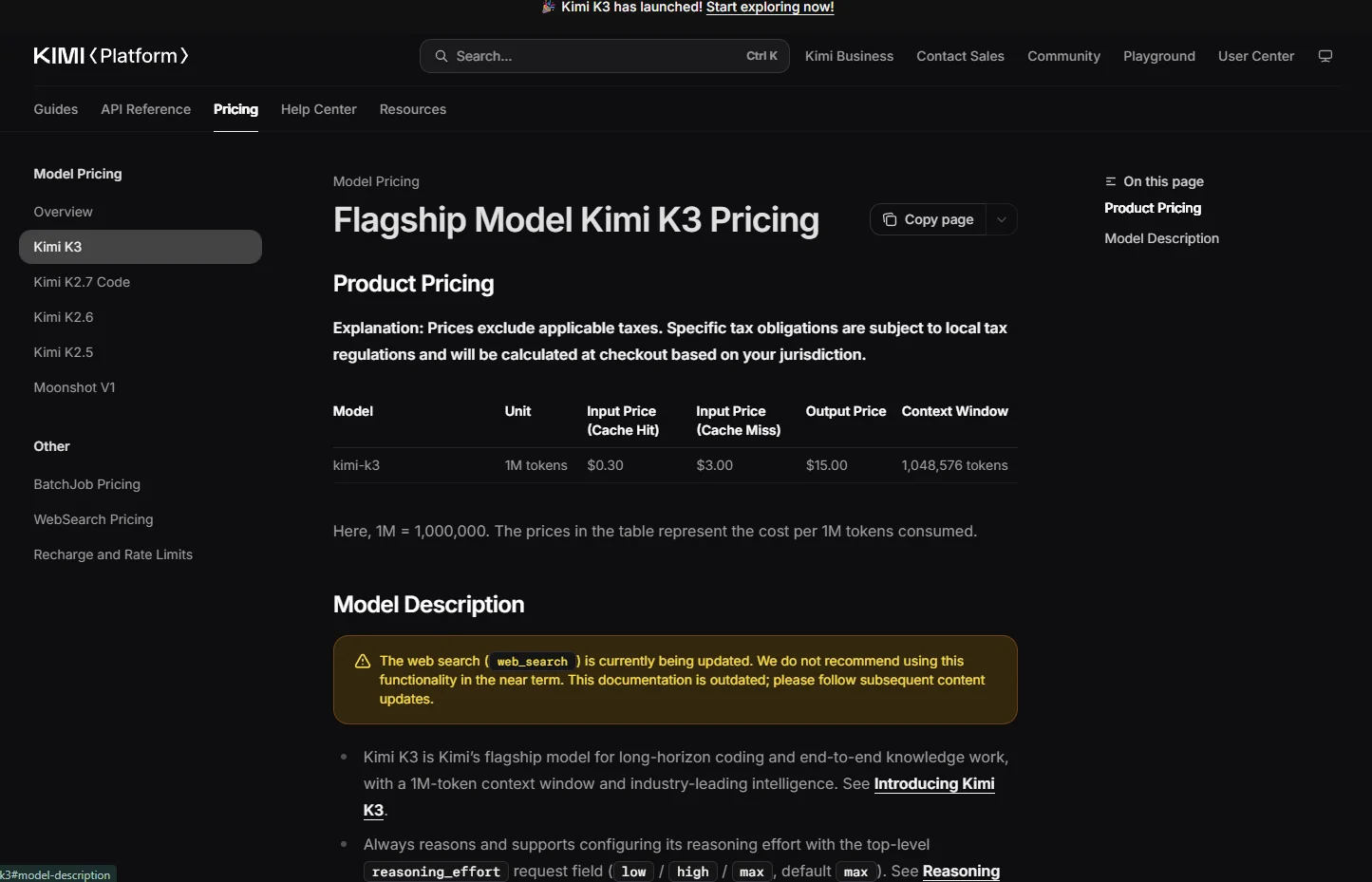 The cache-hit column is the one that makes the whole Company OS pattern affordable.
The honest version: K3 is meaningfully cheaper than Opus 5, by roughly a third once you measure real tasks rather than rate cards. It is not five or ten times cheaper. Pick it for what it can do, not because you think it is nearly free.
Where the real savings actually live
There are two, and neither is the per-token rate.
First, the flat-fee subscriptions. Moonshot sells consumer and coding plans that decouple your heaviest agent workload from metering entirely. Moderato at $19 a month, Allegretto at $39, Allegro at $99, and Vivace at $199. A coding-agent workload that would run $600 to $2,000 a month on metered tokens often fits inside a $99 flat fee. That asymmetry is the single strongest economic argument for putting K3 in your stack.
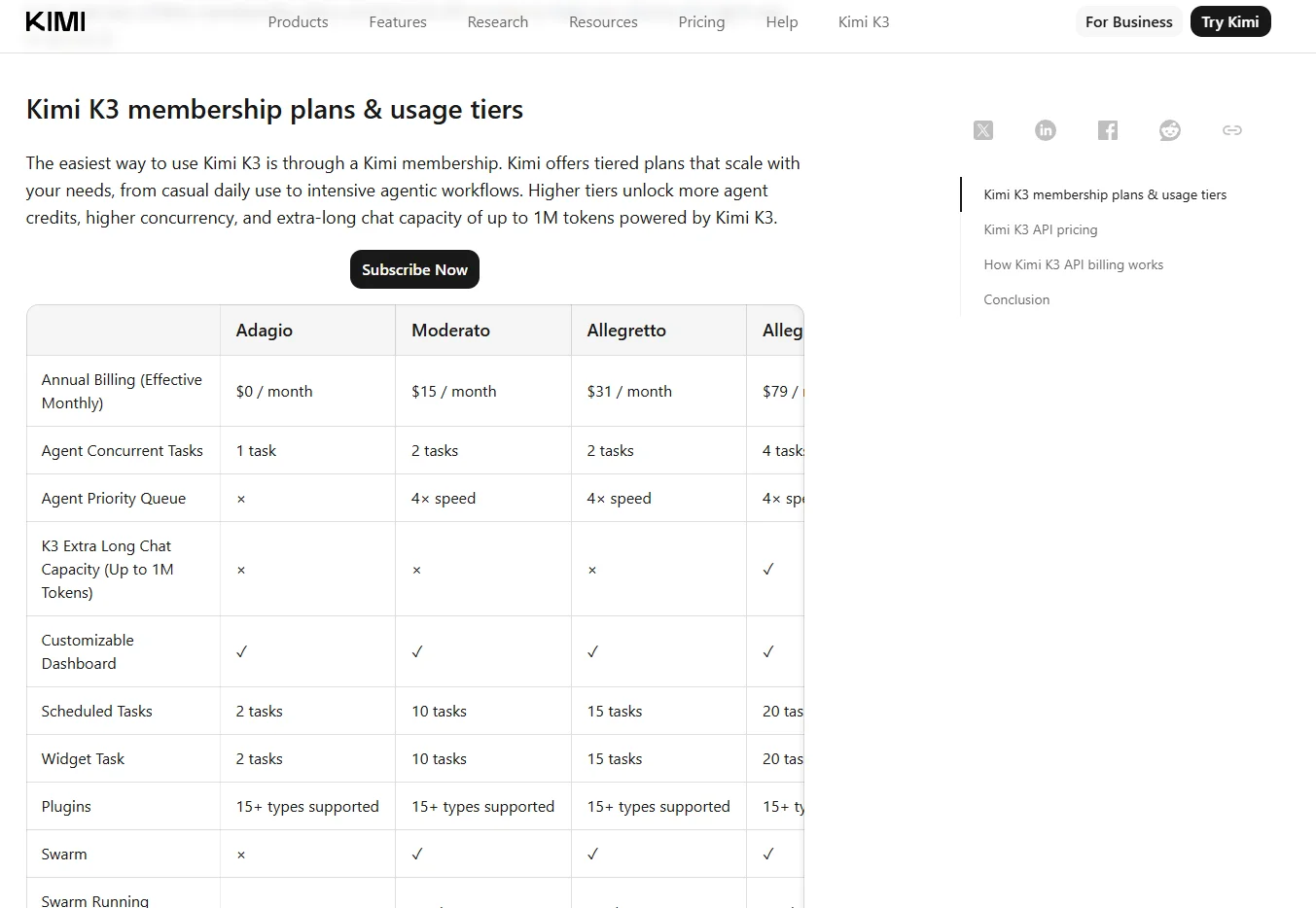 Swarm starts at the Moderato tier. The full 1M-token chat capacity only arrives at Allegro.
Second, the cached prefix from Section 03. A 90% discount on a large stable block of context is a saving no 200,000-token model can match at any price, because they physically cannot hold your whole business at once.
What about running it yourself?
The weights are free to download, so this question comes up constantly. Here is the answer, with numbers.
| What it takes | Reality |
|---|---|
| Download size | 1.56 TB across 96 files. About 4 hours on a gigabit connection. |
| Minimum hardware | vLLM's official recipe calls for 8x GB300 or 8x MI350X class GPUs. |
| Moonshot's own advice | A "supernode" of 64 or more accelerators for production throughput. |
| Realistic rental | $43,000 to $117,000 per month for the smallest viable setup. |
| Break-even vs the API | Roughly 8 billion tokens a month. |
To put 8 billion tokens in perspective: if you fired off a 50,000-token agent job every single minute, around the clock, all month, you would land near 2.2 billion. You would need to be about four times busier than nonstop automation before owning hardware makes any sense.
 2.8 trillion parameters, downloadable, under Moonshot's own custom license rather than MIT or Apache.
So why care that the weights exist at all? Because they are a price ceiling and an exit. Moonshot cannot quietly quadruple the API price or retire the model, since anyone could in principle walk away and run it themselves. That option has value even if you never use it.
Layer 1: build the knowledge layer first
This is the layer that becomes your actual asset. Everything above it is plumbing. Spend an unreasonable share of your effort here.
Keep it as plain files in a git repository. Not a database, not a SaaS knowledge tool. Models read files natively, git gives you free version history, you can search it with basic tools, and it will still work with whatever model comes out next year.
company-os/
├── core/ ← Zone A, the cached prefix
│ ├── 00-identity.md who we are, what we sell, to whom
│ ├── 01-brand-voice.md tone rules + 10 annotated examples
│ ├── 02-icp.md ideal customers, what they want
│ ├── 03-products.md catalogue, pricing, positioning
│ ├── 04-offers.md current offers, funnels, guarantees
│ ├── 05-channels.md per-channel norms and formats
│ ├── 06-red-lines.md the never-do list
│ ├── 07-decisions.md decision log, append only
│ └── _build.py joins them into one cached block
├── working/ ← Zone B, this month
├── archive/ ← Zone C, everything else
├── agents/ role definitions
├── workflows/ process definitions
├── tools/ connector configs
└── evals/ test cases
The single most valuable file you will write
It is core/07-decisions.md, and it is append only. One short entry per non-obvious decision:
## 2026-08-03 Kimi K3 as the workhorse, no self-hosting

Context: Self-host break-even is ~8B tokens/month. We do ~40M.
Decision: Hosted API through a US provider, plus the $99 plan
 for agentic coding work.
Rejected: Self-hosting ($43k+/mo floor), Moonshot's own API
 directly (data goes to servers in China).
Revisit: If monthly tokens pass 2 billion, or a client
 requires everything on our own hardware.
Here is why this matters more than it looks. The reason AI assistants feel clueless about your business is that they see the current state but never the reasoning behind it. They do not know that you tried Facebook ads and they flopped, or that you deliberately price above the market, or that you dropped a product line for a good reason. A decision log is the densest form of business context you can hand a model, and it compounds. Every entry makes every future call sharper. A year of this file beats any vector database you could build.
Skip the vector database. Under 2,000 documents, good filenames plus basic text search plus a million-token window covers more than people expect, and it is debuggable when it goes wrong. Between 2,000 and 50,000, a single SQLite full-text search file handles it. Only past that does embedding search earn its keep.
Layer 0: route the work, don't bet on one model
Running everything through a single model is the most common mistake, and it exposes you to three separate risks: K3's knowledge weakness, availability wobbles from a single vendor, and the near certainty that something better ships within a quarter.
The fix is a gateway sitting in front of three tiers.
| Tier | Model | Use it for |
|---|---|---|
| Reflex | Claude Haiku 4.5 $1 / $5 | Classification, tagging, extraction, spam checks, routing decisions. Anything that needs no thinking. |
| Workhorse | Kimi K3 $3 / $15 | Long-context analysis, research, agent loops, tool-heavy jobs, drafting, code. The bulk of the volume. |
| Escalation | Claude Opus 5 $5 / $25 | Anything customer-facing, brand-voice-critical, financially consequential, or where K3 already failed twice. |
Five routing rules to start with
- Anything over 150,000 tokens goes to K3. Nothing else can hold it. This is K3's uncontested lane.
- Agent loops with more than five tool calls go to K3. It leads on agentic benchmarks, and on the flat-fee plan the marginal cost is roughly zero.
- Factual questions with no retrieved context go anywhere but K3. This one rule neutralises its worst weakness.
- Final customer-facing copy goes to the escalation tier. K3 drafts, Opus 5 finishes. The cost of a 2,000-token final pass is about five cents.
- Two failures in a row escalate a tier automatically. No human in the loop, but log it.
For the gateway itself, LiteLLM is the mature choice. You self-host it, and it gives you one endpoint in front of every provider, plus per-key budgets, spend tracking, caching, and automatic fallbacks. If you would rather not run anything, OpenRouter does the same job as a hosted service, and its Exacto routing mode specifically optimises for tool-calling accuracy, which is worth using on agent work.
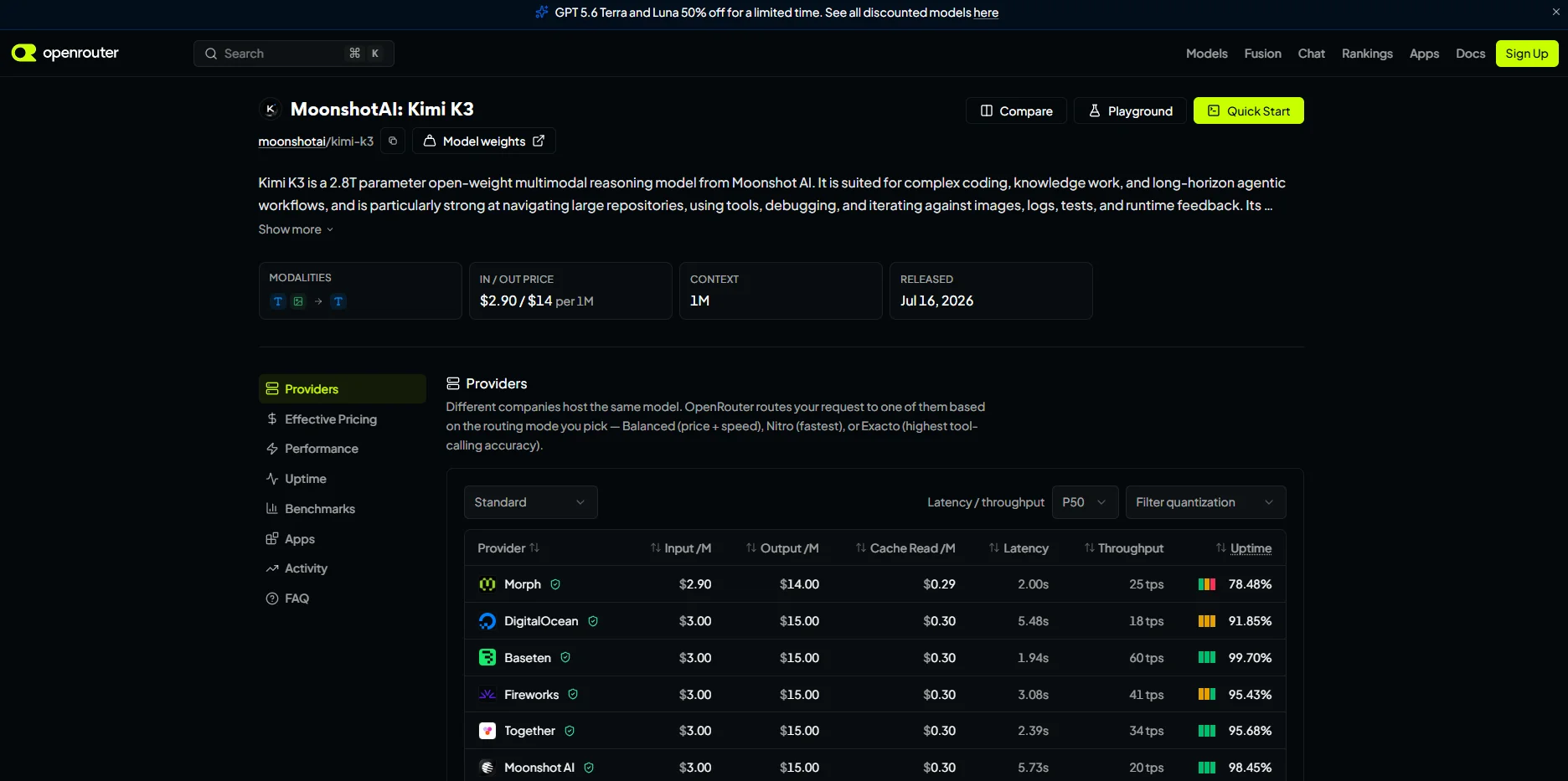 Same price everywhere, wildly different speed. Baseten runs three times faster than Moonshot's own endpoint.
 Opus 5 at $5 and $25 is the escalation tier this article recommends sitting above K3.
Worth knowing before you pick a provider: every host charges the same $3 / $15, but the speed gap is enormous. Baseten runs about 60 tokens per second at 99.7% uptime. Moonshot's own API runs about 20 tokens per second. That is the slowest option, and it is also the one hosted in China. There is no reason to use it.
Four settings that will save you money and grief
These are specific to K3 and they are not optional.
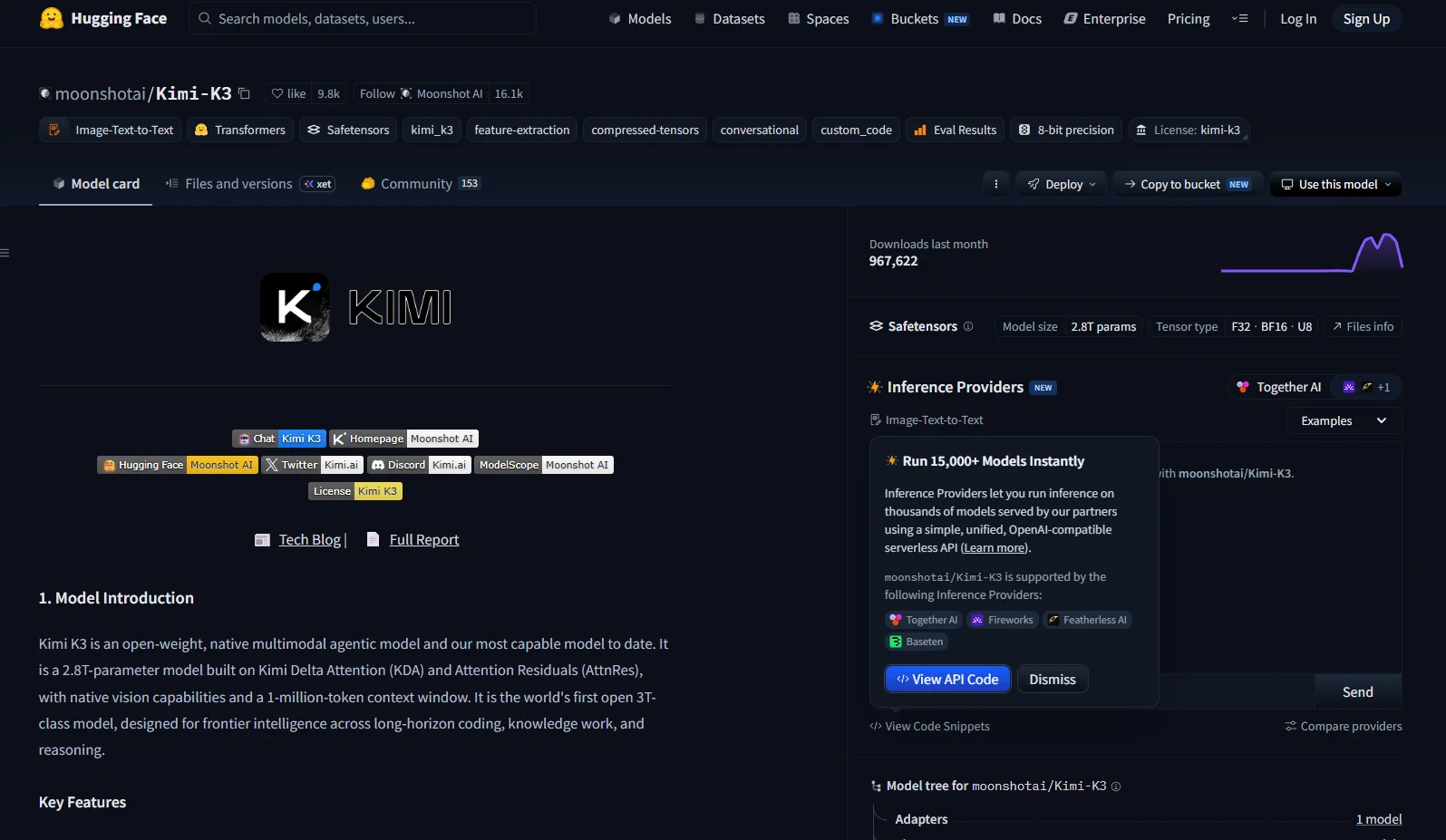 One endpoint in front of every provider, with budgets, fallbacks, and spend tracking built in.
Layers 2 and 3: tools and agents
A model with perfect context and no tools is a very expensive writer. Connect these five first and ignore everything else until they are working.
- Files: read and write your company-os folder
- Shell: run scripts and small jobs, with an allow-list of permitted commands
- Knowledge search: full-text search across your working and archive folders
- Web search: use a proper search API, not K3's built-in web tool, which Moonshot itself says is not ready for production and bills $0.004 per call on top of tokens
- Web fetch: read a specific page, with a domain allow-list
Build narrow agents, not one giant one
The tempting mistake is a single "company agent" holding every tool and all the context. It fails in predictable ways: tool selection degrades past roughly 20 tools, failures become impossible to attribute, and you cannot test it.
Seven narrow agents cover most solo and small-team businesses. Each gets one job, no more than 20 tools, the cached core context, and a defined output format.
| Agent | Job | Runs |
|---|---|---|
| Orchestrator | Route work, enforce budgets, handle escalation | Always |
| Research Scout | Monitor your niche, produce a daily brief with sources | Daily, 6am |
| Content Engine | Draft posts, scripts, and captions from the brief | Daily |
| Product Smith | Build and fact-check the actual products or deliverables | On demand |
| Audience Relations | Triage comments and messages, draft replies | Hourly |
| Revenue Analyst | Pull numbers, flag anomalies, propose one experiment | Weekly |
| Ops Steward | Maintain the OS itself, run tests, report spend | Weekly |
K3 handles most of these well, because they are long-context, tool-heavy, multi-step, and nobody is sitting there watching a cursor blink. That is exactly its profile.
The critique pattern that makes K3 reliable
Given a 51% hallucination rate on wrong answers, you cannot ship K3's first draft on anything factual. But there is a fix that works surprisingly well, and it is not "ask the model to check its work."
Self-checking inside the same call is weak, because the reasoning that produced the error is still sitting in the window. Make it a separate call with a fresh context and an adversarial instruction:
You are reviewing a draft written by someone else. Assume it
contains at least two factual errors and one tone violation.
Your job is to find them.

List every factual claim in the draft and mark each one:
SUPPORTED / UNSUPPORTED / CONTRADICTED, against the sources
provided below.

Be harsh. An empty findings list will be treated as a failure
to review.
Draft with K3, critique with K3 in a separate call, revise with K3. It costs about three times the tokens and still comes in under a single pass on a premium model, and the quality difference is not subtle.
Layer 5: the guardrails you will regret skipping
This is the layer everyone skips. Four things, and none of them take long.
1. The grounding rule, in every prompt
Put this in your cached core block so it applies to every call:
Every factual claim you make must be supported by content
present in this conversation: the context block, retrieved
documents, or tool results.

If a claim is not supported, either leave it out or mark it
[UNVERIFIED] and say what source would settle it.

You have no reliable knowledge of events, prices, names,
dates, or statistics beyond what is provided here. Do not
answer from memory. "I don't know, here's what I'd need to
check" is a correct and valued answer.
2. Budget caps at three levels
Per call (a hard output limit), per agent run (a dollar ceiling), and per month (a hard stop at the gateway). All three, all enforced, not documented as good intentions.
3. A data rule about where your information goes
This one is worth understanding properly. Moonshot's own API runs on servers in China and falls under Chinese data law. There is no publicly confirmed SOC 2 report and no signed business associate agreement on offer. That is a fact about jurisdiction, not an accusation about anyone's intentions, but it should shape what you send where.
| Data type | Where it can go |
|---|---|
| Public: published content, general research, public prompts | Anywhere, including Moonshot's own API |
| Internal: drafts, calendars, unpublished ideas, analytics | US-hosted K3 providers (Fireworks, Together, Baseten, Modal) or Anthropic |
| Sensitive: customer data, email lists, payments, contracts | Anthropic or OpenAI only |
The fix takes two minutes: get your K3 key from a US-hosted provider instead of Moonshot directly. Fireworks advertises US hosting with zero data retention, at the same or similar price. Same model, different jurisdiction.
4. Twenty test cases and a human gate
You do not need a testing framework. You need about 20 small test cases across four categories: does it hallucinate when there is nothing to go on, does it sound like you, does it call the right tool correctly, and does it respect your red lines. Run them whenever you change your core context. At roughly five cents each, that is a dollar a run.
And nothing publishes without you seeing it. Draft, queue, notify, approve. Automate the production, never the taste.
Track one number above all others: the percentage of drafts you materially rewrite. Benchmarks are noisy and vendor-flavoured. Your human-edit rate is the only honest measurement of whether this thing is actually saving you time. Under 40% means it works. Over 60% means your core context is too thin, not that your prompts are bad.
Your first weekend
Here is the build order. Nothing gets built before it is needed, and something is producing value by day seven.
Day 1: Accounts and skeleton
Create the git repo with the folder structure from Section 05. Get an API key from a US-hosted K3 provider and one from Anthropic. Subscribe to the $19 Kimi plan so you can feel the model's output quality in a chat window before you commit any architecture to it.
Day 2: Write your core context
Block out a full focused day for this. Identity, brand voice with ten annotated examples (annotated, not just pasted, explain why each one works), customer profiles, products, offers, channel norms, red lines. This is the most valuable writing you will do all quarter.
Day 3: Wire the cache and prove it works
Build the script that joins your core files into one block. Confirm it produces byte-identical output every run. Make two calls and check your billing shows a cache hit on the second one. If it does not, fix that before anything else.
Day 4: Stand up the router
Three tiers, fallback rules, and a hard monthly budget cap. Test that a failure on K3 actually falls through to the escalation tier.
Days 5 to 7: Ship exactly one agent
Build the Research Scout. Just that one. Schedule it for 6am. Write five test cases about hallucination and run them. Then stop building.
Day 7 checkpoint: you should have a daily brief landing in your folder every morning, grounded in your business context, for under $30 total. If the brief is not something you would actually read, stop and fix the core context. Do not add a second agent. Everything downstream compounds from that one file.
Weeks two through four: add the Content Engine, run it daily, and log your edit rate every single day. Do not build anything new during that week. Where you edit most is where your context is thin, and fixing the context beats fixing the prompt almost every time.
Month two: Audience Relations, Revenue Analyst, Product Smith. Month three: observability, the full test suite, and a bake-off against whatever new model shipped in the meantime.
When to drop K3
Decide this now, while you are calm, rather than later while you are annoyed. Stop using K3 as your workhorse if any of these hold:
- Your edit rate on K3 drafts stays above 60% after two rounds of improving the core context
- More than 30% of workhorse calls are escalating, sustained over two weeks
- Your cost per useful output beats out on a premium model instead (given the token-bloat problem, this is genuinely possible, so measure it)
- A hallucination reaches publication twice despite the fact-check pass
- Something ships that beats it on your tests at a comparable price
That last one will happen. It is supposed to. The whole point of building the router at layer 0 and keeping your knowledge in plain files is that swapping the engine is a config change, not a rewrite.
Three things worth checking yourself
In the spirit of not pretending to know more than the evidence supports:
- Benchmark numbers move with the harness, not just the model. The same test run inside a different agent scaffold can swing scores by fifteen points or more. Treat every leaderboard as directional and trust your own results over anyone's chart.
- Whether K3 qualifies for the batch discount. Moonshot documents a 40% saving on batch jobs, but the list of eligible models does not appear to include K3 yet. Worth a support ticket if batch matters to you.
- How much the reasoning-effort setting actually saves. The API accepts low, high, and max. Nobody has published a clean comparison of cost and quality across the three. Run your own on ten real tasks before you assume max is necessary.
The part worth remembering
Kimi K3 is a genuinely strong model with a specific shape: excellent at agents, tools, code, and reasoning over documents you give it, and unreliable as a source of facts on its own. It is not the cheapest thing available once you account for how many tokens it burns thinking. It is not the smartest model on the market. And you should not run it on your own hardware.
What it does offer, that nothing else currently matches, is the ability to hold your entire business in context on every call at a price a solo operator can pay. That single capability is worth building around.
But notice how little of this guide was actually about Kimi K3. Most of it was about writing down what your business knows, connecting the tools you already use, giving each job to a narrow agent, and putting a human gate in front of anything that goes public. None of that changes when the next model ships.
The model is the most replaceable part of the stack. Build everything above it so that swapping the engine is an upgrade rather than a rebuild. Then the next release becomes something you look forward to instead of something that makes your work obsolete.
Start with one file. Write down who you are, what you sell, and to whom, in enough detail that a stranger could brief a freelancer from it. That file is the beginning of your Company OS, and you can write it today without an API key, a subscription, or a single line of code.