
How to Build Your First AI Agent with Claude
A chatbot answers questions. An agent does the job. Learn how to build your first AI agent with Claude, step by step, with no coding and about five dollars to start.
You've probably had this thought while using ChatGPT or Claude: "This is great, but I wish it would just go do the thing instead of telling me how to do it." You ask for help planning a trip, and it writes you a lovely plan. Then you still have to open the tabs, compare the prices, and book everything yourself.
That gap, between an AI that talks and an AI that acts, is exactly what an AI agent closes. And in April 2026, Anthropic released a product called Claude Managed Agents that makes building one genuinely accessible, even if you've never written a line of code in your life.
This guide will walk you through what an AI agent really is, what you need to build one, what it costs, and how to get your first agent running today inside a simple web dashboard. We'll keep it practical. By the end, you'll understand enough to spin up a working agent in about half an hour.
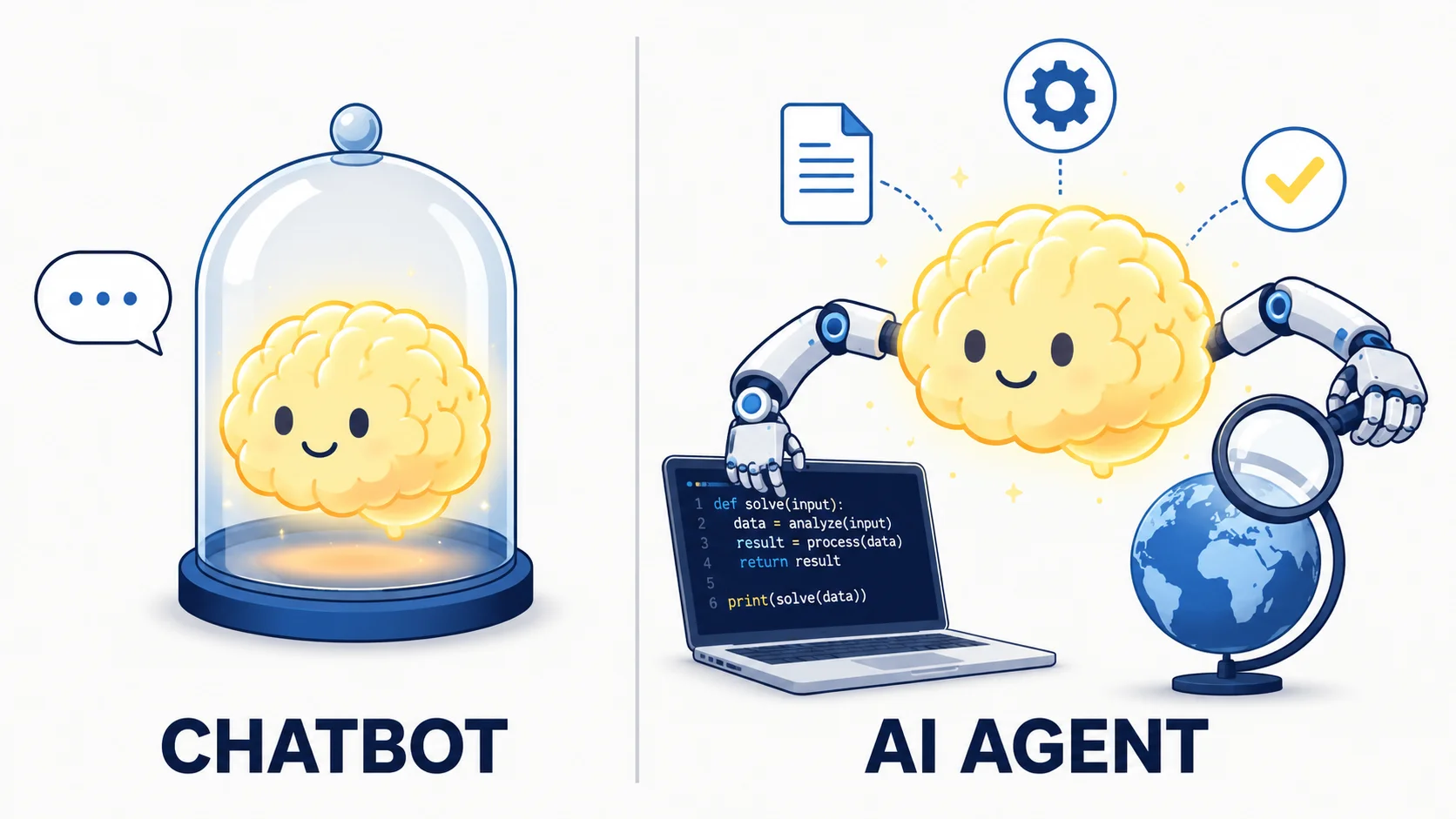
A chatbot has a brain. An agent has hands.
Here's the cleanest way to think about it. A normal chatbot, like the Claude app or ChatGPT, is a brain in a jar. It's brilliant at thinking and talking, but it can't touch anything. It can't run a program, save a file, search the web on its own, or log into your tools. You ask, it answers, and the doing is left to you.
An AI agent is that same brain, given hands. It can take real actions: run code, read and write files, search the web, call other software, and keep working on a task by itself until it's finished. You give it a goal, and it figures out the steps, does them, checks its own work, and reports back.
That's the whole difference. A chatbot answers questions. An agent completes tasks.
The key idea: A chatbot tells you how to do something. An agent goes and does it, then shows you the result. Everything in this guide is about giving Claude hands safely.
The catch has always been that building those "hands" is hard. Somebody has to build the loop that lets the AI think, act, observe what happened, and think again. Somebody has to give it a safe computer to work on, somewhere to store its progress, a way to recover when something breaks, and a place to run that doesn't fall over when ten people use it at once. For most people, that "somebody" was a team of engineers. Which is why, until recently, regular business owners and creators couldn't really build agents at all.
What Claude Managed Agents actually is
Claude Managed Agents is Anthropic running that entire "body" for you. You bring the idea, what the agent should do and what it's allowed to touch. Anthropic provides the thinking loop, a secure computer for it to work on, the tool execution, the memory, and a dashboard to watch it all happen. It's hosted on their infrastructure, not yours.
In Anthropic's own words, instead of building your own agent loop, tool execution, and runtime, you get a fully managed environment where Claude can read files, run commands, browse the web, and execute code securely.
This matters more than it might sound. At two recent Anthropic workshops, the "Code with Claude" sessions, engineers explained the single biggest shift: the agent's brain runs on Anthropic's servers, not on your laptop. You can close your computer, walk away, and the agent keeps working. Everything is saved. When you come back and refresh the page, your whole conversation and all its progress are still there. You don't manage any of it.
Anthropic says teams are reaching production around 10 to 15 times faster using this approach compared to building the plumbing themselves. For a non-technical user, the practical promise is simpler: you get to skip the hardest 90 percent of the work.
One honest note before we go further. Managed Agents is still officially in beta, which is Anthropic's word for "live and usable, but still being refined." That's normal for new AI products, and it's available to all standard accounts right now. It just means a few details may change over the coming months.
The four building blocks (the whole system in four words)
Every agent you build is assembled from exactly four pieces. Both workshop presenters drilled this, because once these click, the rest is easy. Think of it like cooking a meal.
Agent = the recipe
The brain and personality. You pick which Claude model it uses, write its job description, and choose which tools it can touch. You create it once and reuse it forever.
Environment = the kitchen
The safe, separate computer where the agent does its work. You decide things like whether it's allowed on the internet.
Session = cooking one meal
A single live job. It combines one agent with one environment and works on a specific task. You can run many sessions from the same agent.
Events = the play-by-play
The back-and-forth. Your messages going in, and the agent's replies, tool uses, and results streaming back out, live, as it works.
So when you hear "create an agent, then start a session," now you know: you wrote a recipe, and now you're cooking one meal from it. That's it. The rest of this guide is just filling in those four boxes.
What you actually need to get started
This is the question everyone asks first, so let's answer it plainly. Here is the complete entry checklist. Nothing hidden, no surprise requirements.
| What you need | Cost | Notes for beginners |
|---|---|---|
| A Claude Console account | Free | Sign up at platform.claude.com. This is the developer console, which is a different thing from the regular Claude chat app. You can sign up and look around for free. |
| A credit card on file | Free to add | Added under the Billing page. Major cards accepted. |
| Prepaid credits | $5 minimum | The system is prepaid. You buy credits before you use them, so you can never overspend. The minimum first purchase is $5. New accounts also get a small amount of free credits to test with. |
| An API key | Free | Only needed if you later go the code route. Created in your settings, copied once, and kept private. |
| Access to Managed Agents | Free | Already switched on by default for all accounts. There is no waitlist for the core product. |
The real floor: An account, a credit card, and $5. That's it. Everything else on this list is either free or optional. You do not need servers, a database, hosting, or any technical setup.
Two advanced features, called MCP tunnels and dreaming, need a separate access request through a form. You won't touch those as a beginner, so don't worry about them. Everything you'll use today, agents, tools, web search, memory, and the dashboard, works out of the box.
Build your first agent with zero code
This is the part most guides skip, because they assume you're a developer. You're not, and you don't need to be. Anthropic's Console has a point-and-click builder that lets you create and run a real agent without writing anything. Here's the path.
Step 1: Log in and add your credits
Go to platform.claude.com and sign in. Open the Billing page and buy $5 of credits. They become available right away. While you're in settings, find the Limits page and set a spend limit. This is your safety cap, a hard ceiling on what you can spend in a month. Set it low while you're learning.
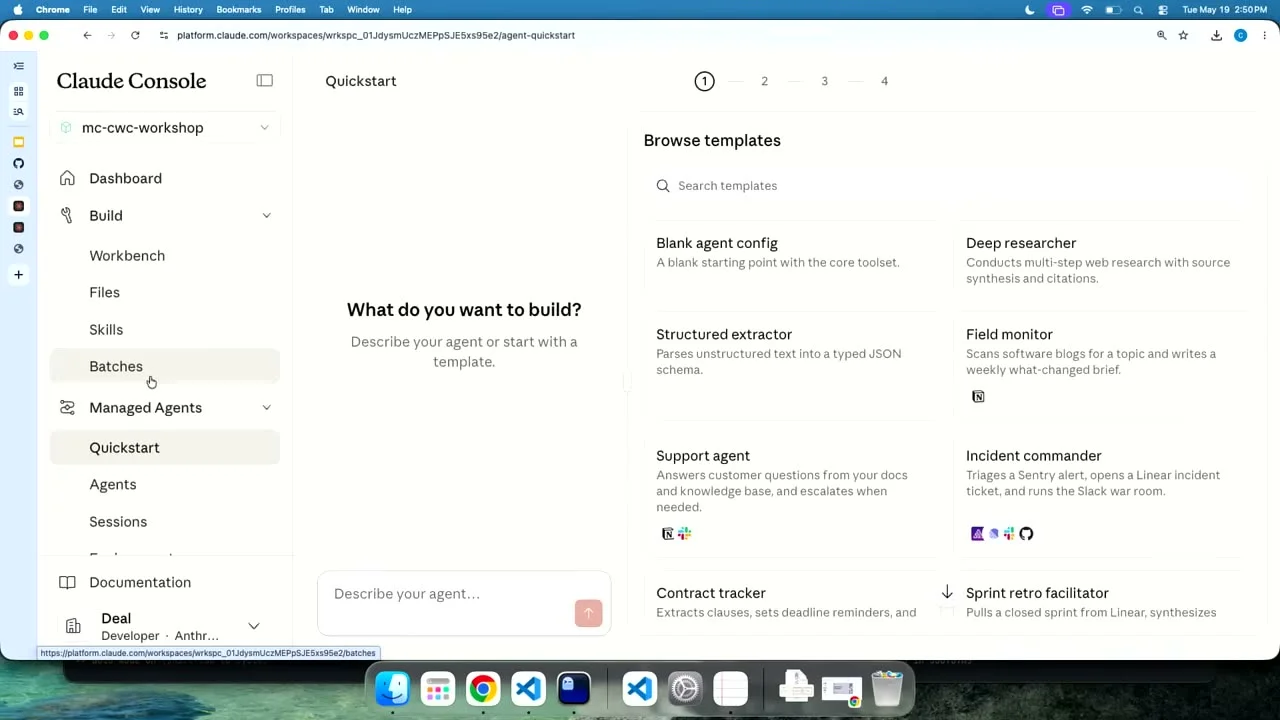
Step 2: Open the Quickstart
In the sidebar, click Quickstart. You'll be offered two choices: describe the agent you want in plain English, or start from a ready-made template. Templates are the fastest way to your first win, so start there.
Step 3: Pick a template
Anthropic ships several starting points, including a Deep Researcher, a Support Agent, a Data Analyst, an Incident Commander, a Contract Tracker, and a blank config if you want to build from scratch. Pick one that's close to what you want. The Deep Researcher is a great first choice because it's useful, safe, and easy to understand.
Step 4: Review the recipe
The template shows you its setup in a simple card: which model it uses, its job description (the system prompt), and which tools it has. Read it. This is your agent's recipe, and you can edit any of it. When you're happy, click "Use this template." You now have a working agent with its own ID.
Step 5: Run it and watch it work
Start a session right there in the Console and type a request. Now comes the satisfying part. You'll see the agent's live play-by-play: every web search it runs, every file it touches, every step it takes, with the inputs and outputs laid out so you can follow its thinking. This is the observability view, and it's one of the best things about the whole product. You're not staring at a spinner wondering what's happening. You can see exactly what your agent is doing.
Pro tip: Agents are versioned. If you change the job description or tools and the new version behaves worse, you can roll right back to the previous version. Anthropic keeps your history, so you're free to experiment without fear of breaking anything.
That's a genuine, running AI agent built with no code. To put it in front of other people inside your own app, you'd add a little code, which is what the next section is about. But for learning, testing, and even getting real work done yourself, the Console alone is plenty.
A peek under the hood (don't panic, it's short)
You don't need this section to use Managed Agents. But a lot of people feel more confident once they've seen how little is actually going on. So here's the honest truth: the entire thing is four steps. At one of the workshops, a presenter even had Claude itself write most of this code for him, live on stage, while he talked.
Remember the four building blocks? In code, they're just four short instructions. This is the real example from Anthropic's documentation, lightly annotated:
# Step 1: Create the AGENT (the recipe), done once
agent = client.beta.agents.create(
 name="Coding Assistant",
 model="claude-opus-4-8",
 system="You are a helpful coding assistant.",
 tools=[{"type": "agent_toolset_20260401"}], # turns on web, files, etc.
)

# Step 2: Create the ENVIRONMENT (the kitchen)
environment = client.beta.environments.create(
 name="my-first-kitchen",
 config={"type": "cloud"},
)

# Step 3: Start a SESSION (cook one meal)
session = client.beta.sessions.create(
 agent=agent.id, environment_id=environment.id
)

# Step 4: Send a message and watch it work
# ...and the agent goes off and does the task.
That's the whole shape of it. Four calls. One line, the part that says agent_toolset_20260401, is what switches on the agent's hands: running commands, reading and writing files, searching the web, and more. If you ever want to try the code route with help, Anthropic has a guided walkthrough you can run inside their Claude Code tool that asks you questions and writes the code with you.
Worth remembering: One of the most useful tricks from the workshops was letting Claude help build your Claude. You can literally ask Claude to write the integration code for you. As one presenter put it, Claude can help you build your own Claude.
What it costs (the question everyone worries about)
Good news here: the pricing is simple, and there's no monthly subscription, no per-agent license, and no hidden infrastructure fee. You pay for exactly two things.
Thing one: tokens
Tokens are the unit of text the AI reads and writes. One token is roughly three quarters of a word. You're billed per million tokens, and the rate depends on which model you pick.
| Model | Input (per million) | Output (per million) | Best for |
|---|---|---|---|
| Claude Opus 4.8 | $5 | $25 | The smartest. Use for hard reasoning. |
| Claude Sonnet 4.6 | $3 | $15 | The balanced everyday workhorse. |
| Claude Haiku 4.5 | $1 | $5 | The cheapest and fastest. Great for simple, high-volume work. |
Thing two: session runtime
This is a small charge for the time your agent spends actively working: $0.08 per session-hour. The important detail is that you're only billed while the session is actually running. When an agent is sitting idle, waiting for your next message or for you to approve an action, the runtime clock stops. Idle time is free.
Here's Anthropic's own worked example, which is reassuringly cheap. A one-hour coding session using the top Opus model, reading 50,000 tokens and writing 15,000:
Input tokens: $0.25 · Output tokens: $0.375 · Runtime: $0.08
Total: about 70 cents for a full hour of work.
A few other notes. Web searches inside a session cost $10 per 1,000 searches, so a handful of searches is pennies. Reading a specific web page (web fetch) costs nothing extra beyond the text it pulls in. And Claude automatically reuses repeated context behind the scenes through something called prompt caching, which can cut your input costs significantly without you lifting a finger.
How to never get a surprise bill: Because credits are prepaid, you can only ever spend what you've loaded. Keep "auto-reload" turned off while you learn, set a low spend limit in your settings, and start with cheaper models. Your $5 is a hard, comforting ceiling.
One more thing on growth. Everyone starts at "Tier 1" after that first $5. If you ever need a higher monthly ceiling, it raises automatically as you load more credits. For example, $40 in total credits moves you to Tier 2, which lifts your monthly limit to $500. You only ever climb if you choose to.
The choices that actually matter when building
When you set up an agent, a handful of decisions shape how well it works. Here are the ones worth understanding, roughly in order of how much they matter for a beginner.
Which model
Start with Sonnet for the best balance of smarts and cost. Drop to Haiku for simple repetitive jobs. Reach for Opus only when the task needs deep reasoning. Bigger isn't always better.
The job description
This is the system prompt. The workshop lesson was clear: keep it simple to start. "You are a research assistant that writes clear, cited summaries" works. Add rules only when you spot a real need.
Tools and permissions
Decide what the agent can touch, and set safe tools to run automatically while risky ones (like deleting things) need your approval first. A human checkpoint where it counts.
Connecting your apps
Through something called MCP, you can plug Claude into outside software like your calendar, your project tracker, or your docs, so it can act inside the tools you already use.
Memory
Let the agent remember things across sessions, so it learns your preferences and corrections over time and gets a little better with each use instead of starting fresh every time.
Outcomes
Instead of just "do this," you hand it a checklist of what a good result looks like. The agent then iterates and grades its own work against that checklist until it passes. A favorite feature of both presenters.
Feeding it your data
You can upload files, like a spreadsheet, a PDF, or a folder of notes, so the agent works over your real information. Deciding what to give it is most of the skill.
Helper agents
A main agent can spin up specialist helper agents that each handle a piece of a big job at the same time, then report back. Powerful once you're comfortable with the basics.
If that feels like a lot, don't sweat it. For your first agent, you really only need the first two: pick a model and write a simple job description. Everything else you can add later, one piece at a time, exactly the way the workshops demonstrated.
A security habit worth forming early: Only give an agent the tools it actually needs. One presenter pointed out that if an agent doesn't need to browse the web, don't give it web access. Fewer hands means fewer ways for it to go wrong or get tricked by bad content it reads online.
What people are actually building
Abstract talk about agents only gets you so far. Here are two real examples shown at Anthropic's workshops, plus some ideas sized for a beginner.
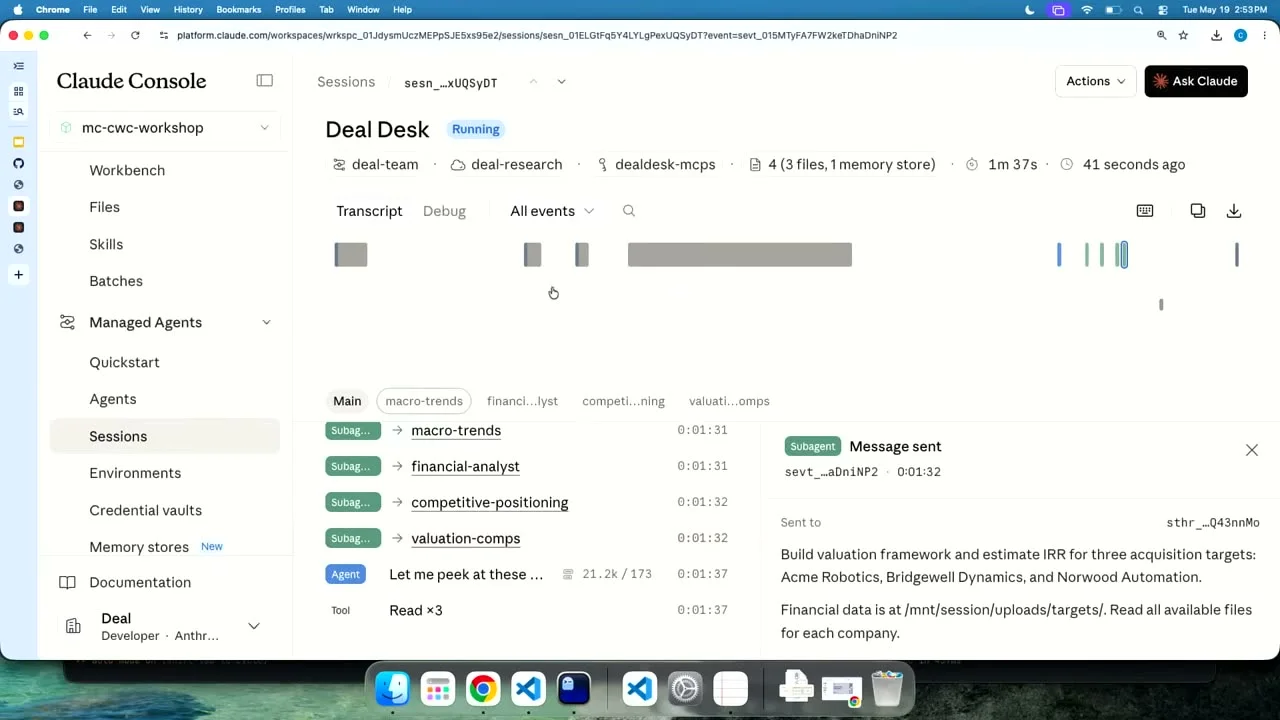
A deal-research agent
One presenter built a tool he called a "deal desk." A user types something like "give me a read on this company," and a main agent kicks off several specialist helper agents at once. One digs into industry trends, one focuses on financial analysis, one checks the company's data in connected tools. They each work in their own space, share findings, and hand back a combined recommendation. It's the kind of research that would take a person hours, done in minutes.
An on-call incident agent
The second workshop built an agent for software teams. When a service breaks at 3 a.m., instead of waking up a human, the agent investigates: it pulls the recent error logs, checks what was recently changed, looks at the metrics, and reasons through the cause. In the demo, it correctly traced an outage to a specific code change that exhausted a database connection pool, then recommended fixes. The presenter's point: give that same agent permission to write code, and it could open the fix itself.
Beginner-sized ideas to start with
You don't need anything that ambitious to feel the magic. Try one of these:
- A research assistant that web-searches a topic and writes you a clean, cited summary.
- A document analyst that reads a spreadsheet or PDF you upload and answers your questions about it.
- A reply drafter that reads a customer message and drafts a thoughtful response for you to approve.
- A content repurposer that takes one long piece and reworks it into shorter formats.
Each of these is cheap to run, low-risk, and genuinely useful from day one. Start small, get the win, then build up.
Staying safe and in control
Handing an AI real abilities raises a fair question: how do you stay in control? Anthropic built several answers into the system.
Your passwords and keys stay hidden. When an agent needs to log into a connected tool, the login details are stored separately and encrypted, and they're never shown to the AI itself. The agent uses the connection without ever seeing the credentials. So you don't have to build your own secure password storage.
The agent works in a sandbox, a sealed-off computer that isn't your own machine. You can also stop an agent mid-task if it heads in the wrong direction, and you can require your approval before it does anything sensitive. You're always the one with the final say.
One important limit to know: Because Managed Agents saves your conversations and progress on Anthropic's servers (that's how sessions resume after you close your laptop), it is not currently approved for regulated health data or data that legally cannot be retained. For ordinary business use it's fine, but don't run agents on protected medical records or similarly sensitive material yet. You can delete any session or uploaded file at any time.
Beginner questions, answered straight
Do I really not need to know how to code?
Correct, to create and run an agent yourself in the Console. You only need code (or a guided tool that writes it for you) when you want to build an app where other people use your agent.
How is this different from just using the Claude app?
The Claude app is chat, a brain in a jar. Managed Agents gives Claude hands. It runs code, uses tools, works on its own for minutes or hours, remembers across sessions, and runs on Anthropic's servers instead of waiting on your screen.
Could I get a surprise bill?
Not easily. Credits are prepaid, so you can only spend what you've loaded. Keep auto-reload off and set a spend limit, and your $5 is a hard ceiling.
Does it keep running if I close my laptop?
Yes. The agent's brain runs on Anthropic's servers. You can close everything, come back later, and your sessions are all still there.
What if the agent does something wrong?
You can gate risky actions behind your approval, send an interrupt to stop it instantly, and watch every step live in the dashboard. You're never flying blind.
Do I need servers, hosting, or a database?
No. That's the entire point of the product. Anthropic handles hosting, scaling, storage, and recovery so you don't have to.
What's the cheapest way to try it?
Load $5, pick a template in the Console, and run one session. A short session can cost just pennies.
Your first thirty minutes
Here's the honest reality. Reading about agents is interesting, but it won't make them click. Running one will. The gap between "I sort of understand this" and "oh, I get it now" is about one real session.
So here's your move. Go to platform.claude.com, create an account, and add $5 in credits. Set a small spend limit so you feel completely safe. Open the Quickstart, pick the Deep Researcher template, and ask it to research something you actually care about, maybe a competitor, a market, or a topic you've been meaning to dig into. Then sit back and watch it search, read, and write, live, in front of you.
That's it. Half an hour, about the price of a coffee, and you'll have built and run your first AI agent. From there, you'll start seeing tasks in your own work that an agent could quietly handle, and you'll have the foundation to build them.
Your next step: Don't bookmark this and mean to get to it later. Open the Console, load $5, and run one agent today. The understanding comes from the doing.
The tools that used to require an engineering team are now a few clicks and five dollars away. The only real question left is what you'll put your first agent to work on.