
Give Claude a Memory
Claude Code forgets you every time you close it. Learn the handful of markdown files that give it a real memory, so it writes like you, designs like you, and remembers your business.
Memory Is Just a Set of Files
Here's the thing nobody warns you about when you start using Claude Code. It's brilliant, and it has no memory. Every time you open a new session, it starts from a blank slate. It doesn't remember your business, your writing style, the brand colors you picked last week, or the correction you gave it ten minutes ago in a chat you already closed.
So you re-explain yourself. Over and over. You paste the same context, repeat the same rules, and fix the same mistakes, like you're onboarding a brand new hire every single morning. It gets old fast. And it's the real reason most people's output from Claude feels generic. Not because the model can't do the work, but because it doesn't know a single thing about you.
The fix is simpler than you'd expect. Claude's memory is just a set of plain markdown files, and each one has a specific job. One file holds your story. One holds your writing rules. One holds your brand look. One holds everything about the people you serve. Claude reads them and shows up already knowing you. This lesson is a tour of those file types, what each one is for, what goes inside it, and the exact prompt that builds it. Every file is plain text you can read and edit, and nothing here is permanent.
One quick distinction before the tour. Claude Code actually has two kinds of memory. There are the files you write, which is what this lesson is about and what you fully control, and there's auto memory, where Claude quietly saves notes to itself based on your corrections. Both load at the start of a session. The files you author are where the biggest wins are, so that's where we'll spend our time.
Here are the core files and what each one does:
| File | What it holds | When Claude uses it |
|---|---|---|
CLAUDE.md | Your never-forget rules and a map to every other file | Every session, always loaded |
soul.md | Your origin story, beliefs, and why | When it writes as you or makes a judgment call |
voice.md | Your tone, phrases, and the words you never use | When it writes anything in your voice |
design.md | Your colors, fonts, and visual rules | When it designs anything for you |
audience.md | Your people's pains, fears, and exact words | When it writes copy for your audience |
business.md | What you sell, to whom, and your goals | When you ask anything strategic |
Those are the ones almost everyone needs. Further down we'll cover the more specialized file types too, the ones for projects, knowledge bases, and automations. But the pattern is always the same: one job per file.
Why split it up like this instead of one big file? Three reasons. Files you aren't using stay out of Claude's way, so it isn't distracted by your brand colors while it's drafting a sales email. Each file stays short enough that you'll actually keep it current. And when something sounds off, you know exactly which file to open and fix. One giant document gives you none of that.
CLAUDE.md: The File That's Always On
Start here, because this is the one file that's different from all the others. A CLAUDE.md file is loaded into context at the start of every single session, in full. Every other file is read only when Claude needs it. That makes CLAUDE.md your control panel, and it also makes it the one file you can ruin by overloading.
You can keep a personal CLAUDE.md at ~/.claude/CLAUDE.md that applies to everything you do, or a project one at ./CLAUDE.md for a single folder. Either way, one rule governs it: keep it lean. Because it loads every session, a bloated file costs more tokens and, counterintuitively, gets followed less reliably. Anthropic's own guidance is to keep each CLAUDE.md under roughly 200 lines. So it should not hold everything. It should hold a few never-forget rules, and a map that points to the other files.
There's a real cost angle here too. Everything in CLAUDE.md gets paid for on every message of every session, whether it's relevant or not. Everything in a detail file gets paid for only when Claude actually opens it. Routing from a lean hub out to detail files is how you keep deep context available without carrying its weight all day long.
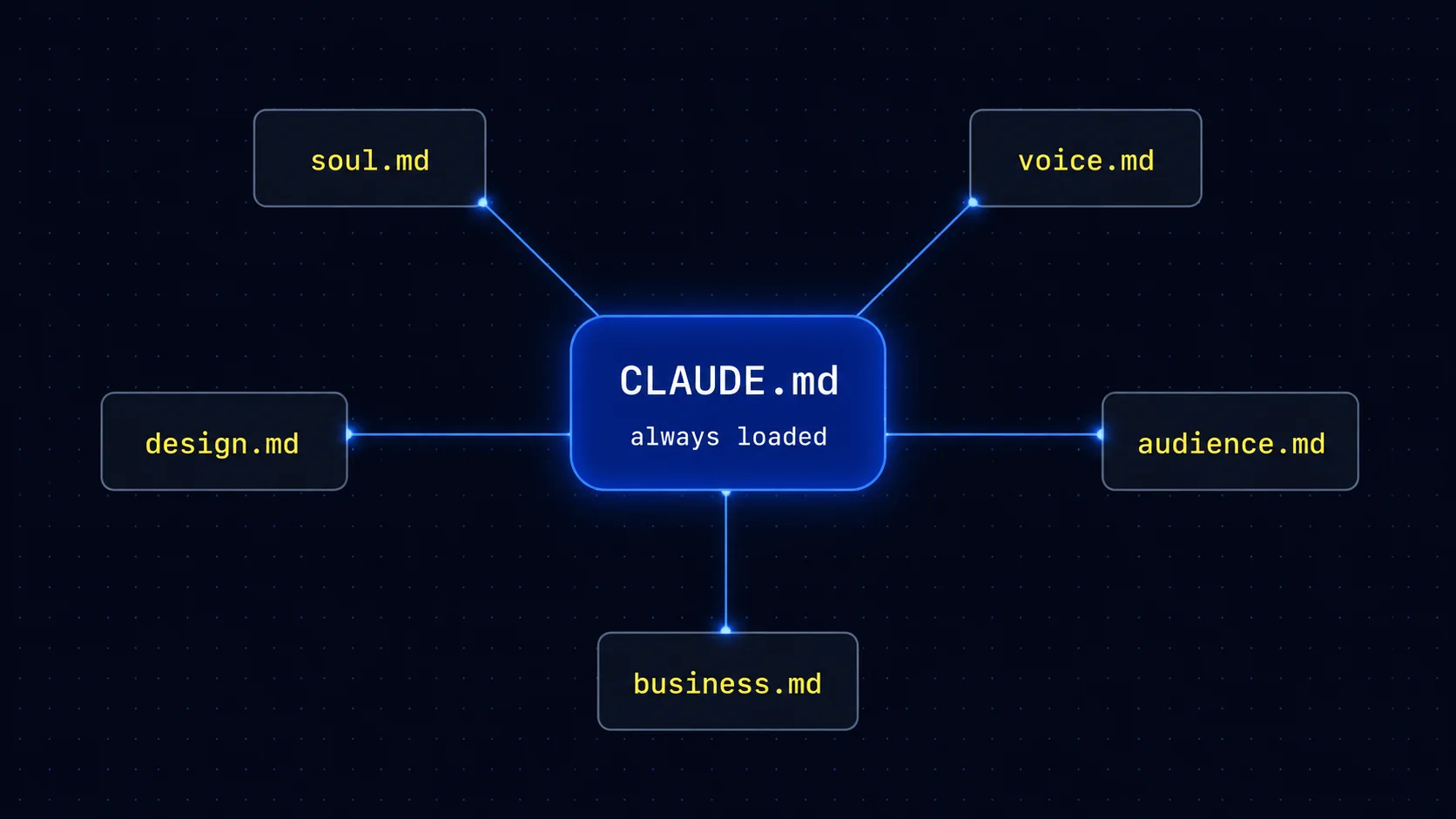
Here's what a lean CLAUDE.md looks like once it's set up as a map instead of a dump:
You don't have to write it by hand. This first prompt builds a lean one from scratch, asking you questions before it writes:
Already have a CLAUDE.md that's grown into a wall of text? This one turns it into a clean map that routes to other files:
Three rules worth putting inside it
Since CLAUDE.md loads every session, it's the right home for the handful of behaviors you want Claude to follow always. These three are the ones experienced builders reach for most. The first stops Claude from charging ahead before it understands the job:
The second keeps answers tight. And there's real research behind it: a 2025 body of work on efficient reasoning found that long, verbose model output often does not improve correctness, and under tight limits can even hurt it. Telling the model to be brief and answer first is a sound default.
The third gives the file a way to learn from its own mistakes without slowly ballooning in size:
A common myth: people call CLAUDE.md "your system prompt." Close, but not quite. It's loaded into context at the start of the session, delivered right after the system prompt, and it guides behavior rather than enforcing it. Two commands help you manage it: /init generates a starter file, and /memory lists every memory file currently loaded so you can open and edit any of them.
The Identity Files: Sound Like You
If CLAUDE.md is the control panel, these four files are the soul of the system. They're the difference between output that could have come from anyone and output that's unmistakably yours. Each one captures a different layer of your identity, and each is built by pasting a single prompt and answering a few honest questions. Claude does the writing. You just tell the truth.
For a founder or creator, these are the files that earn their keep first. Anyone can generate content now. The thing that makes it yours, your story, your phrasing, your taste, is exactly what these four files encode. Get them right, and everything downstream sounds like you wrote it on your best day.
soul.md
Who you are. Your story, your beliefs, your why. The human behind the work.
design.md
How you look. Your exact colors, fonts, and visual rules, so nothing comes out generic.
voice.md
How you talk. Your tone, your phrases, and the words you never use.
audience.md
Who you serve. Your people's real pains, fears, dreams, and exact language.
soul.md: Who You Are
This isn't your resume. It's you. Your origin, the moment things changed, the opinions you actually hold. Claude reads it whenever it writes in your voice, tells your story, or makes a judgment call that should reflect your values. You don't write it from a blank page. Claude interviews you, one question at a time, then writes the file from your answers. Paste this into the Claude Code panel and answer the seven questions honestly. Short answers are fine.
design.md: How You Look
Without this file, every visual Claude makes comes out generic. With it, Claude checks your colors, fonts, and rules first. The fastest way to build it is to show Claude a look you love and let it reverse-engineer the system. Find a brand, site, or post whose visual style you want (yours, or one you admire), screenshot it, drag the screenshot into the Claude Code panel, and paste this one line. You get back a design system as an HTML preview and a design.md file. No brand yet? Screenshot any site whose style you'd be proud to copy. You can refine it later.
voice.md: How You Talk
This is where Claude learns how you actually talk. Not a generic brand-voice doc, but your specific rules: the words you always reach for, the ones you never use, how your DMs differ from your posts. This prompt is smart. It first mines how you've written in the current chat, and if you paste in a real sample, it pulls the rules straight from your own words.
Want the strongest possible version? Feed it a real batch of your own writing. This is the same file type, built from evidence instead of memory, and it produces the most convincing results:
audience.md: Who You Serve
This is everything Claude needs to write copy that actually connects. Your audience's daily reality, what they're afraid of, the exact phrases they use, and your offer. The prompt interviews you first, then researches Reddit and the web to pull real quotes from real people in your space, so the language is theirs, not invented. It works best when Claude has web research tools available, but it will still build a strong first draft from your answers alone.
Pro tip: build these in the order above, and do the interviews in a chat where you've already been writing naturally. voice.md especially gets sharper when Claude has a page of your real words to study rather than a cold start.
The Context Files: What Claude Needs to Know
The identity files handle how Claude sounds. These next file types handle what Claude knows. They hold the facts about your business and your world, so Claude stops guessing and starts answering from real context.
Think of these as the briefing you'd give a sharp new assistant on day one. The more of your real world Claude can see, the less it has to invent, and the less time you spend correcting it later.
business.md: Your Company in One File
Without context on the problem you solve, Claude can't help you solve it well. A business.md file fixes that, and the last line of the prompt wires it into CLAUDE.md so Claude reads it automatically whenever you ask something strategic.
A markdown wiki: Your second brain
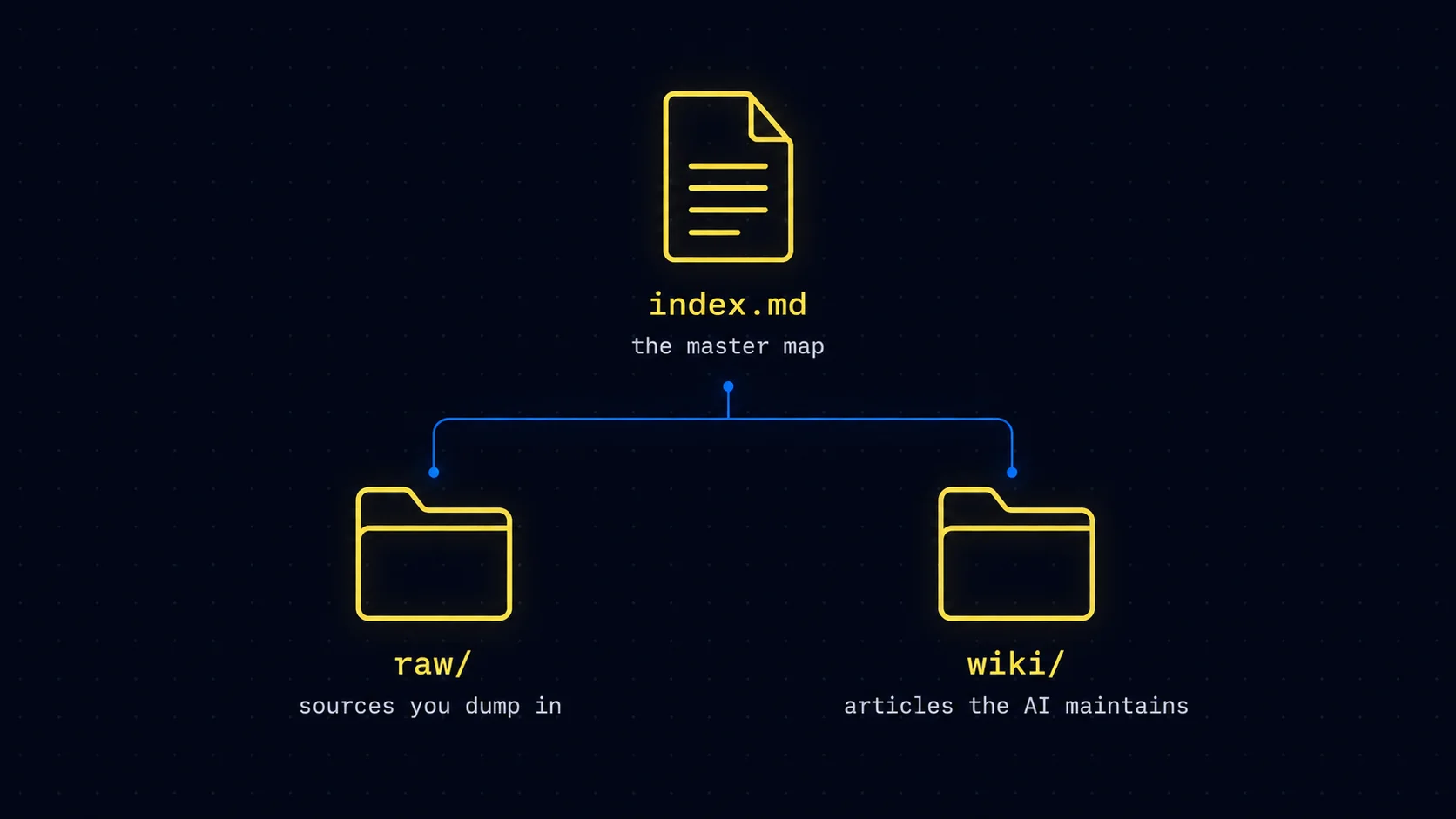
When your notes and sources grow past a handful of files, this file type turns them into a searchable knowledge base with no special database, just organized markdown. It mirrors the "LLM wiki" pattern that AI researcher Andrej Karpathy shared publicly in April 2026: a raw folder for sources, a wiki folder of summaries the model maintains, and a master index. For a personal library up to roughly 100 substantial documents, that plain-markdown approach can give the model better context than fancier retrieval systems, and every answer traces back to a file you can read and edit.
docs-index.md: A map for big documents
Working with a giant docs set, an API reference, or a long PDF? Instead of making Claude re-scan the whole thing every time, this file type builds a small index that points to exactly where each answer lives.
The Project & State Files: Track Work Over Time
This last group of file types exists to carry work forward. They remember where a project stands, what you decided and why, and where you left off, so no session ever starts from zero.
These matter most once you're using Claude Code for ongoing projects rather than one-off chats. Even if you skip them today, it's worth knowing they exist for the day a project grows too big to live in a single conversation.
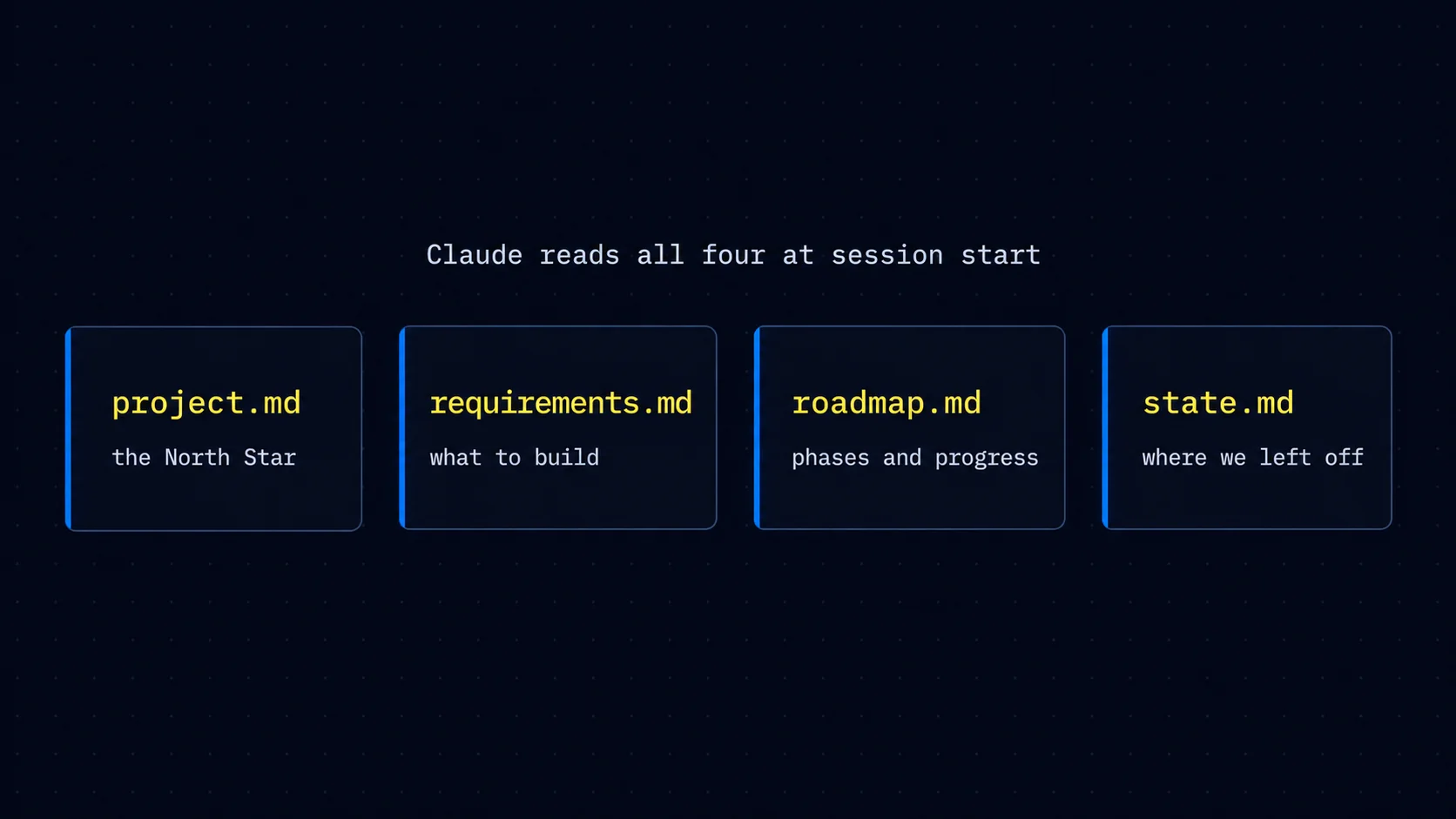
The four-file state system
Rather than let one CLAUDE.md try to do everything for a real project, this pattern splits the job across four purpose-built files, so Claude always knows the goal, the spec, the plan, and the live progress.
decisions/log.md: A running decision log
Every meaningful decision you make is something you'd otherwise re-explain later. This file type saves decisions, not conversations, so the reasoning is always one lookup away.
handoff.md: Pass the baton between sessions
When a chat gets long and you want to start fresh without losing your place, this file type packages up the current state so a brand new session can pick up exactly where you left off.
last-run.md: Memory for automations
If you run a task on a schedule, each run normally starts blind. This file type gives it a single, self-overwriting memory trail, so each run learns from the last without piling up an endless log.
Copy these prompts word for word. The wording is deliberate. The line lengths, the caps, the specific numbers, they all do a job. Resist the urge to "improve" a prompt until you've seen how it performs as written.
Keeping Your Files Healthy
A set of memory files isn't a one-time setup. It's a living thing, and it rots if you ignore it. Two habits keep the whole system sharp, and both are just prompts you run now and then.
A simple cadence works well. Run the consolidation pass every couple of weeks, or whenever a file starts to feel long, and capture corrections the moment they happen, while you still remember what was wrong. You don't need an elaborate system for this. You just need to not let it slide for months.
The consolidation pass itself merges duplicate files, turns vague dates like "next Friday" into real ones, and synthesizes recent sessions into durable notes, tightening your index back down so it stays a map and not a dump.
And any time Claude gets something wrong and you correct it, capture that correction on the spot so it becomes a permanent fix instead of a mistake you keep re-making.
One more file type to know about: Claude Code also keeps its own auto memory in a MEMORY.md index it writes for itself as it learns your preferences. Run /memory anytime to see every file that's loaded, including that one, and edit anything that looks off.
Where to Start
Don't try to build every file today. That's the fastest way to build nothing. The system compounds, so start small and let it grow with you.
This week, create three files. Build your CLAUDE.md hub with the lean prompt. Run the soul.md interview so Claude knows who you are. Then build voice.md from a batch of your real writing, because voice is the file you'll feel in every single thing Claude writes for you. That's it. Three files, maybe thirty minutes.
Add design.md, audience.md, business.md, and the rest as the need comes up. Building a landing page and tired of generic layouts? That's your cue for design.md. Writing copy that keeps missing the mark? Time for audience.md. Let the friction tell you which file to build next.
Open Claude Code, paste the lean hub prompt, and answer its questions. In under an hour, you'll have a version of Claude that finally remembers you. Everything after that is just adding one more file when you need it. Six months in, you won't be re-explaining yourself anymore. You'll open a session and Claude will already know your story, your voice, your customers, and your rules, and you'll wonder how you ever worked the other way.