
Claude For Legal: Anthropic's Free 13-Plugin Suite
A hidden gem from Anthropic: 13 free legal plugins for NDAs, contracts, trademarks, renewals, and more. Here's how to install it on your desktop.
What This Repo Actually Is
Anthropic quietly published a GitHub repository called claude-for-legal. It's a free, open-source collection of 13 Claude plugins built for legal workflows. Apache 2.0 licensed, which means you can use it, fork it, white-label it, or pull individual pieces into your own setup.
The repo describes itself as "reference agents, skills, and data connectors for the legal workflows we see most." Translation: Anthropic looked at the kinds of repetitive legal work that small businesses, in-house counsel, and law firms actually do, and they built a working reference implementation. Not a marketing demo. A real, installable suite of tools.
Most people will never find it. It isn't featured in the Customize section of Claude Cowork or the Claude Code desktop app. You have to know it exists, go to GitHub, and install it manually. That's what this article walks you through.
And here's the part that surprised me: even if you aren't a lawyer, the patterns inside this repo are some of the best examples of how to build serious, high-stakes AI agents that I've seen Anthropic publish anywhere. Section 10 is about why that matters for your business, even if you never sign an NDA.
The point of this article: Show you what's in the repo, walk you through installing it on the desktop app (no terminal needed), and pull out the workflow patterns you can copy for your own business.
The Important Disclaimer!
The repo itself opens with a loud, deliberate warning, and I'm going to repeat it here because it matters more than anything else in this article.
This is not legal advice. Every output from these plugins is a draft for attorney review. Not a legal conclusion. Not a substitute for a lawyer. If a contract, demand letter, or trademark question matters to your business, a real lawyer needs to look at it before you sign, send, or rely on anything.
The plugins are built with this in mind. They flag judgment calls instead of making them. They refuse to conclude that a trademark is "clear" or a product is "non-infringing." They mark every output as a draft. That posture is one of the smartest things about the design, and Section 10 comes back to it.
Use these tools to do the boring 80% of legal work faster. Pay a lawyer for the 20% that can sink you.
What's In The Box: The 13 Plugins At A Glance
The repo ships 13 plugins. Twelve are first-party Anthropic. One is a Thomson Reuters partner plugin for Westlaw research. Here's the full list with one-line descriptions so you can scan and figure out which ones matter to you.
| Plugin | What it handles |
|---|---|
| commercial-legal | Vendor agreements, NDAs, SaaS subscriptions, renewal tracking, escalations, stakeholder summaries |
| ip-legal | Trademark clearance, freedom-to-operate triage, cease-and-desist letters, DMCA takedowns, open-source compliance, portfolio tracking |
| privacy-legal | Privacy impact assessments, DPA reviews, DSAR responses, policy monitoring |
| product-legal | Launch reviews, marketing claim checks, "is this a problem?" triage |
| corporate-legal | M&A diligence, disclosure schedules, closing checklists, board consents, entity compliance |
| employment-legal | Hire and termination reviews, worker classification, leave tracking, investigations, policy drafting |
| regulatory-legal | Regulation feed watching, policy diffs, gap tracking, NPRM monitoring |
| ai-governance-legal | AI use-case triage, impact assessments, vendor AI reviews, policy drift monitoring |
| litigation-legal | Claim charts, chronologies, depo prep, privilege logs, demand letters, briefs |
| law-student | Socratic drills, case briefs, outlines, bar prep, IRAC practice, study planning |
| legal-clinic | Law-school clinic supervision, student onboarding, intake, semester handoffs |
| legal-builder-hub | Discovery, security review, and install gate for community-built legal skills |
| cocounsel-legal | Thomson Reuters Westlaw Deep Research (requires CoCounsel subscription) |
If you're running a small business or working solo, the two you're most likely to use right away are commercial-legal and ip-legal. So those get spotlights next. The rest get short summaries in Section 06.
Spotlight: commercial-legal
This is the plugin that pays for itself fastest if you sign vendor contracts, sell to other businesses, or use SaaS tools with auto-renewing subscriptions. It's built around three jobs.
Job 1: Review contracts against your own playbook
You feed it an NDA, a vendor MSA, or a SaaS subscription agreement. It compares the document against the playbook you set up during onboarding and flags every deviation. Sales-side and purchasing-side are tracked separately, because what's a good liability cap when you're selling is a bad one when you're buying.
NDAs get a green/yellow/red triage. Green means "you can sign this without bothering a lawyer." Yellow means "specific things to look at." Red means "stop and call legal." The plugin is strict about this: it will not issue green unless you've configured proper playbook positions during setup. No configuration, no green light. That's a feature, not a bug.
Job 2: Track renewals so you stop bleeding money
The renewal-tracker skill watches a register of every subscription you have and warns you before the cancel-by window closes. It's careful about three things that most renewal trackers get wrong: business-day roll-back keyed to governing law, notice transit time (so certified mail isn't ignored), and rolling auto-renewals where the cancel-by date moves forward each year.
There's also a renewal-watcher agent that runs every Monday and posts to a Slack channel. Items inside 13 days fire immediately, regardless of schedule.
SMB use case: If you've ever discovered an auto-renewed software subscription you forgot to cancel, this skill alone would have paid for itself. Add up your tools, list them in the register, and the agent does the watching.
Job 3: Route the messy stuff to the right human
The escalation-flagger matches an issue to your escalation matrix and drafts a "hey, can you approve this?" message in plain English. It explicitly does not send. You send. The calibration line in the skill is worth quoting: "the cost of an unnecessary escalation is 30 seconds of the approver's time. The cost of a missed escalation is signing an unapproved term, which is a one-way door. The costs are not symmetric."
The clever bit: a playbook that learns
This is the architectural piece worth studying even if you'll never sign a vendor contract. The plugin has three pieces that talk to each other:
- deal-debrief runs weekly. Surfaces deals you signed in the last 7 days with playbook deviations and asks you to log why (counterparty pressure, commercial priority, legal judgment, one-off, etc.).
- playbook-monitor runs automatically after deal-debrief. When the same clause has been deviated from 5+ times in 12 months and the deviations are directionally consistent, it drafts a proposed playbook update.
- review-proposals walks you through the proposals one by one. You accept, reject, edit, or defer each. The diff is shown before any write.
The result is a playbook that quietly updates itself based on what you're actually signing, but never without your explicit approval per change. It's one of the cleanest examples I've seen of an AI system that gets smarter over time without going rogue.
Spotlight: ip-legal
If you've ever named a product, registered a trademark, used open-source code, or worried about someone copying your work, this plugin is built for you. The standout posture: every skill that approaches a binding conclusion opens with a non-removable "this is NOT an opinion" guardrail. It will never tell you a trademark is "clear" or a product is "non-infringing." That's the lawyer's call.
Trademark clearance
First-pass knockout and similar-marks check. Walks the right circuit's confusion test. Sweeps adjacent families and foreign-language equivalents.
Freedom-to-operate
Element-by-element claim charts against utility patents. Flags design patents and trade dress to specialist counsel. Has a willfulness-awareness note.
Cease-and-desist
Two modes: draft to send (with diligence required first) or triage one you received. Six-option response memo for incoming letters.
DMCA takedowns
Send, respond, or counter-notice. Built-in fair-use gate before drafting. Counter-notice explicitly warns about consenting to federal jurisdiction.
OSS license review
Asks your deployment model first, then classifies dependencies. Severity depends on linking relationship, not just the license name.
IP clause review
Checks assignment language ("hereby assigns" vs. promise-to-assign), moral rights waiver, AI-generated content questions, inventorship.
Invention intake
First-pass patentability screen across six dimensions. Verdict is PURSUE / INVESTIGATE / DECLINE, never "patentable."
Portfolio & renewals
Tracks registrations and computes maintenance fee deadlines across USPTO, EUIPO, Madrid, EPO. Weekly renewal-watcher agent posts to Slack.
Important scope note: This plugin does not draft patent claims. The README is explicit: "patent prosecution with claim strategy is a specialist craft that needs a patent agent or patent attorney and should not be outsourced to a generalist tool."
For a small business, the OSS license review skill alone is worth the install. If you ship software, you have dependencies. Some of them have licenses that, depending on how you link to them, require you to open-source your own code. The plugin catches this before it ships.
The Other Eleven Plugins, At A Glance
You probably won't install all of these. Read the descriptions, pick the two or three that match what you do, ignore the rest.
For founders and small teams
privacy-legal handles privacy impact assessments and DPA reviews. Useful if you collect customer data, especially across borders. product-legal reviews marketing claims and runs "is this going to get us sued?" triage on product launches. ai-governance-legal is for any business deploying AI in their product or operations, especially relevant under the EU AI Act and the patchwork of US state laws.
For larger orgs and people doing M&A
corporate-legal is the M&A diligence engine. Its tabular-review skill produces Excel files with every cell cited to its source document. It also handles board consents, minutes, and entity compliance. employment-legal covers hiring, termination, worker classification (CA ABC test, IRS), leave tracking, and internal investigations. Notably, it refuses to hardcode jurisdiction-specific rules because employment law moves too fast.
For regulated industries
regulatory-legal watches regulatory feeds and diffs new rules against your current policies. litigation-legal is the biggest plugin in the suite, covering claim charts, depo prep, privilege logs, and brief drafting.
For students and educators
law-student is built for the "learning mode" approach: Socratic drills, case briefs, IRAC grading. The legal-writing skill won't rewrite your draft. It tells you what's weak and refuses to rewrite. That's a deliberate design choice. legal-clinic is the supervisor side for clinic faculty, including ABA Formal Opinion 512 considerations.
The infrastructure plugins
legal-builder-hub is the most architecturally interesting plugin in the suite. It's an app-store-with-security-review for community-built legal skills. Default mode is fail-closed: unknown sources are refused. Every install requires you to read the raw source (not an AI summary), pass a heuristic injection scan, and type "yes" to approve. Updates pin to commit hashes, not mutable tags. If you ever build your own plugin ecosystem, copy this design.
cocounsel-legal is the only third-party plugin in the suite. It connects to Thomson Reuters Westlaw Deep Research via OAuth and runs autonomous legal research workflows. Requires a CoCounsel subscription.
How To Install It On The Desktop App
This is the part that throws people. The repo is a marketplace of 13 plugins, but Cowork's Customize section installs one plugin at a time. So you need to download the whole thing, then re-zip each individual plugin folder before installing it. Here's the exact flow.
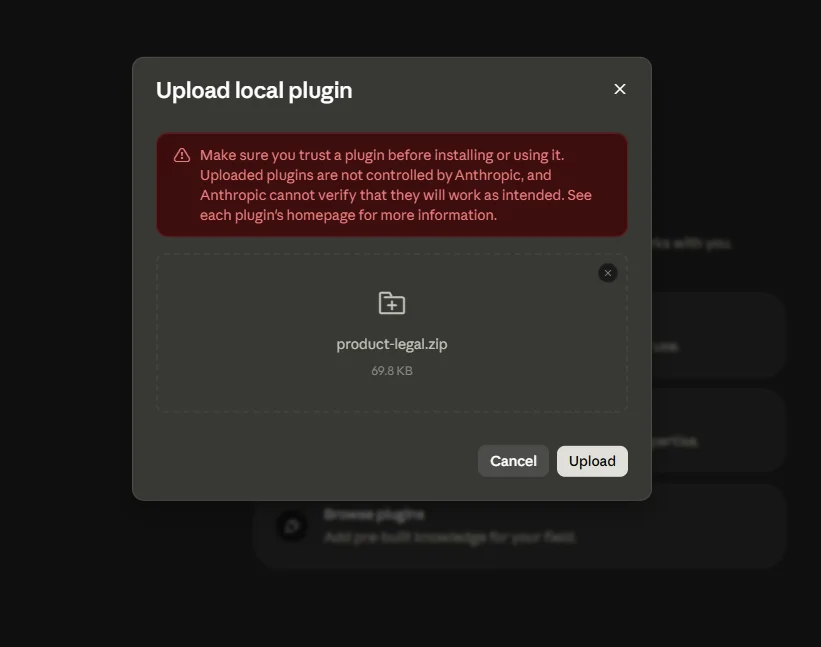
Step-by-step
- Go to the repo. Search GitHub for "anthropics claude-for-legal." Make sure the author is
anthropicswith the official badge. Don't trust forks. - Download the ZIP. Click the green "Code" button, then "Download ZIP." This pulls the entire repository as a single archive.
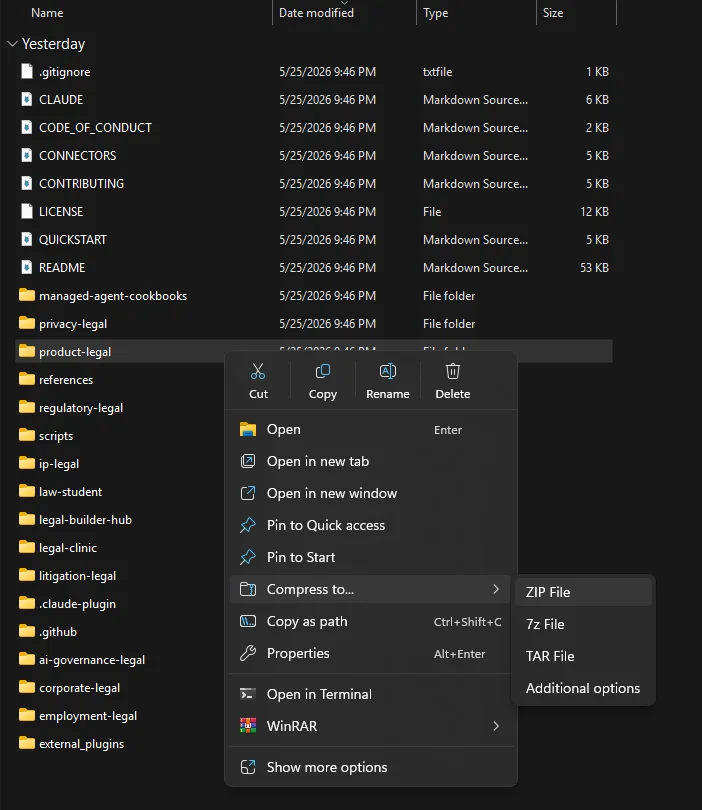
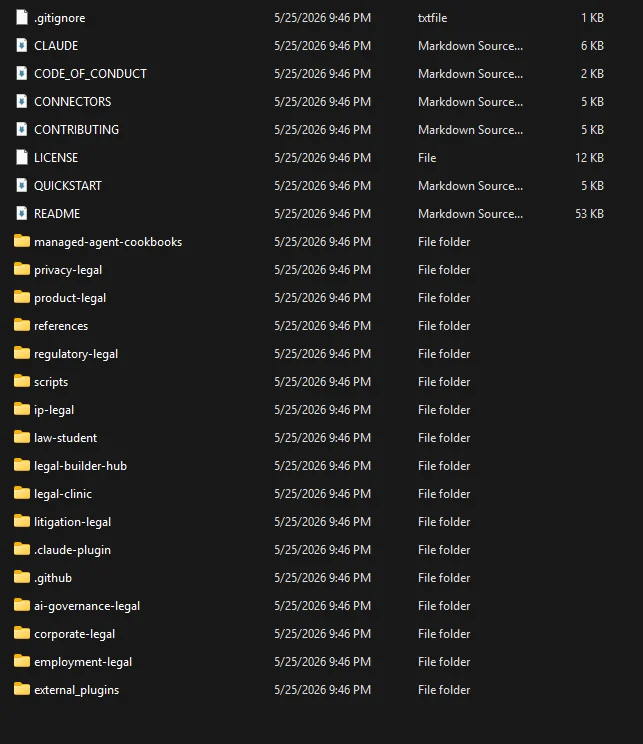
- Unzip it somewhere you can find again. Your Desktop or Downloads folder is fine. You'll see folders named
commercial-legal,ip-legal,privacy-legal, and so on, alongside files likeREADME.mdandLICENSE. - Pick the plugins you want. Don't install all 13. Pick the two or three that match your work. For most SMB users, that's commercial-legal and ip-legal to start.
- Re-zip each plugin folder individually. Right-click
commercial-legaland choose "Compress" (Mac) or "Send to → Compressed folder" (Windows). The result should be acommercial-legal.zipfile containing the contents of that one plugin folder. Do this for each plugin you want. - Open Claude Cowork or Claude Code desktop. Go to the Customize section. Look for "Install plugin" or "Add plugin from file" depending on your version.
- Upload your zipped plugin. Select the
commercial-legal.zipyou just made. The app reads the manifest and installs it. Repeat for each plugin. - Restart the desktop app. Plugins don't always activate cleanly until you fully restart. Quit and reopen.
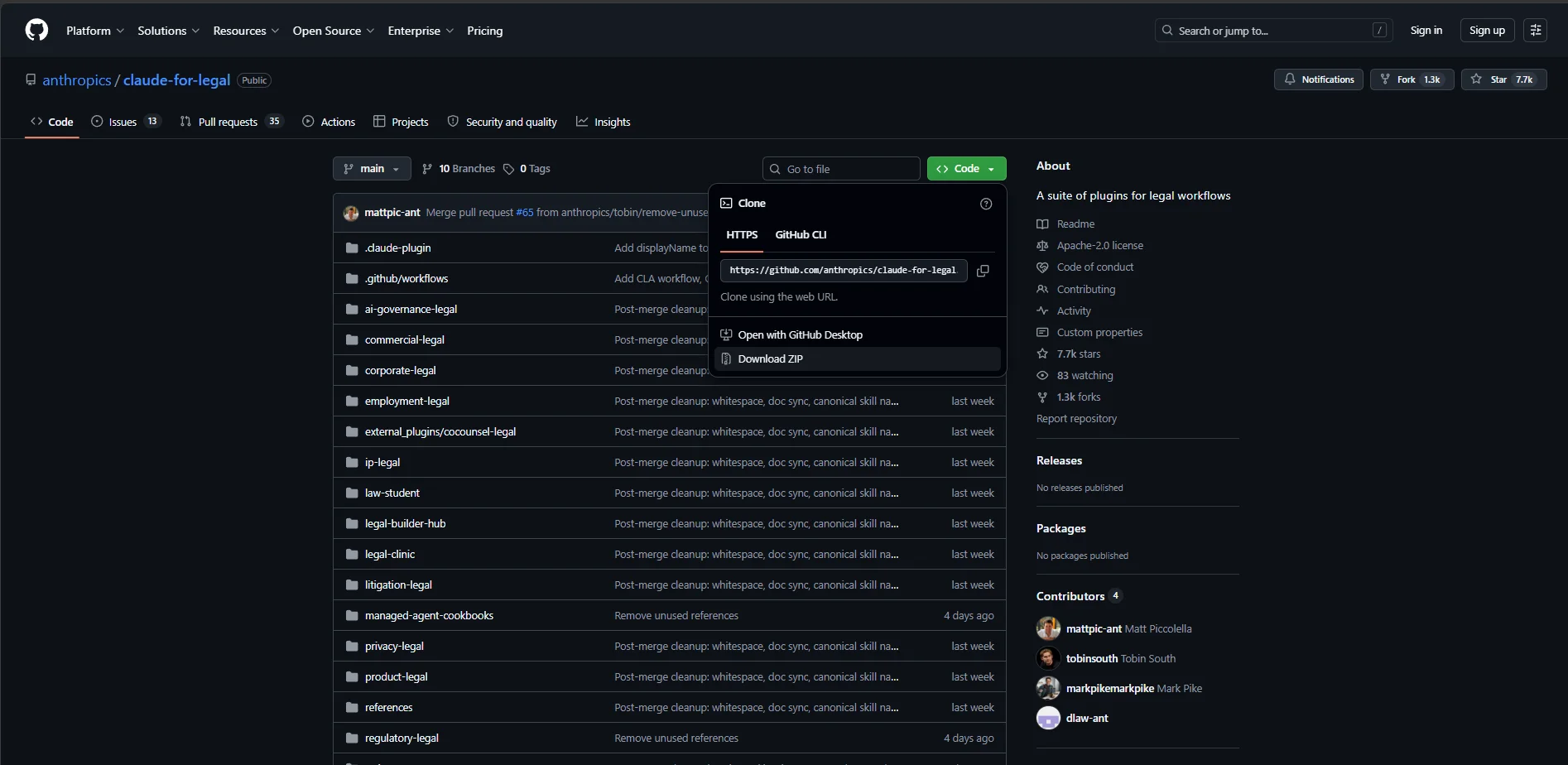
Why the re-zip step matters: Each plugin folder needs to be its own archive because the desktop installer expects a single plugin per upload (with .claude-plugin/plugin.json at the root of the zip). If you upload the whole repo zip, the installer won't know which plugin to install.
Common gotchas
If the install fails, the most common issue is that the zip contains an extra wrapping folder. The structure inside commercial-legal.zip should be: .claude-plugin/, skills/, agents/, etc. at the root. Not commercial-legal/.claude-plugin/. On Mac, this happens if you zip the folder from the parent directory instead of compressing its contents. Open the zip and check the structure before uploading.
The other gotcha: the README says to install user-scoped, not project-scoped. Project-scoped installs block the plugin from reading files outside the project folder, which kills most of the workflows. The desktop app usually handles this for you, but worth knowing.
First Run: The Cold-Start Interview
Every plugin in the suite ships with the same first move. The first time you try to use any skill, it bounces you to a cold-start interview. No silent generic defaults. The interview takes 2 minutes (quick start) or 15 minutes (full setup), and it writes a practice profile to your config folder that every other skill reads from.
For commercial-legal, you'll be asked things like:
- Are you on the sales-side or purchasing-side? (This flips most playbook positions.)
- What's your risk posture? Aggressive, measured, or conservative?
- Who approves what? Who's the named escalation contact for liability cap deviations? IP assignment issues?
- Are you a lawyer, a non-lawyer with attorney access, or a non-lawyer without? (This changes the output header and the gates.)
- Which jurisdictions do you operate in?
The 2-minute version fills in sensible defaults marked [DEFAULT] so you can start using the plugin right away and tune later. The 15-minute version asks you to upload 5 to 20 recent signed contracts so the interview can compute the delta between your templates and what you've actually been signing. That delta is the real playbook, and it's often different from what you think it is.
Power move: Run the quick start first to get unblocked. Use the plugin for a week. Then come back and run the full interview with your real contracts. The interview gets dramatically more useful once it can read what you're actually signing.
/commercial-legal:cold-start-interview/ip-legal:cold-start-interviewOr just say "set up commercial legal" or "configure ip legal" and Claude should route you to the right interview.
The Agents: The Part That Earns Its Keep While You Sleep
Skills react. You ask, the plugin does. Useful, but you have to start the conversation. Agents are different. They run on their own. On a schedule, or when something in your data changes, an agent wakes up, does a job, posts a result to Slack or a file, and goes back to sleep.
This is what separates the claude-for-legal suite from almost every other AI tool I've installed. Most plugins are passive. You open them, ask, close. The agents in this suite are active. They watch the boring stuff so you don't have to remember to.
There are seven agents across the suite, split into two kinds.
Calendar-triggered: runs on a schedule
Most of these wake up Monday morning, do their job, and post a digest to Slack. You see the result with your coffee.
| Agent | Plugin | What it watches |
|---|---|---|
| renewal-watcher | commercial-legal | Subscription cancel-by deadlines. Weekly Monday. Anything inside 13 days fires immediately, regardless of schedule. |
| deal-debrief | commercial-legal | Contracts signed in the last 7 days with playbook deviations. Asks you to log why each one happened. |
| dataroom-watcher | corporate-legal | New uploads to Box, Intralinks, or Datasite during active M&A. Flags Material Contracts, Litigation, IP. |
| leave-tracker | employment-legal | FMLA, CFRA, NY PFL, USERRA, ADA leave deadlines. Designation overdue, medical cert overdue, leave exhaustion. |
| ip-renewal-watcher | ip-legal | USPTO, EUIPO, Madrid, EPO maintenance fee deadlines. Cross-references Anaqua, CPA Global, Alt Legal. |
| registry-sync | legal-builder-hub | Community skill registries. Posts a digest of new skills. Will not auto-install anything. |
Data-triggered: runs when conditions are met
This is the rare one. Only one agent in the suite works this way, and it's the cleverest piece of architecture in the whole repo.
playbook-monitor (commercial-legal)
Runs automatically after every deal-debrief. When the same clause has been deviated from five or more times in twelve months and the deviations are directionally consistent, it drafts a structured proposal to update your playbook. Doesn't write anything to your config without your per-change approval. The result: a playbook that quietly updates itself based on what you're actually signing, never without your sign-off.
Why these agents are unique
Four design choices make this part of the suite different from anything else in the plugin ecosystem I've used.
Narrow tool scopes
Each agent gets only the tools it needs. The renewal-watcher has Ironclad and Slack. Nothing else. An agent with too many tools is an agent that can do too much when something goes wrong.
Shared infrastructure with skills
Same practice profile, same guardrail vocabulary, same provenance tags. When an agent posts to Slack, the output reads like every other deliverable from the plugin.
Two runtimes, one definition
Same agent works inside Cowork as a scheduled task, or runs headless via the Claude Managed Agents API. The repo ships managed-agent cookbooks for the big watchers so you can deploy on your own infrastructure.
Posts where work happens
Slack channels you specify. Not a dashboard nobody checks. The agent shows up where your team already is, with output formatted for that channel.
One limit worth knowing: The leave-tracker's own schedule field is candid that it doesn't run on its own. You set a recurring reminder. The suite is honest about the fact that automated scheduling sometimes still needs an external cron job or calendar reminder. Not everything is fully autonomous yet.
If you've ever wanted an AI tool that watches the boring stuff for you, this is the part of the suite that actually does it. The skills are the worker. The agents are the watchman.
The Real Lesson For SMBs (Even If You Never Touch A Contract)
Here's why this repo is worth studying even if you're not in legal. Anthropic built 13 plugins for an industry where the cost of being subtly wrong is catastrophic. The patterns they used are the same ones you'd want if you were building serious AI agents for any high-stakes domain: finance, healthcare, customer support that handles money, anything compliance-related.
These are the patterns I'd copy into my own AI workflows tomorrow.
Pattern 1: The cold-start interview as customization
Instead of a config file buried in a repo, every plugin starts with a 15-minute conversation that writes out a profile. That profile is the customization. It survives plugin updates because it lives in a separate config folder. If you're building an AI agent for your business, do this. Don't ask users to edit YAML. Ask them questions.
Pattern 2: Tag everything with provenance, not confidence
The plugins use a small, deliberate vocabulary: [verify] means "factual claim, please confirm," [review] means "judgment call for a human," [PROVISIONAL] means "I didn't have your config." Source tags like [USPTO], [model knowledge, verify], or [web search, verify] tell the reader where a claim came from. This is more useful than "I'm 87% confident" because confidence scores are noise. Provenance is signal.
Pattern 3: No silent supplement. Three values, not two.
When a skill needs information it doesn't have, it can do one of three things: supplement with a flag, stop and say nothing, or flag-but-don't-use. Silence about known doubt is treated as misleading. If your AI workflow is filling in gaps without telling the user, you're shipping a liability.
Pattern 4: Conservative-default decision posture
"Under-flagging is a one-way door. Over-flagging is a two-way door an attorney closes in 30 seconds." That single sentence is the entire design philosophy. When the cost of an error is asymmetric, the default has to bias toward the recoverable mistake. Apply this to refunds, content moderation, fraud flags, anything where one direction is expensive to undo.
Pattern 5: Self-improving with explicit human gates
The deal-debrief plus playbook-monitor plus review-proposals loop in commercial-legal is the cleanest example I've seen of an agent that gets better over time. It logs what's actually happening, detects patterns, drafts proposals, and shows you the diff. But it never writes without a typed approval, per change. That's the right shape for any AI system that needs to learn from your business without going off the rails.
Pattern 6: Fail-closed by default, explicit relaxation for users who need it
The legal-builder-hub plugin treats unknown community skills as unsafe by default. Solo practitioners can flip to permissive mode after confirming. If you're building anything that touches third-party code, plugins, or data, fail-closed is the only honest default.
The takeaway: This isn't really a legal plugin suite. It's a working example of how to build AI agents that don't lie to you, don't drift silently, and don't write checks they can't cash. The legal domain is the showcase. The patterns are the lesson.
Installing Via The Terminal (For The Technically Curious)
If you use Claude Code from the command line, you can skip the zip-and-re-zip flow entirely. The repo includes a marketplace manifest, so you can register the whole thing as a marketplace and install plugins by name.
git clone https://github.com/anthropics/claude-for-legal
# Then in Claude Code, register it as a marketplace
/plugin marketplace add <path-to-cloned-repo>
# Install whichever plugins you want
/plugin install commercial-legal@claude-for-legal
/plugin install ip-legal@claude-for-legal
# Restart Claude Code, then run the setup
/commercial-legal:cold-start-interview
This is the cleaner install path if you're comfortable in the terminal. You get all 13 plugins available to install or uninstall by name, you can pull updates with a git pull in the repo folder, and you don't have to manage individual zip files. Worth learning if you plan to use the suite seriously.
One Last Thing
The reason I think this repo is a gem isn't that it'll replace your lawyer. It won't. It can't. The repo itself is loud about that.
It's a gem because Anthropic published a complete, working, production-grade reference for how to build AI agents in a domain where being wrong has real consequences. Apache 2.0 license. Plain Markdown and JSON. No build step. You can read every line of the system prompts. You can fork the parts you like, modify them for your own business, and run them locally.
If you're a small business owner, install commercial-legal and ip-legal this weekend. Run the cold-start interview with your real contracts. See what it flags. Send the flagged stuff to a lawyer before you sign anything. You'll save the cost of the plugins (zero) plus the cost of the next contract that would have bitten you.
If you're building AI tools for your own business, fork the repo and study the CLAUDE.md template at the top of each plugin. That's where the guardrails live. Those patterns transfer to whatever you're building. Steal the structure. Adapt the vocabulary. Ship something that doesn't lie to your users.
And if you find a bug or you want to contribute a plugin of your own, the contributing guide is right there in the repo. Anthropic seems to want this thing to grow.
Your next move: Go to GitHub, search for "anthropics claude-for-legal", and download the ZIP. Even if you don't install today, read the README. It's one of the best teaching artifacts Anthropic has published.