
Hyperframes vs Motion vs Remotion
Three video tools now plug straight into Claude, and picking the wrong one costs you either money or a weekend. Here's what each is actually good at, what each really charges, and which one fits your work.
Three Very Different Ways to Make a Video
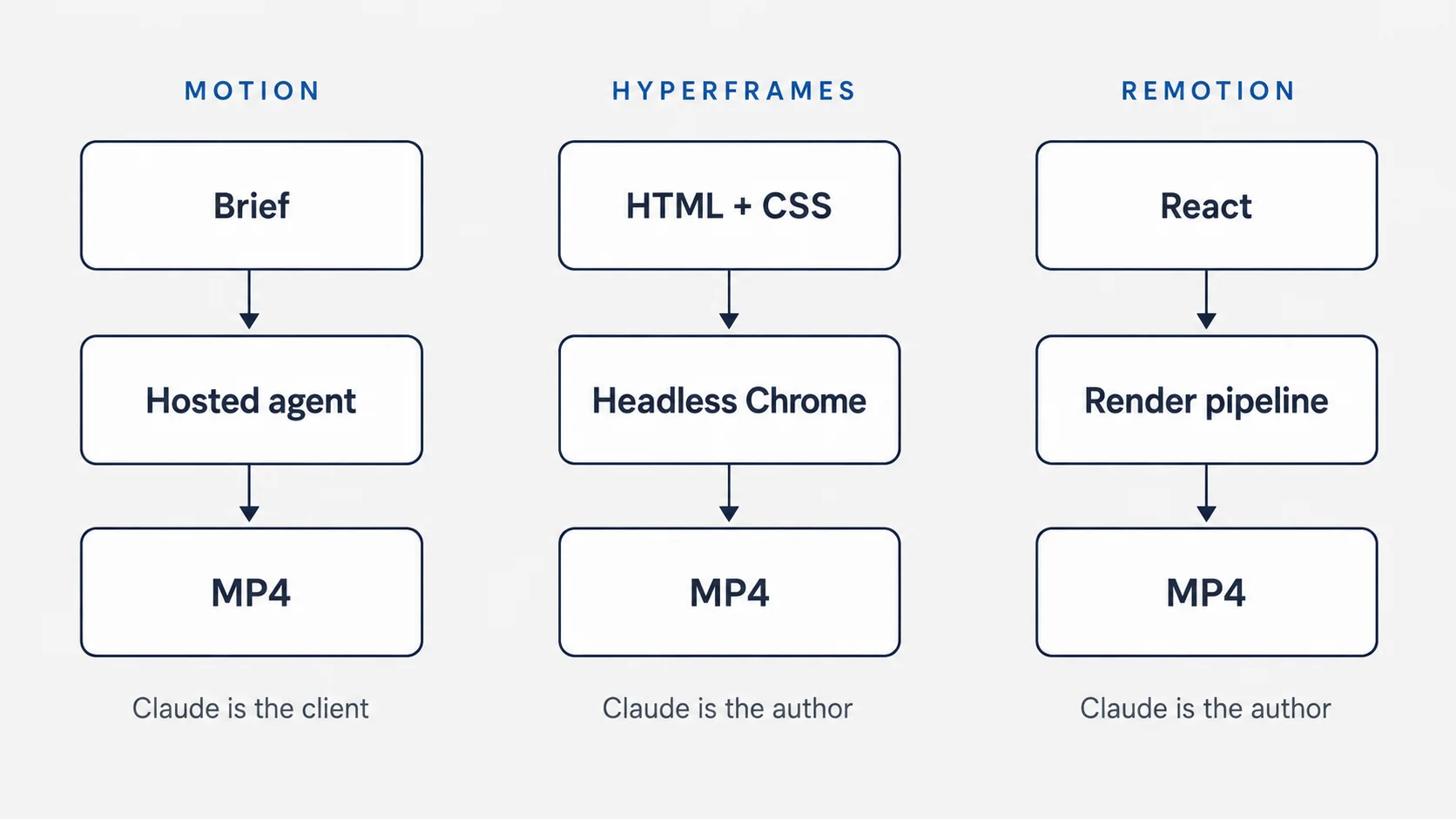
Claude cannot render video. It has no timeline, no codec, and no canvas. What it has is the ability to drive software that does. That distinction is the whole reason this comparison exists, because the three tools people keep naming in the same breath are not competitors in any normal sense. They sit at three different points on the same pipeline.
Here is the short version of how each one works.
Motion, which lives at motion.so and comes from a company called Mosaic, is a hosted service. Claude sends it a brief. Motion does its own research, writes a script, picks a color palette, animates the scenes, records a voiceover, adds music, and sends back an MP4. Claude is the client, not the creator.
Hyperframes, an open source framework from HeyGen, turns HTML into video. Claude writes the HTML, CSS, and JavaScript. A headless Chrome browser steps through the composition one frame at a time, and FFmpeg stitches those frames into a file. Claude is the author.
Remotion does the same job as Hyperframes, but the language is React. Claude writes components that describe what the screen looks like at any given frame number, and a render pipeline walks through every frame and encodes the result. Claude is the author here too, just writing in a different dialect.
So one of these tools makes creative decisions on your behalf, and two of them execute decisions that somebody already made. That single difference predicts almost everything else: cost, speed, how much control you get, how much setup you need, and how badly things go wrong when you are unhappy with the result.
The fork in the road nobody mentions
Before any of the feature talk matters, there is a practical question that eliminates two of the three options for a lot of users: does your Claude have a computer?
Motion runs entirely on somebody else's servers. You add it as a connector, type a request into a normal Claude chat, and a video comes back. Nothing gets installed. It works from your phone.
Hyperframes and Remotion both need a machine with Node.js on it, plus a place to keep project files. That means a Claude that can run commands and write files, so Claude Code in a terminal, or a Cowork session with a sandbox or access to your folders. If you have only ever used Claude in a chat window, Motion is the one that will work for you today, and the other two are things you would need to set up first.
Careful with the name "Motion": at least three unrelated products use it. There is Motion the AI video agent at motion.so, which is the one this article covers. There is Motion the calendar and task app at usemotion.com. And there is motion.dev, a JavaScript animation library that used to be called Framer Motion. If you search for pricing and land on a page offering $19 per month for an AI scheduling assistant, you are on the wrong site.
Motion: The One That Works in a Plain Chat
Motion calls itself a frontier agent for motion design, which is marketing language for something fairly specific: you give it one or two sentences and it comes back with a finished, branded, narrated video. Not a template you fill in. Not a storyboard. A file.
The process runs in five stages, and it helps to know them because they tell you where to intervene. Motion takes your brief, researches your brand by reading your website and pulling out your colors and typography, plans the video scene by scene with a style guide and a pacing decision, produces the visuals, motion graphics, voiceover, music, and captions, and then hands you an editable result. That last stage is the interesting one. You can drag a layer, retype a headline, or ask for different colors without regenerating the whole thing from scratch.
What you can actually control
The knobs are deliberately few, which is either a relief or a frustration depending on your temperament. As of August 2026 the tool accepts five aspect ratios: 16:9, 9:16, 1:1, 4:5, and 21:9. Duration comes in four buckets: under 10 seconds, 10 to 30 seconds, 30 seconds to a minute, and 1 to 5 minutes. Five minutes is the ceiling, so this is not a tool for long-form content.
The most useful control is the design system. Motion ships 21 built-in brand styles, and the list reads like a tour of tech design language: Apple, Linear, Stripe, Vercel, Figma, Notion, Spotify, Supabase, Raycast, Framer, Resend, Mintlify, Sentry, Tesla, Nike, Shopify, Airbnb, Claude, Cursor, PostHog, and Mosaic's own. Picking one is the single fastest way to change how a video feels. If none of them fit, you can hand over a custom DESIGN.md file, which is just a markdown document describing your brand, and it overrides the built-in choice.
Two other inputs are worth knowing. You can pass a YouTube URL as a style reference, and Motion will borrow that video's pacing and structure. And you can attach up to 100 assets, images, video, audio, or documents, as long as they are reachable at a public web address. Local files have to be uploaded first, which is a small friction that surprises people on their first attempt.
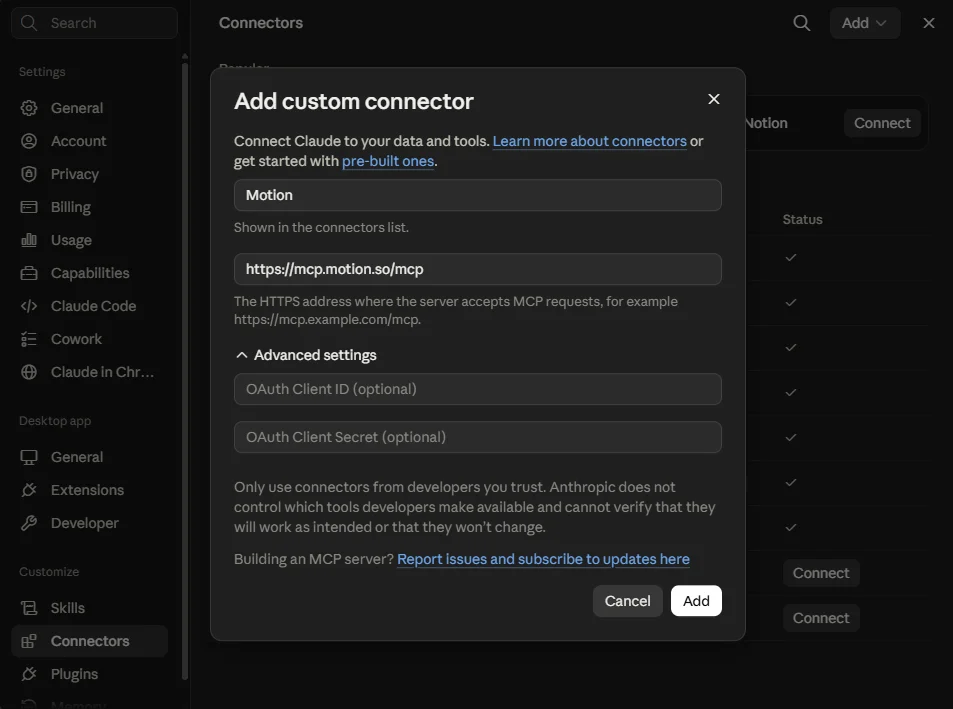
Connecting it to Claude
https://mcp.motion.so/mcp
3. Complete the browser sign-in. Motion uses OAuth, so you approve access once and Claude keeps the connection.
4. Ask for a video in plain language. A good first brief looks like this:
Make a 30 second vertical launch video for
my site [your URL]. Audience is small business
owners. Confident but not hypey. Use the Linear
design system. Lead with the problem, then the
three features, then a clear call to action.
5. Wait. Generation is asynchronous and a widget updates itself as the video builds, so you do not need to keep asking whether it is done.
Then iterate with a followup rather than starting over: "Cut the intro by two seconds, make the headline on scene 2 larger, and swap the music for something calmer."
Where Motion is strong
No terminal, no Node, no project folder. If you can add a connector, you can make a video. This is the only one of the three that works from a phone.
Script, palette, typography, pacing, voiceover, music, and captions all arrive together. You are reviewing work, not producing it.
Point it at a URL and it pulls the visual identity from the live site. For anyone without a brand kit on hand, this saves a genuinely annoying step.
Layer-level edits and chat-based revisions mean a near-miss is fixable. Most prompt-to-video tools make you reroll and pray.
Where Motion frustrates people
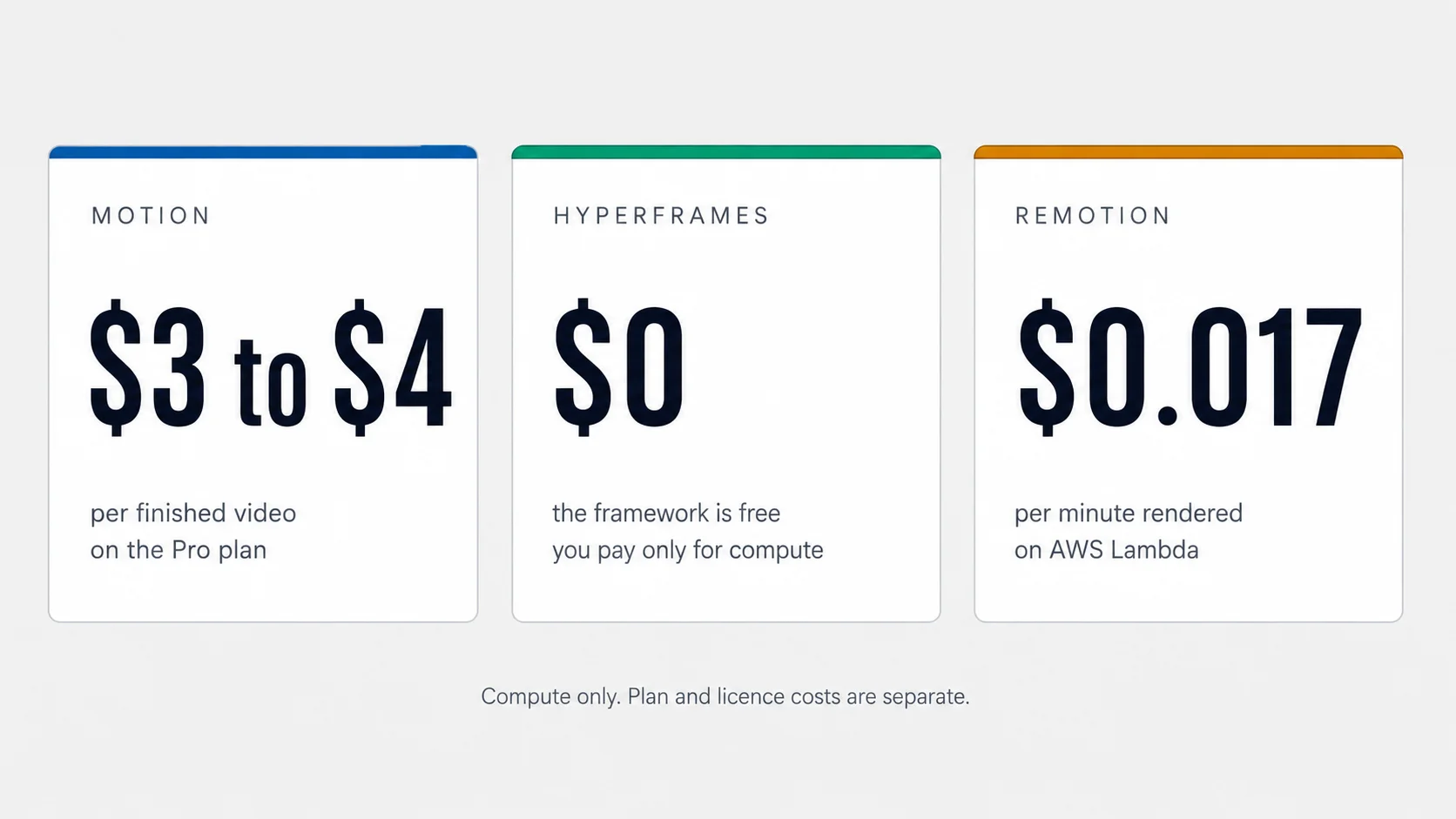
Every generation spends credits. On the Pro plan a finished video works out to roughly $3 to $4, so five attempts at the same 30 seconds is a real line item.
The longest duration bucket tops out at 5 minutes. Courses, webinars, and long explainers are out of scope.
You get layer edits, not keyframes and curves. If you need a specific easing on a specific object at a specific millisecond, this is the wrong tool.
Motion generates footage and graphics. It does not cut your camera footage, sync your podcast, or clean up your interview.
Launch and announcement videos. Product demos and explainers. Turning a blog post or changelog entry into something you can post. Social ads where polish matters more than precision. Anyone who needs a good video this afternoon and does not want to learn a tool to get it.
Hyperframes: HTML That Becomes Video
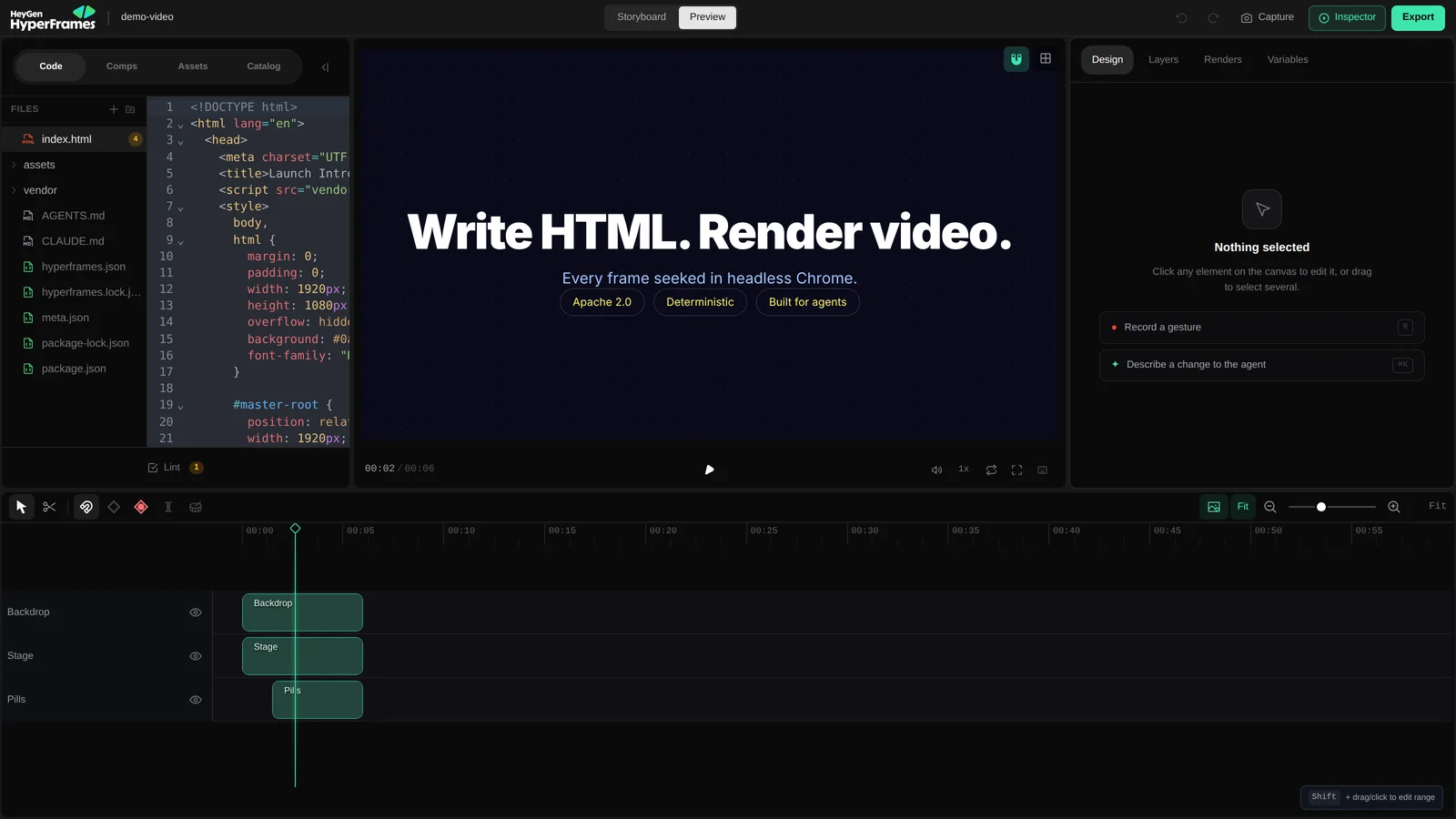
Hyperframes started from a blunt observation. Language models are excellent at writing HTML and CSS, and terrible at operating a timeline in a graphical editor. So instead of teaching an agent to use video software, HeyGen built a renderer that treats a web page as a video source and let the agent write what it is already good at writing.
A composition is a folder of web files. Elements carry timing attributes: data-start says when something appears, data-duration says how long it stays, and data-track-index assigns it to a layer. Media elements get marked with a clip class. That is close to the whole mental model.
When you render, headless Chrome seeks to each frame position, calculated as the floor of time multiplied by frame rate, screenshots it, and pipes the result through FFmpeg. Nothing depends on how fast your machine plays the animation back, which is why the output is deterministic. The same input produces the same frames every time, byte for byte.
Why determinism is more than a nerd detail: if identical input always gives identical output, you can cache renders, test them, diff them, and split one video across many machines without worrying about seams. For an automated pipeline that produces the same video shape every week, that reliability is worth more than any single feature.
What it will and will not do
Because a composition is a web page, you can animate it with anything the web can animate with. GSAP, plain CSS, Lottie, Three.js, Anime.js, and the Web Animations API all work. There is no React requirement and no build step. If you already have a landing page whose look you want in motion, a large part of the work is copy and paste.
The framework is Apache 2.0 licensed. Not source-available, not free-until-you-grow. Actually open source, with no per-render fee, no seat count, and no license review no matter how big your company gets. Given how much of this category is priced per render, that is the loudest thing about it.
What it needs from you is a real development environment: Node.js 22 or newer, FFmpeg, and Chrome. There are two ways to reach it from Claude, and they are not equivalent.
npx skills add heygen-com/hyperframes --full-depth
Choose Core Skills when the picker appears. Then just describe the video:
Using /hyperframes, make a 10-second product
intro for https://example.com
You get an editable project folder and a live preview. To reopen the preview or render later:
npx hyperframes preview
npx hyperframes render --output video.mp4
Requires Node 22+, FFmpeg, and Chrome on the machine running the agent.
https://mcp.heygen.com/mcp/hyperframes/
3. Complete the HeyGen sign-in, then enable Hyperframes in your connectors list.
The trade: rendering happens on HeyGen's infrastructure, and you do not get local project files or Studio access. You also inherit whatever plan and credit rules your HeyGen account carries, which HeyGen's own docs tell you to confirm in your account because they change independently of the framework.
Where Hyperframes is strong
Apache 2.0. No render fees, no seat counting, no threshold that turns into an invoice when your team grows to four people.
HTML, CSS, and JavaScript. No new component model to learn, no framework to adopt, no build pipeline to configure.
The CLI has no interactive prompts, so an agent can drive it end to end without getting stuck at a menu it cannot see.
Local, your own cloud, AWS Lambda, or Google Cloud Run. You are not locked into one vendor's render farm.
Where Hyperframes falls short
One reviewer measured about 3 minutes for a 30-second 1080p composition on a local machine, against roughly 25 seconds for a comparable job on Remotion's Lambda service.
Templates and components are limited next to React's, and the browser-based Studio is young. When you get stuck, there are fewer answered questions waiting for you.
Seek-based rendering and tightly choreographed audio are a fiddly combination. Beat-matched edits need more attempts than you expect.
Node 22, FFmpeg, and a headless browser. If you have never opened a terminal, this is a project before it is a tool.
Automated content pipelines where an agent produces a video on a schedule: newsletter recaps, changelog videos, weekly social clips from a data source. Teams over three people who want zero licensing conversations. Anyone who already has web design assets and wants them moving. Short to medium compositions, seconds to a few minutes, not feature length.
Remotion: Video as a React App
Remotion is the oldest and by a wide margin the most established of the three. The company reports more than 5 million monthly npm installs, 56,000 GitHub stars, and over 300 enterprise customers. HeyGen's own comparison page concedes the point, calling Remotion "older and much more established" with "more templates, more tutorials, more answered questions, and far more production history."
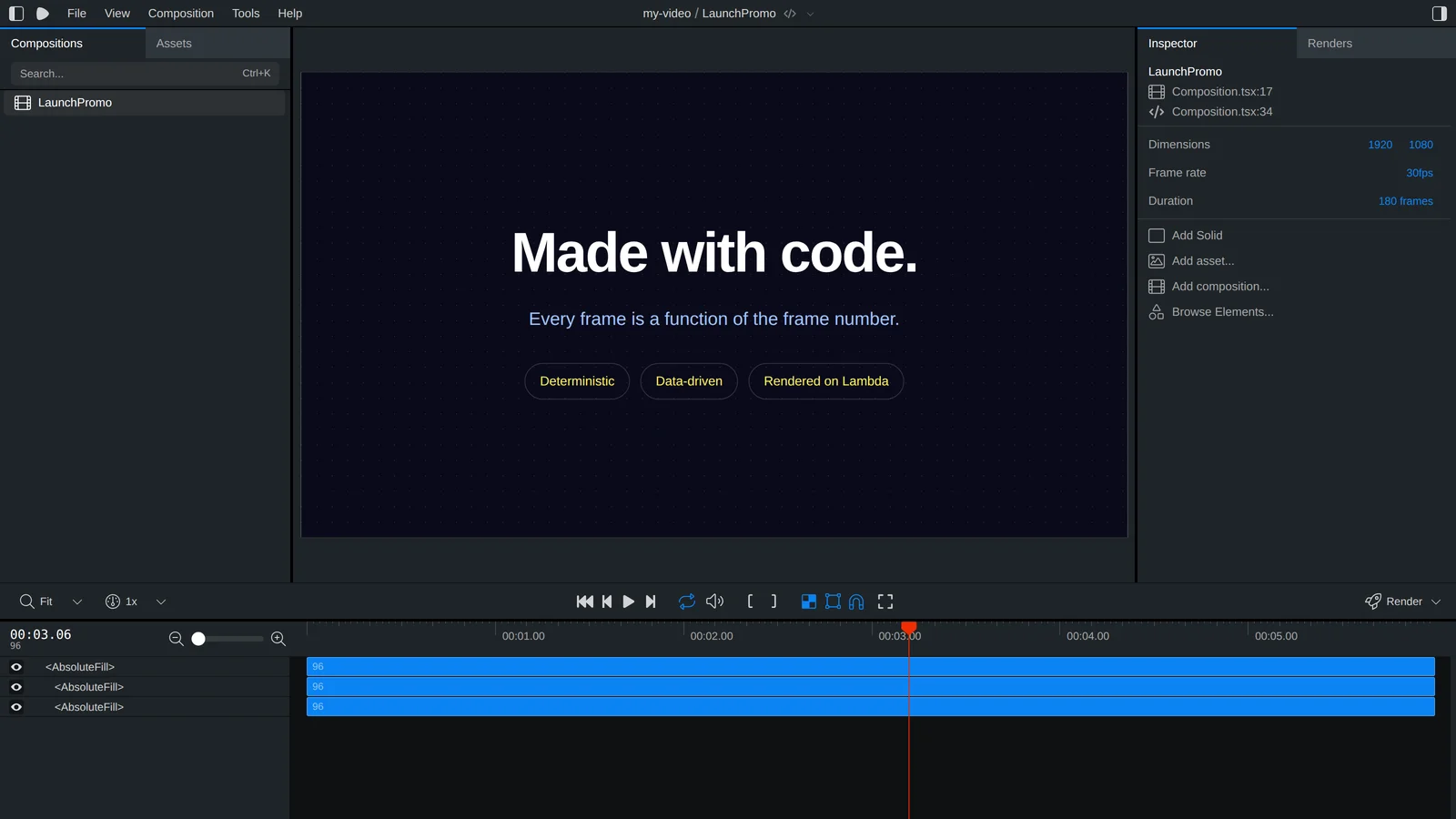
The mental model is one idea, applied consistently: your video is a function of the frame number. At frame 0 the title is invisible, at frame 30 it has finished sliding in, and you describe that relationship in code rather than dragging keyframes. HeyGen's comparison page is again unusually honest about this, admitting Remotion's model is "genuinely simpler to hold in your head. One pure function of the frame number, no timeline to register, no contract to get subtly wrong."
Around that core sits an unusually complete set of parts. Studio is a browser-based editor where visual edits and code stay in sync. Player embeds a video into your own app. Lambda renders at scale on AWS. There is a Recorder for screen capture, a Timeline, an Editor Starter for teams building their own video app, Convert for format changes, and Media Parser for reading media metadata. If your ambition is to build a product that makes videos rather than just make videos, this is the only one of the three with the pieces already in the box.
Connecting it to Claude
Remotion has invested more in agent support than either competitor. There is an official Claude Code plugin, and a set of twelve skills covering the specific things people get wrong.
claude plugin marketplace add remotion-dev/claude-code-plugin
claude plugin install remotion@remotion
2. Restart Claude Code. The Remotion agent skills load automatically.
3. Ask for what you want, optionally naming a skill:
/remotion-best-practices Make a 20 second promo
video for a vinyl record store, dark theme,
bold type, one product shot per scene
For other agents, or to skip the plugin, install the skills directly:
npx skills add remotion-dev/skills
Useful skills to name explicitly: /remotion-create for new projects, /remotion-markup for animation and layout questions, /remotion-studio to open a preview, /remotion-render to produce a file, /remotion-captions for subtitles, /remotion-maps for map animations, /remotion-saas if you are building a product, and /remotion-docs to search the documentation.
The licensing, in plain language
This is where users get caught, so it is worth being precise. Remotion is free for an individual, and free for a company or team of up to 3 people, with commercial use allowed and no signup required. At 4 people you need a paid company license.
That license comes in two shapes. Remotion for Creators is $25 per seat per month and covers teams making low-volume videos for themselves. Remotion for Automators is $0.01 per render with a $100 per month minimum spend, and covers anything that renders on autopilot: video editors, prompt-to-video products, and automated pipelines. Enterprise starts at $500 per month. New Mux customers get $250 in Mux credits with a company license.
Two details bite people. First, the headcount threshold aggregates related parties, so contractors, agencies, and clients who own the project can count toward your total. Second, Remotion is source-available, not open source; the docs say so directly, noting it "is not open-source software according to the Open Source Initiative's Open Source Definition." If a free-forever license is what you came for, that is Hyperframes, not this.
What renders cost
Lambda pricing is published with real examples, which is refreshing. A one-minute local video costs about $0.017 on a warm Lambda. A ten-minute HD video costs about $0.103. A ten-second 4K clip costs about $0.013. Those are compute costs only, so add S3 egress, storage, and logs, plus the license if your team is over three people.
Years of production history, a deep template library, an active community, and answers to most questions you will have.
Lambda renders thousands of videos in parallel at published, predictable prices. Nobody else here has that on tap.
Claude writes the code, but you own the debugging. When a component misbehaves, you are reading React, not HTML.
Four people triggers payment, the $100 automator minimum stings for a small pipeline, and contractor headcount can count against you.
Teams that already write React and have a design system worth reusing. Data-driven video at volume: hundreds or thousands of personalized clips from a spreadsheet or database. Products that generate video for other people. Anything where a visual editing surface matters, since Studio has no real equivalent in the other two.
Head to Head, Line by Line
With the individual tours done, here is the same information arranged so you can scan it. Pay attention to the first four rows in particular, because those are the ones that rule options in or out before taste enters the picture.
| Motion | Hyperframes | Remotion | |
|---|---|---|---|
| Works in a plain Claude chat | Yes | Hosted connector only | No |
| Local setup needed | None | Node 22, FFmpeg, Chrome | Node, React project |
| What Claude writes | A brief | HTML, CSS, JS | React and TypeScript |
| Who decides the design | The tool | You and Claude | You and Claude |
| Voiceover and music | Generated for you | You supply it | You supply it |
| Max length | 5 minutes | No hard limit | No hard limit |
| Visual editor | Layer edits in app | Studio, still young | Studio, mature |
| Render location | Their servers | Local, cloud, Lambda, Cloud Run | Local or Lambda |
| Repeatable output | Varies by generation | Deterministic | Deterministic |
| License | Subscription | Apache 2.0, free | Free up to 3 people |
| Ecosystem | Closed service | New, small | Large and established |
| Time to first video | Minutes | An hour, maybe two | An hour, maybe two |
The pattern in that table is worth naming. Motion trades control for speed. Hyperframes trades ecosystem for freedom. Remotion trades simplicity for power. There is no row where one tool wins everything, and any article telling you otherwise is selling something.
The question that settles most arguments: do you want a video, or do you want a video machine? If the answer is a video, Motion. If the answer is a machine that will produce a hundred videos with your fingerprints on all of them, Hyperframes or Remotion.
What These Actually Cost
Prices below were checked in August 2026. All three companies change pricing without much warning, so treat this as a shape rather than a quote, and confirm before you put a card in.
| Tool | Entry | Middle | Top |
|---|---|---|---|
| Motion | Flex, $5 one time, 200 credits, about 1 to 2 videos | Pro, $29 per month or $276 per year, 1,250 credits, about 8 to 10 videos | Max, $99 per month or $960 per year, 5,000 credits, about 18 to 20 videos |
| Hyperframes | Free, Apache 2.0, unlimited renders on your own machine | Your own cloud render costs, whatever Lambda or Cloud Run charges you | Hosted path adds a HeyGen plan, from $29 per month for Creator |
| Remotion | Free for an individual or a team of up to 3 people | Creators, $25 per seat per month, or Automators at $0.01 per render with a $100 per month minimum | Enterprise, from $500 per month |
The arithmetic that matters
Motion's credits are $0.025 each and top-ups start at 100 credits. Divide the Pro plan's 1,250 monthly credits by its stated 8 to 10 videos and you land at roughly 125 to 155 credits per video, so about $3 to $4 of value per finished piece. The Max plan works out closer to $5 or $6 per video, which suggests the videos it expects you to make are longer or more complex. Either way, the honest number to hold in your head is a few dollars per finished, narrated, branded video. Compared to a freelancer, that is nothing. Compared to a render you control, it is not nothing, and it recurs every time you change your mind.
Remotion's render costs are almost too small to matter: about $0.017 for a one-minute video, $0.103 for ten minutes of HD, $0.013 for a ten-second 4K clip, all on warm Lambda. The cost that matters is the license. A four-person company running an automated pipeline pays the $100 monthly minimum before it renders a single frame, which is more than most small operations expected.
Hyperframes is the outlier because the framework itself costs nothing and never will under Apache 2.0. Your bill is your compute. Render locally and it is electricity. Render on Lambda and it looks a lot like Remotion's numbers. The one place cost gets murky is the hosted HeyGen connector, where HeyGen's published credit examples are all avatar-related, one minute of Avatar III costs 3 credits and Avatar IV or V costs 20, with no clear published rate for Hyperframes renders specifically. HeyGen's own documentation tells you to confirm limits in your account before starting long or repeated renders, which is a polite way of saying the pricing for that path is not fully nailed down. If predictable cost matters, run it locally.
One conflict worth flagging: Motion's plan page and the live plan data returned through its connector do not always agree on credit allowances, and third-party "pricing" articles for Motion are frequently describing the unrelated calendar app. Check the number inside your own account before you plan a month of content around it.
Pick Yours in Sixty Seconds
Find the row that sounds most like your week. The winner column is a real recommendation, not a hedge.
| If this is you | Use | Why |
|---|---|---|
| I need a good launch video this week and I do not write code | Motion | The other two require a development environment before they produce anything at all. |
| I want a video published every week from the same recipe | Hyperframes | Deterministic renders, an agent-friendly CLI, and no per-render fee to punish repetition. |
| I need 500 personalized versions from a spreadsheet | Remotion | Lambda is the only mature, published-price way to render at that volume without building the farm yourself. |
| My team already ships React and has a design system | Remotion | Your components, charts, and typed props come along for free instead of being rewritten. |
| We are 6 people and nobody wants a licensing conversation | Hyperframes | Apache 2.0 means no seat count and no license review, at any company size. |
| I make faceless social content and polish is the whole product | Motion | Voiceover, music, captions, and a coherent visual style arrive together. Assembling that yourself is the slow part. |
| I am building a product where my users make the videos | Remotion | Player, Editor Starter, and the SaaS guidance exist for exactly this. Nothing comparable in the other two. |
| I need to edit footage I shot on a camera | None of these | All three make video from instructions. None is a cutting tool for existing footage. |
The two rows people argue about
The weekly-recipe row is the closest call in the table. Remotion would also do that job well, and its ecosystem would make the build faster. Hyperframes wins on the economics of repetition: an automated pipeline is exactly the case Remotion's Automator license is designed to charge for, at $0.01 per render with a $100 monthly floor, while Hyperframes charges nothing forever. If your team is three people or fewer, Remotion is free too and the call flips on which language you would rather debug.
The volume-personalization row is the one where being honest costs Hyperframes a win it nearly earns. It can render on Lambda and Cloud Run, and determinism makes caching easy. But HeyGen's own comparison page concedes that Remotion Lambda is "a mature, heavily documented rendering system; ours is newer." When you are on the hook for 500 renders tonight, maturity is the feature.
If you are still torn, start with Motion. Spend $5 on the Flex plan, make two videos, and see whether what comes back is close enough to what you wanted. That answer tells you more about your own standards than any comparison table can, and it costs less than lunch.
Running Two of Them Together
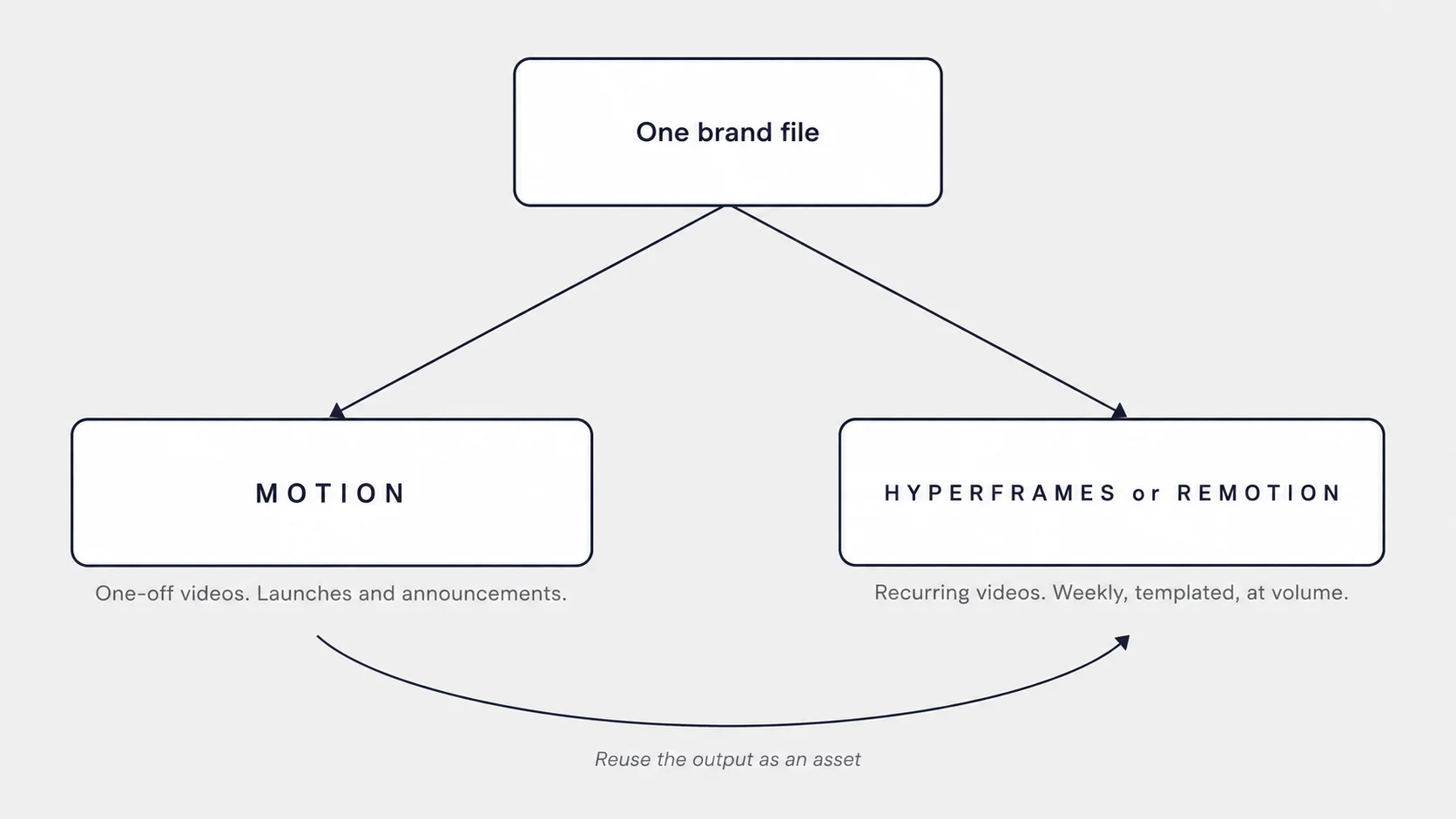
The framing of this article has been "pick one," because that is the question users ask. But the setups that work best after a few months usually involve two, split along a clean line: Motion for the videos that only happen once, and a code-based renderer for the videos that happen every week.
A launch video, a funding announcement, a new-feature explainer: each of those needs fresh creative thinking, and paying a few dollars for Motion to do the research, scripting, and animation is a good trade. A weekly digest, a daily quote card, a personalized onboarding clip for each new customer: those need consistency, not creativity, and paying per generation for something you already know the shape of is money set on fire.
Two practical notes if you go down that road.
First, keep one brand specification and reuse it. Motion accepts a custom DESIGN.md that overrides its built-in styles. Remotion has design system tooling for the same purpose, and a Hyperframes project is HTML with a stylesheet. Writing that brand definition once, and pointing all three at it, is the difference between a coherent library and a pile of videos that happen to have your logo on them.
Second, Motion output can be an input. It accepts up to 100 attachments at public URLs, and a Hyperframes or Remotion composition can pull in any MP4. So a title sequence generated once by Motion can be reused as an asset in fifty programmatic videos, which is often the cheapest way to get a polished opener without hand-animating one.
Five Mistakes to Avoid in Your First Week
1. Trying to run Hyperframes or Remotion from a chat window
Both need a filesystem and Node. In a plain Claude chat, the install commands have nowhere to run. Use Claude Code, or a Cowork session with a sandbox or folder access. The hosted Hyperframes connector is the one exception, and it costs you local project files and Studio.
2. Judging Motion on the first generation
The first output is a draft with confidence. The value is in the followup, where you correct pacing, copy, colors, and music without regenerating from zero. Users who reroll the same prompt three times get three different drafts and spend triple. Users who send one correction get what they wanted.
3. Letting Claude over-engineer a Hyperframes project
Given room, an agent will build an abstraction layer, a config system, and a component library for a 15-second video. Reviewers of the framework name over-engineering as its most common failure mode. Ask for the simplest composition that works, then add structure only when a second video needs it.
4. Ignoring Remotion's headcount rules until you are five people
Free covers an individual or a team of up to 3. The threshold counts related parties, including contractors and clients who own the project, so an agency building for a client can cross it without hiring anyone. Read the rules while it is still cheap to change your mind.
5. Expecting any of them to be a video editor
Motion generates. Hyperframes and Remotion render instructions. None of them will cut your interview footage, fix your audio, or color-grade a camera file. If that is the job, you want an editor, and possibly one of these three afterwards for the graphics that go on top.
Power tip for all three: write the brief before you open the tool. Goal, audience, one sentence per scene, the exact call to action, and a reference you like. Every one of these tools produces better work from a specific brief, and the tool you choose matters less than whether you knew what you were asking for.
Where to Start
If you want the shortest honest answer: most users reading this should connect Motion today and stop there for a month. It is the only one that works without a development environment, it produces something usable on the first try, and $5 is enough to find out whether the output meets your standard. If the answer is yes, you have a video habit. If the answer is no, you have learned something important about your own taste before spending a weekend on setup.
Move to Hyperframes when you notice yourself asking for the same video shape a third time. Repetition is the signal that a recipe would serve you better than a generator, and Apache 2.0 means the recipe costs nothing to run forever.
Move to Remotion when the video is part of a product, or when the volume is in the hundreds, or when your team already writes React and rebuilding your design system in plain HTML would be the actual work. Its maturity is the reason it is still the default for anyone shipping video at scale, and the license is a real cost worth planning around rather than a reason to avoid it.
One last thought worth sitting with. Six months ago the interesting question was whether an AI could make a watchable video at all. That question is settled, and it settled faster than most people noticed. The interesting question now is whether you can describe what you want precisely enough to be worth handing to something that will build it in three minutes. That skill, writing a brief that a capable agent can execute, is going to outlast every tool in this article. Pick whichever one gets you practicing it soonest.