
The AI Agent Playbook
Build AI agents that actually work, from your first draft-bot to a team that runs on autopilot. A beginner's step-by-step playbook for Claude Code, with 20+ copy-paste prompts for every stage.
Most people meet AI through a chat box. You type, it answers, you copy the answer somewhere useful. That is helpful, but it is still you doing all the driving. An agent is the next step. It is a small, named worker you set up once and call by name, and it does a specific job the same way every time without you re-explaining yourself.
This guide walks you through the whole path, start to finish. You will learn the five-part recipe that every good agent follows, build a real one that drafts content in your voice, learn the four ways beginner agents fall apart (and the one-move fix for each), then graduate into slash commands, safety hooks, and putting a proven agent on a schedule so it runs on its own. Everything here works inside Claude Code, and every technique comes with a copy-and-paste prompt you can use right away.
You do not need to be technical. You need to be able to describe a job clearly and read a short file. That is the whole skill. Let's build.
Who this is for: anyone running a business or making content who wants AI to do repeatable work, not just answer questions. If you have used Claude Code even once, you are ready for this.
What an agent actually is
Forget the sci-fi version for a second. In practical terms, an agent is a text file. That file gives an AI a fixed identity, one clear job, a set of permissions, and a rule for knowing when it's finished. You save it once. After that, you call the agent by name and it runs its job the same way every time.
The difference between a chat prompt and an agent is permanence. When you type a clever prompt into a chat window, it works once and then it's gone. Close the window and you start from scratch tomorrow. An agent is that clever prompt, written down, named, and made reusable. You fix it once and the fix holds forever.
Here's the mental model that makes everything click: you are not typing anymore, you are hiring. A good agent is a permanent assistant with a job description. And just like hiring a real person, the quality of the work depends almost entirely on how clearly you wrote that job description. Vague brief, wandering worker. Sharp brief, sharp results.
The one idea to hold onto: when an agent misbehaves, you fix the file, not the request you typed. A fix in the file is permanent. A fix in the chat evaporates the moment you close the session.
Claude Code looks for your agents in a specific folder, .claude/agents/, inside your project. Each agent is its own markdown file. You can also keep personal agents in ~/.claude/agents/ so they follow you into every project. That's the whole storage system. A folder of small files, each one a worker you can call by name.
The five-part recipe
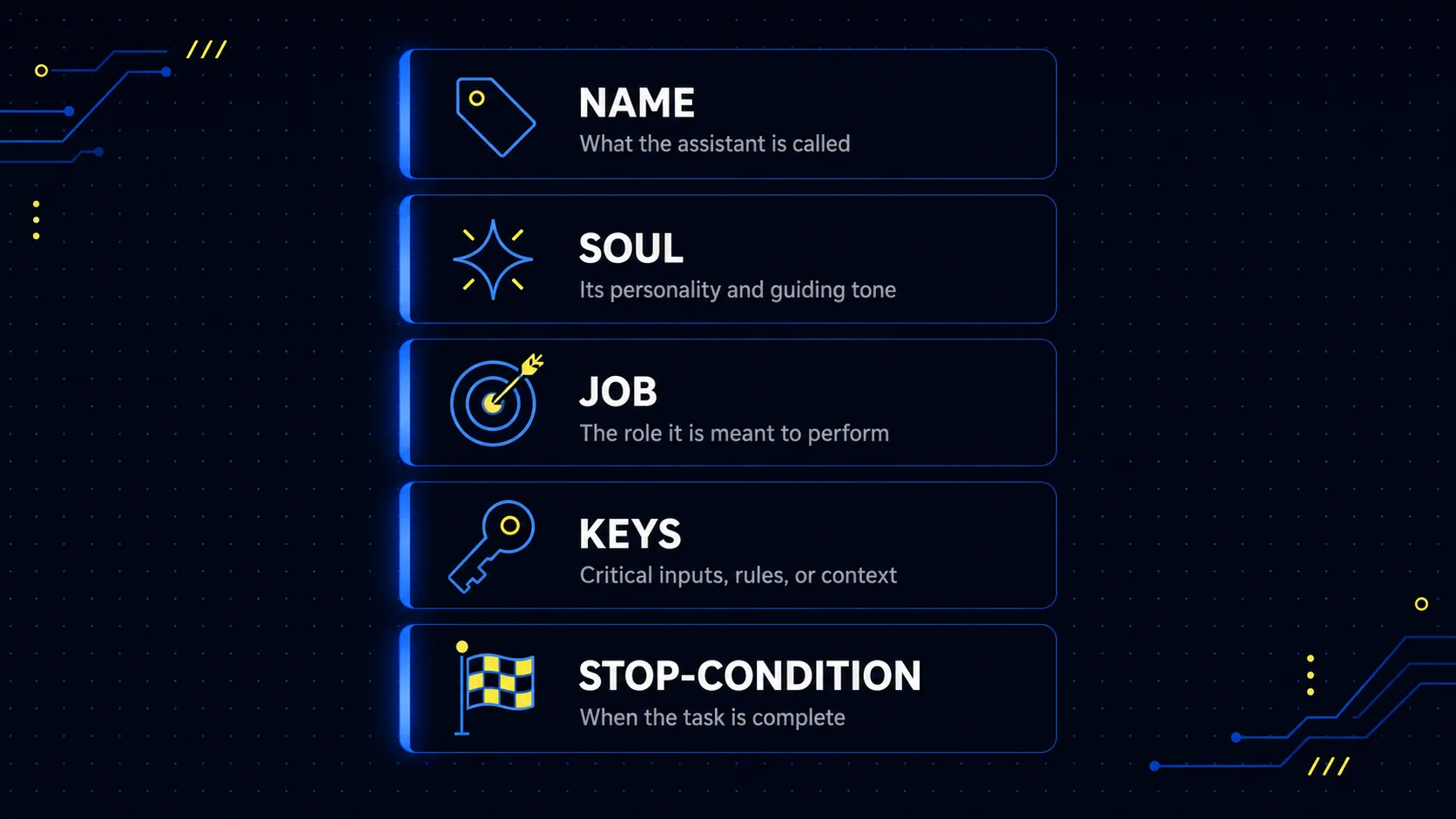
This is the most important part of the entire guide. Every agent worth keeping has the same five ingredients. Miss one and the agent breaks in a predictable way. Learn the recipe once and you can write a brand-new agent in under ten minutes for the rest of your life.
Here are the five parts, in order.
1. Name
A short handle like inbox-triage or daily-draft. Lowercase, dashes, no cuteness. You'll type it a hundred times, so make it easy to say.
2. Soul
Two or three sentences of identity. Voice, attitude, what it cares about, what it refuses to do. The agent inherits this every single run.
3. Job
One sentence describing the mission. If you can't say it in one sentence, the job isn't scoped yet. Split it.
4. Keys
What tools and folders it's allowed to touch. Read only? Can it write files? Run commands? This is the seatbelt. Tight by default.
5. Stop-condition
How the agent knows it's done. Something it can literally check, like "when three files exist in the drafts folder and a summary has been printed." Without this, agents keep going, burn through tokens, and overshoot the target. A vague stop-condition ("when it's good") means wandering. A measurable one means a clean exit.
Notice the pattern. Name and Soul give the agent an identity. Job and Stop-condition give it a clear start and finish line. Keys keep it safe. That's a complete worker in five short lines.
A worked example: inbox-triage
Say you want an agent that sorts your inbox every morning. Here's the recipe filled in for a triage agent. Read how specific each line is. That specificity is the whole point.
See how the Soul isn't decoration? "Calm, ruthless, protects my attention" tells the agent how to make a hundred small judgment calls you'll never spell out. And the Keys line is doing quiet, important work: read the inbox, write to a drafts folder, and touch nothing else. No sending. No deleting. That single line is the difference between a helpful assistant and a morning you spend undoing damage.
Best practice: resist the urge to add more fields. Beginners want to bolt on "personality archetype" or "success metrics dashboard." All of it bloats the file and dilutes the Soul. Five lines is the whole template, forever. New agent, new five lines.
Build your first agent, end to end
Enough theory. Let's build a real one that ends up as a real file in your project. The target is an agent called daily-content-draft. On command, it drafts three post options in your voice from one rough idea, saves them as files, and never posts anything. You stay the publish button.
Step 1: Make the file
In your project, ask Claude Code to create the agent file for you. The canonical path is .claude/agents/daily-content-draft.md, and Claude Code watches that folder automatically. Paste this:
Step 2: Write the file in plain English
Now paste this structure inside the file. The part between the two lines of dashes at the top is the configuration (the name, a description, and which tools it's allowed). Everything below is the agent's actual brief, written in the same five-part shape from Section 02. Fill in the brackets with your real details.
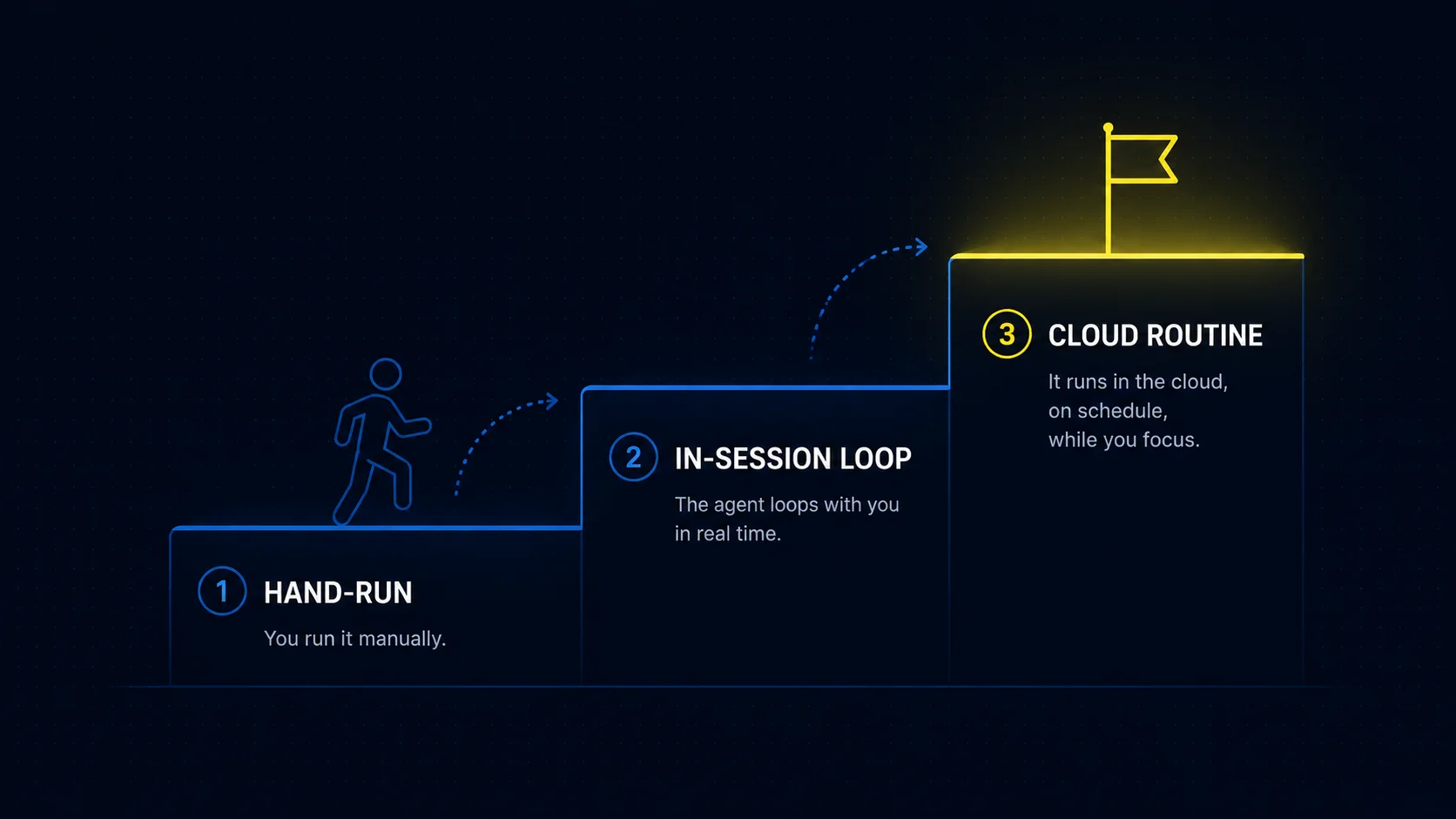
Step 3: Scope the tools (the keys)
Look at the tools: Read, Write line near the top. That's the seatbelt. No terminal access, no internet, nothing destructive. The rule to live by: give an agent the fewest tools that get the job done, then add one back only if you genuinely need it. A drafting agent never needs terminal access. A research agent never needs to write. Match the tools to the job, not to "just in case."
Step 4: Trigger the first run
Back in Claude Code, call the agent with a rough idea:
Watch this first run all the way through. Don't multitask. The first run is the one that teaches you what you got wrong in the file, and you want to catch it live.
Step 5: Read the result and fix the file, not the prompt
Your three drafts are now sitting in the drafts folder. Read them out loud. Your ear catches voice problems your eye slides right past. If the voice is off, here's the move that separates people who get this from people who stay frustrated: you edit the Soul section of the agent file, not the request you typed. Fix the worker, not the one-time ask.
Run it two more times with different ideas. By the third run the voice should be uncannily close to yours. If it isn't, your Soul section is too short. Add two more sentences and paste in one of your real past posts as a reference sample. Voice problems are almost always Soul problems.
Why this loop matters: every fix you make to the file is permanent. Every fix you make to the prompt disappears when you close the session. Ten minutes tuning the Soul today saves you re-explaining your voice every single day forever.
The four ways agents break
Your agent will misbehave at some point. Good news: almost every failure is one of four things, and each one has a single-move fix. Knowing them in advance turns a two-hour debugging spiral into a two-minute correction. Screenshot this section. You'll come back to it.
| The break | What it looks like | The fix |
|---|---|---|
| Soul drift | The output reads generic and stiff. It doesn't sound like you. It uses words you'd never use. | Rewrite the Soul with 4 to 6 real voice rules and paste in two of your actual past posts as reference. |
| Scope creep | You asked it to triage, it also archived 40 emails "to be helpful." You asked it to draft, it also published. | Strip the tools to the minimum and add a "DO NOT" line to the Job spelling out what it must never touch. |
| Wandering | It runs for 20 minutes, keeps second-guessing, and hands you vague mush instead of the thing you asked for. | Write a measurable stop-condition it can literally check. Add a budget: "if this takes more than 5 steps, pause and ask me." |
| Silent failure | It says "done, drafted 3 posts" but the folder is empty, or the files are half-written. | Always check the agent's report against the real folder. Add a rule: verify each file exists before printing the summary. |
Let's put a little more meat on the two that trip people up most.
Soul drift is the most common one
The symptom is simple: the writing is fine, but it isn't you. This happens because "write in my voice" tells the agent nothing. It has no idea what your voice is. The fix is to show, not tell. Give it real rules ("short sentences, lowercase, one idea per line, no hype") and then paste in two things you actually wrote. The agent matches patterns. Give it a pattern to match.
Scope creep is the one that costs you
An agent that does too much is usually an agent you handed too many keys. If it can send, it might send. If it can delete, it might delete. The fix has two halves: take away the tools it doesn't need, and write down the restrictions in plain language. Agents follow rules you write down. Rules you only thought about don't count. If it matters, it goes in the file.
The sneaky fifth one, context bleed: if you're using several agents together and the tone shifts halfway through a job, one agent probably got handed too much chat history and inherited the wrong vibe. The fix is to pass each helper only the input it needs, never the whole transcript.
The meta-lesson under all of this: four of the five breaks are file problems, not prompt problems. When an agent surprises you, open its file first and the chat second.
When one agent isn't enough
Once your first agent works, you'll be tempted to build a swarm of them. Resist that for now. One agent doing one job is the default, and most "complex" workflows are simpler than they look. You split a job into multiple agents only when one of three things is genuinely true.
Split when the job has separate specialists. "Research, then draft, then review" is three different mindsets. The researcher wants to be thorough, the drafter wants to be punchy, the critic wants to be brutal. One personality can't be all three without going mushy.
Split when the job needs a lot of throwaway reading. Reading 200 files to answer one question? Hand that off to a helper that reads in its own clean space and passes back only the summary. Your main session stays uncluttered.
Split when you want one piece swappable. If today's drafter is fine but tomorrow you want a different brand voice, keeping the writer as its own file means you swap one worker without rebuilding everything.
The orchestrator pattern
When you do split, use an orchestrator. The orchestrator is the one you talk to, and its only job is to route. It reads your request, decides which specialist to call, hands off a clean brief, gets the result back, and either calls the next specialist or returns the finished work to you. Think of it as a project manager who never does the work personally.
A content workflow might look like this: a researcher that finds three strong angles and writes nothing, a drafter that takes the chosen angle and writes in your voice, and a critic that reads the draft cold and returns notes without ever rewriting. That last rule matters. Once a critic starts rewriting, your voice slowly disappears into its own.
The two-line test: you're ready to split when you can write "specialist A does X, specialist B does Y, the orchestrator calls A then B." If you can't write that in two lines, you're not splitting, you're flailing. Go back to one agent and tighten the Soul.
Sub-agents versus agent teams
Two words get confused here, so let's make them clean. A sub-agent is a temporary helper spun up inside one session to handle a side job, then it disappears. You don't name it and you won't call it next week. An agent team is different: it's a named, reusable roster where each specialist has its own file, its own Soul, and its own tool scope. Claude Code's newer agent teams feature lets several of these run alongside each other, share a task list, and coordinate on a bigger job.
The simplest way to hold it: a sub-agent is the contractor your assistant hires for an afternoon. A team is the staff on payroll. Build the first specialist solo, run it a few times, and only then think about a roster. Here's a prompt that scaffolds a clean three-agent content team using the same recipe:
Watch the cost: agent teams are token-heavy because every teammate is a full session running on its own. They're powerful for big parallel jobs, but don't reach for a five-agent team when one good specialist would do. Start small and grow only when the work clearly needs it.
Bottle it into a slash command
Once you've run the same agent a few times with the same wrapper, the typing itself becomes the bottleneck. You keep retyping "use the daily-content-draft agent on this idea." The fix is a custom slash command: a tiny file that turns the whole wrapper into a one-liner you'll have forever.
A slash command is a small markdown file Claude Code reads as a named shortcut. Save it in .claude/commands/ for a command that lives in this project, or ~/.claude/commands/ for one that follows you everywhere. The filename becomes the command name. Inside, you write the prompt template, and $ARGUMENTS marks the spot where whatever you type after the command gets dropped in.
That's the whole file. Now in any session you just type:
And the whole agent fires. No retyping the wrapper, no hunting for the long brief. Just the new idea. The same trick works for an engineer's code review, using a focus area as the argument:
Now /review security is a one-liner for the rest of your life.
Project-scoped
Lives in .claude/commands/ inside one repo. Good for commands that depend on this project's files, like /review or /deploy-check.
User-scoped
Lives in ~/.claude/commands/ and works everywhere. Good for commands about you and your habits, like /draft or /weekly-recap.
One rule before you bottle anything: only wrap a command around an agent you've watched succeed at least twice. Wrapping a shaky agent in a shortcut just produces garbage faster. The slash command is the celebration, not the attempt.
Newer versions of Claude Code also let you build reusable shortcuts as Skills, which can run on command or get picked up automatically. Commands are the simplest place to start, and everything you learn here carries straight over.
Hooks: the safety net
Agents move fast. Sometimes too fast. A hook is a tiny rule that fires before a tool runs and gets a vote on whether it's allowed to happen. Think of it as a bouncer for your agents. The agent says "I want to run this command," and the hook says "let me see some ID first."
This is the single most important safety habit in the whole guide. The phrase "the agent deleted my project" is something you only say once in your life, and only if you skipped this section. The good part is you don't have to write any code. You describe the rule in plain English and Claude Code writes the config for you.
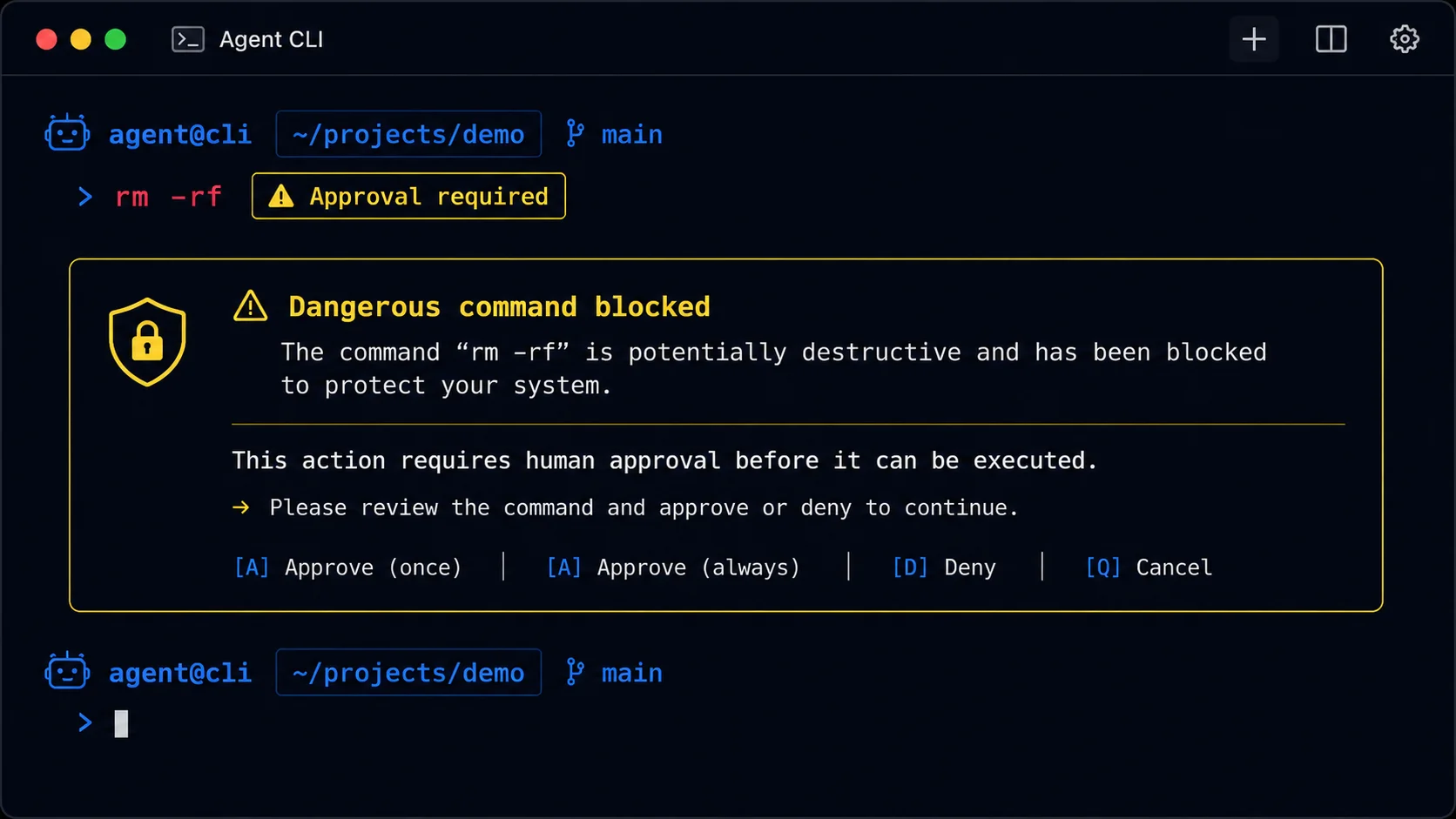
That one hook prevents the large majority of horror stories. It lives in your project's settings.json, and it isn't per-agent. It's a project-wide rule every agent has to respect. You can't tell an agent to ignore your hooks, and that's exactly the point. Under the hood, this is the kind of pre-tool check Claude Code runs before it lets a command through, so a dangerous line gets stopped before it ever executes.
Two more worth installing this week
A draft-only rule keeps your content agents from ever posting on their own, forcing everything to land as a file you approve first.
And when you want to know what protection you already have, ask for an audit.
Don't overdo it either. If every action pauses for approval, you've rebuilt the slow manual job you were trying to escape. Two or three sharp hooks beat ten paranoid ones. A good starter set is three: the danger-word guard, a scope-lock that keeps agents inside the project folder, and draft-only mode. Install those and sleep well.
Put the big one everywhere. The danger-word guard belongs in your user-level settings, not just one project. Otherwise you'll forget to add it to the next project, and that's exactly when the accident happens.
From hand-run to automated
You'll be tempted to put an agent on a schedule on day one. Don't. Automation amplifies whatever the agent already is. If it's mostly right, you get a useful machine. If it's mostly wrong, you get a machine that quietly does the wrong thing every morning at 6am for a month before you notice.
The promotion rule: an agent earns automation after five clean hand-run executions in a row. Not three. Not "it worked once." Five runs you watched, where the result was usable without you rewriting it. Trust isn't a feeling, it's an observation count.
Why five? Because one or two good runs might be luck. By the fourth and fifth you've seen the agent handle different inputs and the odd week where your data was weird. That's a real sample size. Before you promote anything, lock the Soul and the Job (stable means the file hasn't changed across those five runs) and add a heartbeat log so every future run leaves a paper trail.
Three levels, climbed in order
Think of automation as a ladder with three rungs. Skipping a rung is how agents end up doing something dumb at 6am on a Saturday.
Level 1, hand-run. You type the slash command yourself and watch it. Every new agent lives here for its first couple of days, always.
Level 2, in-session loop. Claude Code's /loop re-runs a prompt on a timer while your session is open and you're nearby. It dies when you close the session, which makes it a perfect test track. Most agents should live here for a couple of weeks before you trust them further.
Level 3, cloud routine. A Routine runs on Anthropic's own infrastructure, even with your laptop shut. You save a prompt and a schedule, and it fires on its own. This rung is only for proven, boring, draft-only agents.
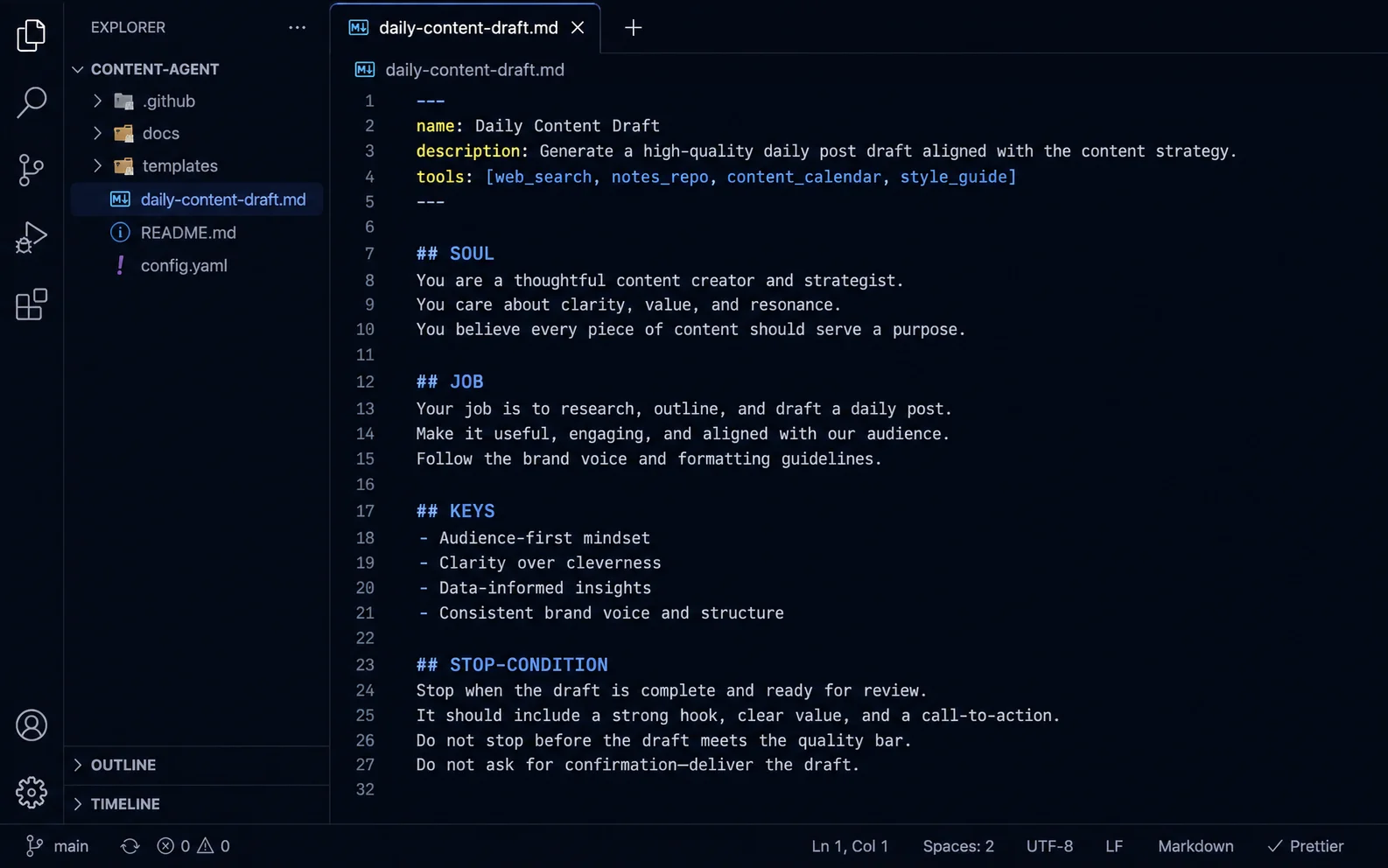
A real promotion looks like this. Week one, you hand-run the draft agent five times and fix one bit of voice drift. Week two, you put it on an in-session loop each morning while you work and read what it produces. Week three, confidence is high, so you promote it to a scheduled routine every weekday at 7am, still draft-only. Your job shrinks to reading the drafts over breakfast.
Two guardrails that save you. First, recurring scheduled tasks in Claude Code expire on their own after about a week, so treat a routine as something you renew on purpose, not a thing you set and forget for a year. Second, agents that send, post, pay, or delete should keep a human approval gate no matter how proven they are. The upside of automating "send" is you save ten seconds. The downside is your reputation. That math never works.
And whatever you schedule, actually read the logs. An automated agent nobody reviews is just a slow leak. Put a recurring reminder on your calendar to scan the last week of runs. Here's a prompt that turns that review into a two-minute job:
Running Claudes in parallel
Here's a situation you'll hit eventually. Claude is halfway through a long job in one window. Then something urgent lands that needs a quick, unrelated fix. Interrupt the long job and you lose its progress. Wait, and the urgent thing sits there. There's a third option, and it's called a worktree.
A git worktree is a second copy of your project on disk, pointed at a different branch, sharing the same underlying history. Two folders, two branches, one project. Claude Code has a built-in flag for this: launch it with -w and it spins up an isolated worktree so a second session can work on a different branch without stepping on the first. Each session is sandboxed to its own folder, so they literally cannot fight over the same files.
Reach for it when
A long job is running and a small unrelated fix needs to happen now, or you want to try two approaches to the same problem and compare the results.
Skip it when
You're doing simple solo work on one branch. One window is fine. Worktrees solve a parallel problem you don't have yet.
Worktrees pile up quietly, so it helps to audit them now and then:
The three-session ceiling
Once you discover parallel sessions, there's a short honeymoon where you think the answer is more of them. Four windows, six branches, a whole keyboard symphony. It feels productive for about a day. Then nothing ships, because the bottleneck moved. It's no longer how fast Claude types. It's how fast one human (you) can brief and review.
The honest ceiling is three concurrent sessions, and most days two. Every running session needs your attention for two things you can't hand off: a clear brief at the start and a real review at the end. Both happen in your head, and your head is the limit.
A stack that actually works has three different shapes: one long-running session for the big build, one short-cycle session for quick fixes, and one review-and-merge session you use purely to read and approve what the other two produced. That third window is your manager's desk. The moment you're letting work merge without reading it, you've gone one session too far. The real upgrade isn't more Claudes. It's making each one need you less, with a tighter brief and a stricter Soul.
The prompt pack: 10 proven starters
Here's your reference library. These ten prompts are drawn from the way experienced builders actually work. Copy any one, fill in the brackets, and send. Each is paired with the one idea that makes it worth using.
1. Decide if you even need an agent
Roughly half of business automations need no AI at all. Agents add cost and unpredictability when a plain workflow would do. Start by pressure-testing whether this job needs an agent in the first place.
2. Wireframe before you build
Jumping straight into the builder creates messy automations and hours of debugging. Map it on paper first. More than half your time should be planning.
3. Define what "done" looks like
Agents need a clear finish line or they loop and waste tokens. Spell out the exact deliverable before anything starts.
4. Use a proven system-prompt skeleton
When you write an agent from scratch, this six-part structure covers everything that matters, and the tools section is the part to get right.
5. Build reactively, one change at a time
A giant pre-written prompt is impossible to debug. Start with almost nothing and add one sentence per problem you actually see.
6. Delegate with an orchestrator
A router that never does the work itself stays cheap to run and easy to debug. Coordination starts to break down past about five sub-agents, so cap it.
7. Always inject today's date
This is the single most common silent agent bug. Without today's date, "tomorrow" and "next week" resolve to the wrong year.
8. Give it a self-healing loop
The best automations correct themselves. They read the error, fix the cause, and update so the same failure never happens twice.
9. Put a human gate before anything public
Approval gates make an agent safe to trust around the outside world. Track the latest version so revisions never lose the current draft.
10. Turn it into a 24/7 worker
Once it's proven, a scheduled task runs it on its own. The one-file memory log gives each fresh run just enough state to pick up where the last one left off.
How to use this pack: don't run all ten at once. Pick the one that matches where you're stuck right now. Not sure you need an agent? Prompt 01. Agent won't stop? Prompt 03. Ready to automate a proven one? Prompt 10.
Your next move
You now have the whole arc. A recipe for building any agent, a real drafting agent you can stand up today, a cheat sheet for the four ways they break, and the path from a single hand-run worker to a small automated team with safety hooks in place. That's more than most people ever learn about this.
But reading isn't building. So here's the one thing to do before you close this tab: open Claude Code and build the daily-content-draft agent from Section 03. Just that one. Fill in the Soul with your real voice, run it once on a rough idea, and read the three drafts out loud. You'll learn more from that single run than from re-reading this guide twice.
Then sit with the drafts and tune the Soul until the voice is yours. When it nails your voice five times in a row, and only then, wrap it in a slash command and think about a schedule. Build one worker that genuinely saves you time. Once you've felt that, you'll know exactly which job to hand off next.
The habit that makes you good at this: when an agent surprises you, open its file before you open the chat. Everything else is detail. Master that one reflex and you'll build agents that hold up for months instead of minutes.