
Teach Claude Your Workflows
Opus 5 is here, and Claude can now learn your workflow by watching you work. What actually changed, what it costs, and the two-minute fix for its most annoying habit.
Two launches, one week
Anthropic released a new flagship model called Claude Opus 5 on 24 July, and a few days earlier added a feature to Claude Cowork that lets you teach Claude a task by recording your screen while you do it.
The model release got the headlines. The screen recording feature got announced on X and nowhere else. No blog post, no changelog entry, one help page. Most of what you'll find written about it is a rewrite of that single tweet by someone who never opened the app.
So this guide covers both properly. First half: what Opus 5 actually is in plain English, what it costs, what changed in how it behaves, and the two-minute fix for the one complaint everyone has about it. Second half: the full walkthrough for Record a Skill, including the narration technique that decides whether you get something useful or something useless.
There's an honest section on who can't use the recording feature yet, because the requirements are narrower than the coverage suggests. If you're on Windows, you're not locked out of the outcome, just the shortcut, and Section 12 shows you the way round it.
What Claude Opus 5 actually is
Here's the part most coverage buried. Anthropic says plainly, in its own launch post, that Opus 5 is not more capable overall than its top-end model. That's a strange thing to admit on launch day, until you look at the price.
Opus 5 costs exactly the same as the model it replaces, roughly half what the tier above it costs, while landing very close to it on most tests. That's the entire pitch. Not "the smartest AI ever built," but "very nearly the best, at half the price, on plans you already pay for."
Which is arguably more useful. The gap between the best model and the second-best model has been shrinking for a while now. The gap in what they cost to run has not.
If you're on a Max plan, Opus 5 is already what you're talking to. Nothing to switch on.
Pro users can select it. It's the best model available at that tier.
Roughly a stack of books in a single conversation. Hand it a year of documents at once.
About 2.5 times faster for double the cost. Useful when you're waiting on it and the answer is simple.
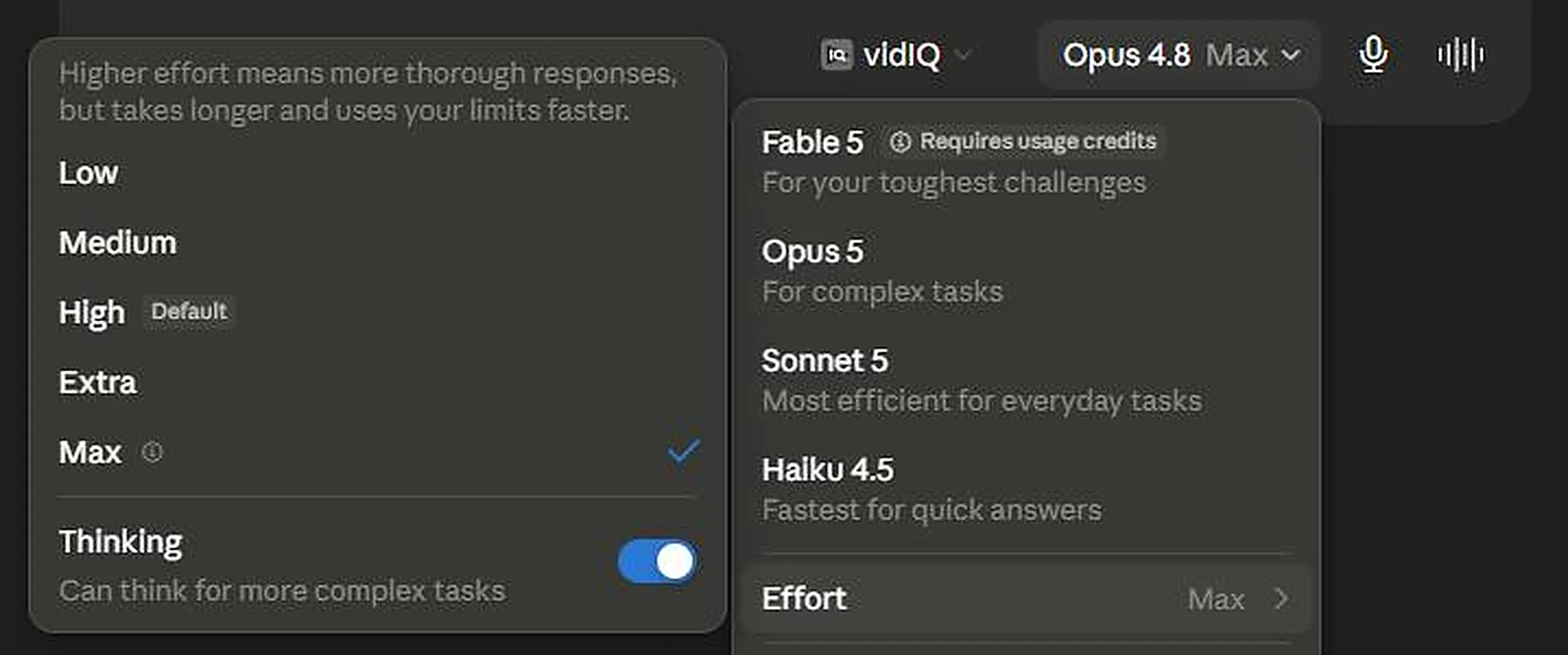
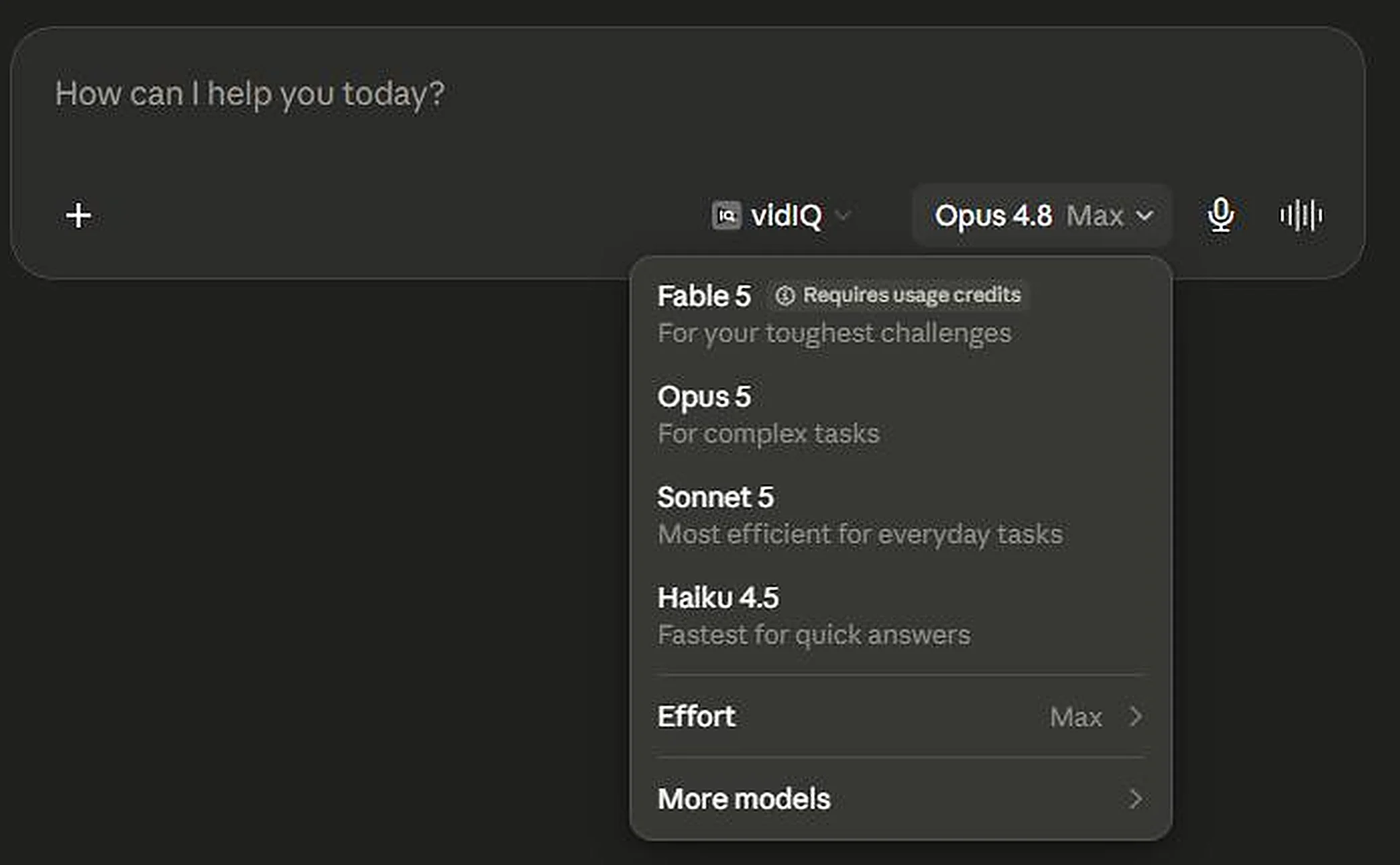
One thing worth understanding, because it explains a lot of confusion online: Anthropic now runs several models at once at different price and capability tiers, not a simple ladder where newer means better. Open the model picker and the shape of it is right there. Fable 5 sits at the top, flagged as requiring usage credits and described as being for your toughest challenges. Opus 5 comes next, for complex tasks. Then Sonnet 5 for everyday work, and Haiku 4.5 for speed.
So Opus 5 is the value tier, not the ceiling. If you've seen people online asking what the point of it is, that's why. The point is the price.
What actually changed for you
Forget benchmark charts for a second. Here's what you'll notice within about ten minutes of using it.
It checks its own work now
Opus 5 verifies and re-checks answers without being asked. It'll catch its own mistake and correct it mid-response. This is genuinely useful and it's the biggest behavioural change from the previous version.
It talks more
Noticeably more. Anthropic's own documentation confirms the default responses run longer than previous models. This annoyed people fast. Claire Vo, who runs ChatPRD and hosts the How I AI podcast, ran Opus 5 through a structured blind comparison against six other models and coined the phrase "Claude Slop" for the verbosity. She said it makes her blood boil. A developer on Hacker News put it more mildly: the longer answers "feel like a step in the wrong direction."
It narrates and delegates
On longer tasks it explains what it's doing as it goes, and it's much more willing to spin up sub-agents to work on parts of a job in parallel. That second one matters for the screen recording feature later in this article, because building a workflow out of a demonstration is exactly the kind of multi-part job it now handles well.
It's stricter on some topics
Several researchers have reported refusals on completely legitimate work. One had a malaria drug screening project rejected. Another works in neuroimaging and reported similar problems. If your work touches medical, chemistry, or security terminology, test it on your actual files before you commit.
The verbosity problem, and the two-minute fix
The longer responses aren't just irritating. You pay per word, in usage allowance or in real money, so a model that says the same thing in twice the words costs you twice as much. That quietly eats the half-price advantage this model was built on.
But it's largely fixable, and this is the most useful thing in this article for anyone who won't touch the recording feature.
Fix one: delete your old "double-check" instructions
This is the one almost nobody knows. Go into your saved prompts, project instructions, and custom instructions, and delete anything that says "double-check your work," "verify before responding," "review your answer carefully," or similar.
Anthropic's own migration documentation says these instructions now cause over-verification on Opus 5, because the model already does this by default. You wrote those lines to fix a problem in an older model. On this one, they make it check its work twice and charge you for both passes.
Two minutes, real money. Open every saved prompt and project instruction you use regularly. Search for the word "verify," "check," and "review." Delete any instruction telling Claude to police its own output. That's the whole fix.
Fix two: turn the effort down
Opus 5 has five effort levels: Low, Medium, High, Extra, and Max. High is the default, which means there are two settings above it and two below. Claude's own description of the control is blunt about the trade: higher effort gives more thorough responses, but it takes longer and uses your limits faster.
For routine work, drafting, summarising, formatting, rewriting, you don't need maximum reasoning. The legal AI company Harvey tested exactly this and reported similar quality with 26% fewer tokens by using lower reasoning levels. That's a quarter of your cost, back, for changing one setting.
Fix three: just ask
Obvious but underused. "Answer in three sentences." "No preamble, just the list." "Skip the explanation unless I ask." The longer default is a default, not a personality trait, and it responds to instruction like anything else.
Which model, when
For most people running a business or making content, Opus 5 is the right default and you can stop thinking about it. Three situations where you'd choose differently:
| Situation | What to do |
|---|---|
| Everyday work: writing, planning, admin, content | Opus 5, and drop the effort level for routine jobs |
| A genuinely hard strategic problem | Use Fable 5 to think it through, then Opus 5 to carry out the work |
| Anything medical, chemical, or security-related | Test carefully first. Refusals have been reported on legitimate research |
| Simple, high-volume, repetitive tasks | Opus 5 at Low effort. It may well beat Sonnet 5 on value |
That second row comes from a pattern a developer described online: expensive model plans, cheaper model executes. It works outside coding too. Buy the premium thinking only where the thinking changes the outcome.
Watch your usage this week. Because Opus 5 talks more and thinks more by default, a few users reported burning through their allowance faster than expected in the first days. If you hit limits sooner than usual, that's the likely cause, and the two fixes in Section 04 are the answer.
The other launch: teaching Claude by showing it
Now the feature almost nobody has written about properly.
A skill is a saved set of instructions Claude pulls up whenever it recognises the job. Think of it as the difference between explaining your filing system to a new assistant every single morning, and writing it down once so they can check the note themselves.
Until now, making one meant writing it. Sitting down and describing your process in text, in the right structure, guessing at what Claude needed to know. Which is fine if you enjoy writing documentation. Most people don't, and more importantly, most people can't accurately describe a process they've done a thousand times. The knowledge lives in your hands, not your head.
That's the real insight behind Record a Skill. You don't write the process down. You do it, out loud, while Claude watches.
Anthropic isn't first. OpenAI shipped a similar record-and-replay feature in its coding tool about a month earlier, and Claude in Chrome has had a browser-only version since December. What's different here is scope. This watches your whole screen rather than one browser tab, and it's aimed at office work rather than programming.
Check whether you can use it
Read this before you get invested. Record a Skill has the tightest requirements of any Claude feature I've come across, and most coverage got it wrong by saying "the Claude desktop app," which implies Windows and Linux are included. They're not.
| Requirement | Status |
|---|---|
| Claude Pro, Max, or Team plan | Yes |
| Claude Free plan | Not available |
| Claude Enterprise plan | Not available |
| Mac desktop app | Yes |
| Windows, Linux, or ChromeOS | Not available |
| Claude on web or mobile | Not available |
| Inside a Cowork task | Yes |
| Inside a normal chat | Not available |
The Enterprise exclusion is the interesting one. Enterprise customers pay the most and get this feature least. The likely reason: Cowork activity isn't currently captured in Anthropic's compliance tooling, so an IT administrator can't produce an audit trail of what a recorded skill did. Layering screen recordings on top of a surface nobody can audit is a governance problem, so Enterprise waits.
On Windows? You're not locked out of the result, only the shortcut. Section 12 has a skill template you can paste and edit in about fifteen minutes. It works on every plan and every platform, and it's what Mac users end up doing anyway once a recording hands them a rough draft.
Setup, and clearing your screen first
You need the latest version of Claude for Mac. If "Record a skill" doesn't appear in the menu, this is almost always the reason.
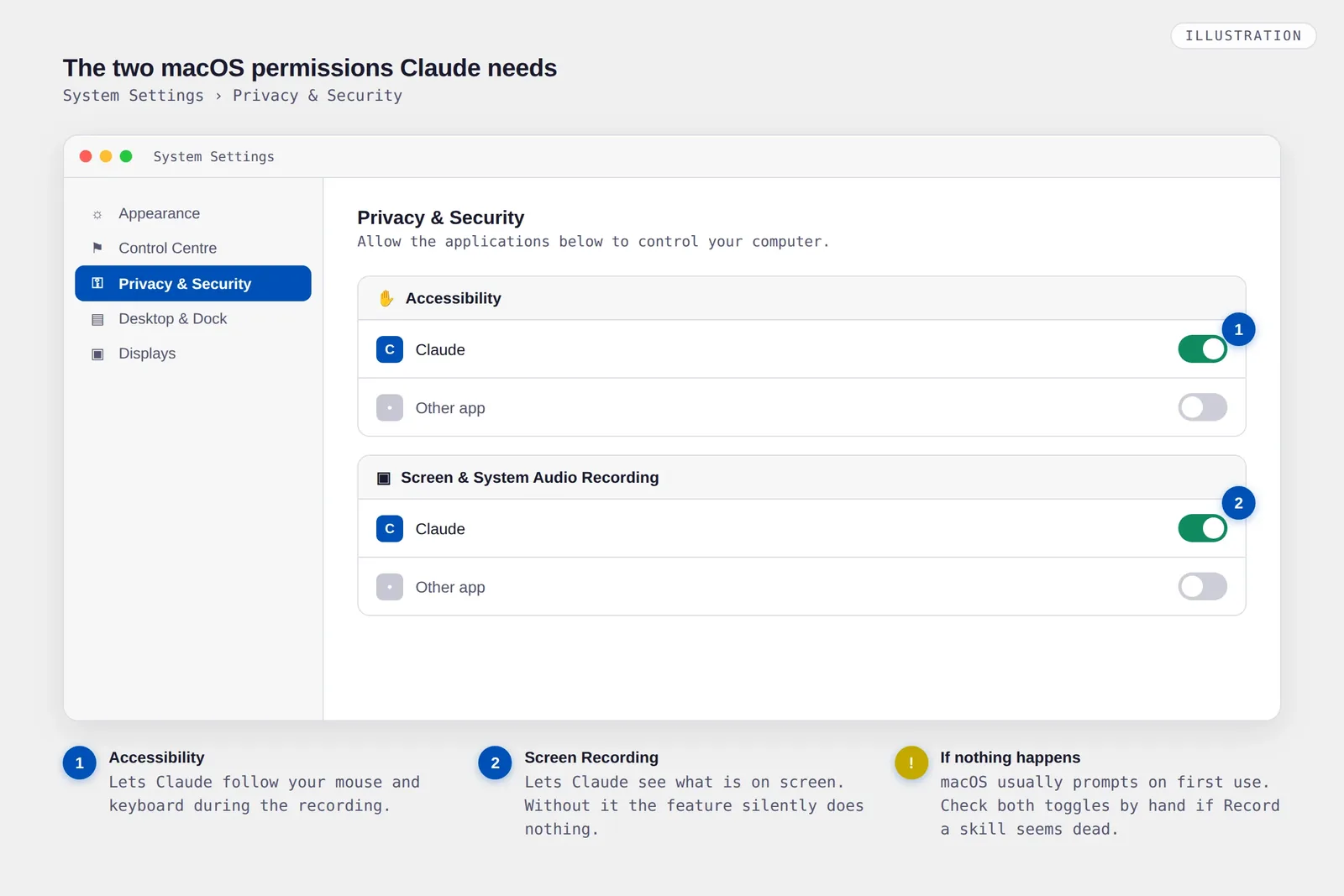
System Settings, then Privacy and Security. Claude needs Accessibility to track your mouse and keyboard, and Screen Recording to see what's on screen. macOS usually prompts you the first time, but check these manually if the feature seems dead.
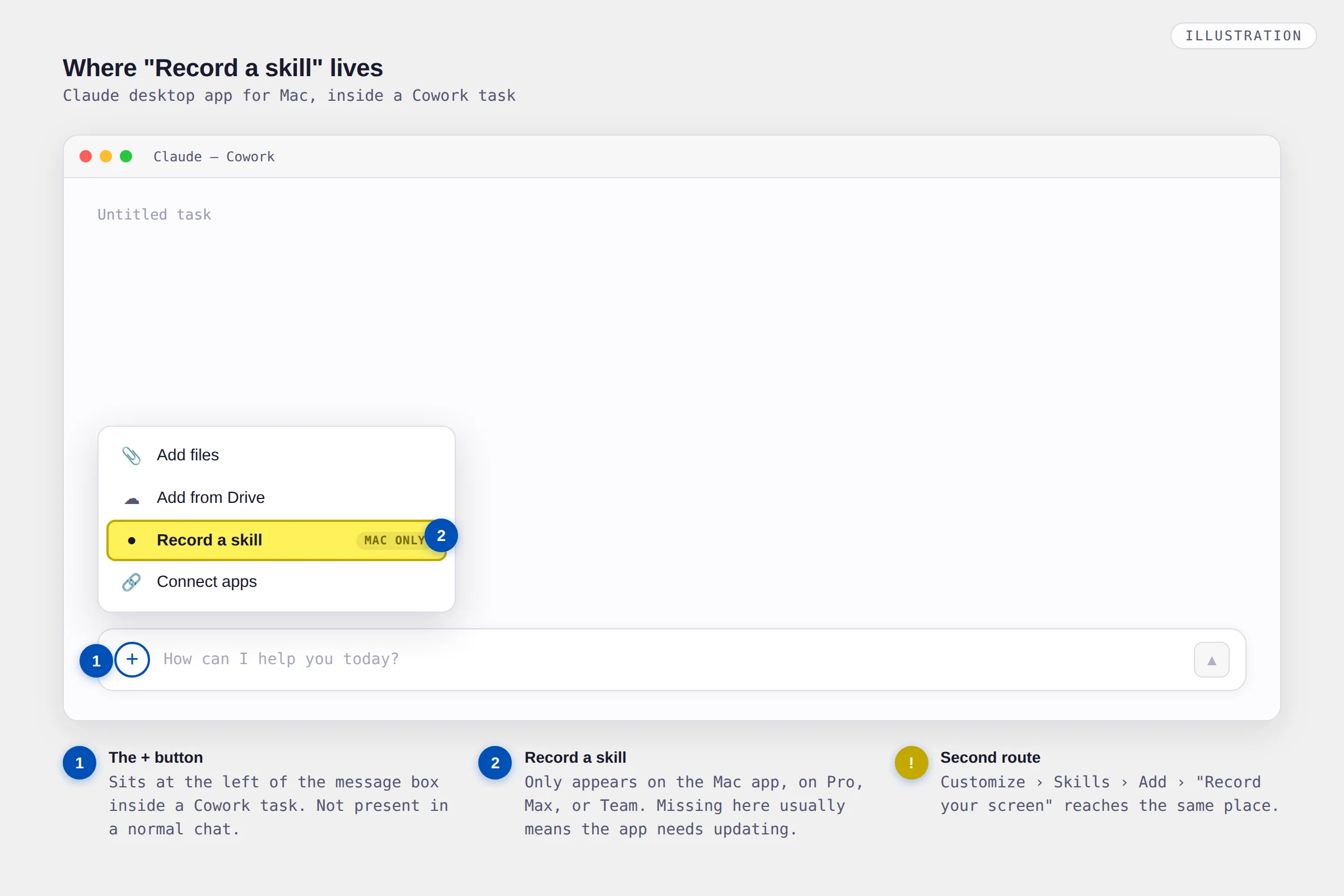
Not a normal chat. Cowork is the mode where Claude works with your actual files and apps.
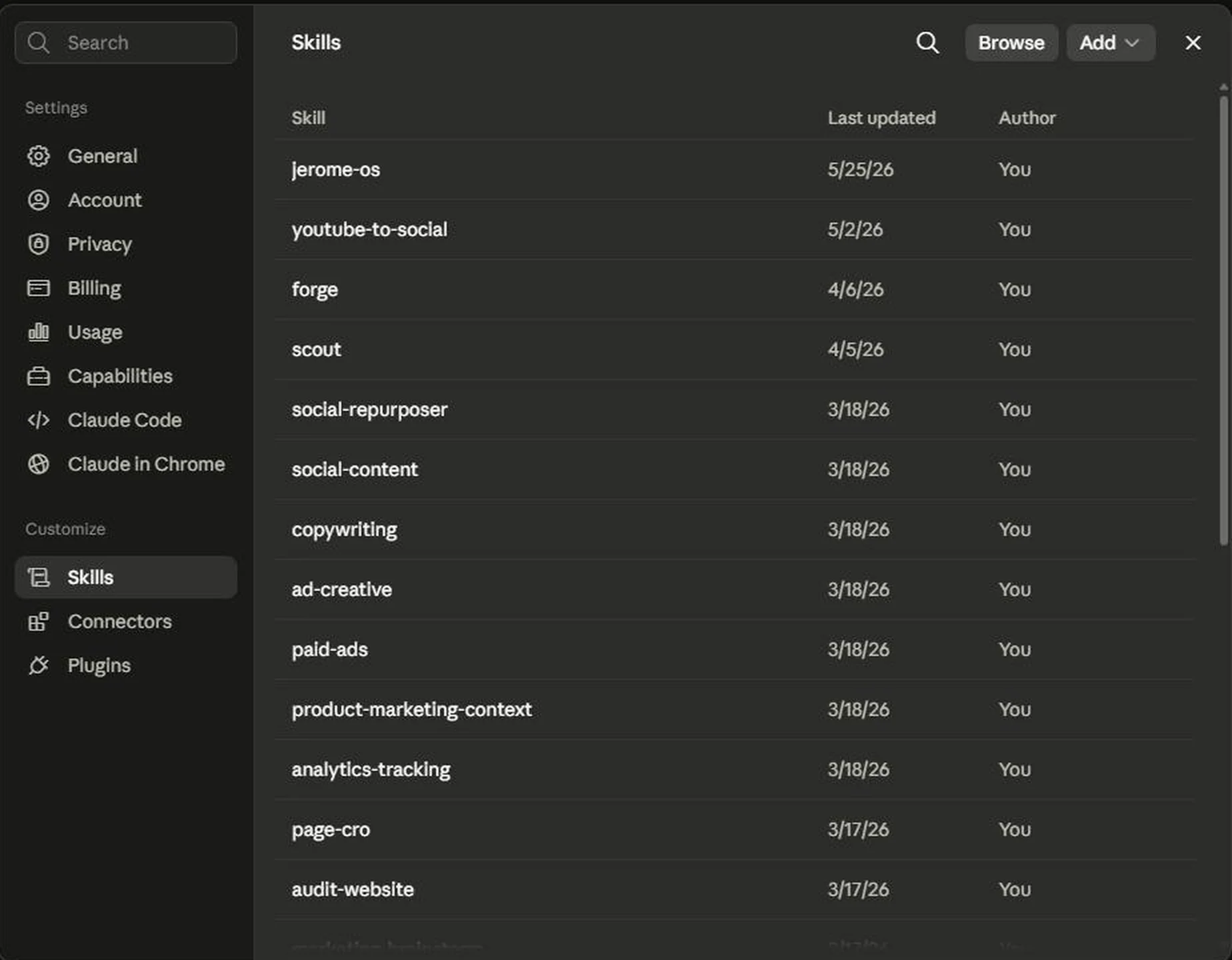
Two routes, same result. Click + in the message box and pick "Record a skill." Or go to Customize, then Skills, click Add, and choose "Record your screen."
Thirty seconds of housekeeping before you press record
Anthropic's warning is blunt: everything on your screen is captured for the length of the session, along with anything you say. So:
- Close your email, messaging apps, and password manager
- Close anything showing client names, account numbers, or card details
- Use sample data instead of real customer records where you can
- Turn off notifications, or you'll capture a client message popping up mid-take
What happens to the recording: Anthropic says the video and audio aren't retained. What does get saved is a set of screenshots from the session, stored inside that Cowork task. Delete the task and the screenshots go too. Worth knowing: Anthropic has not published whether recordings are used to train models, so treat that as unanswered rather than settled.
The worked example: turning one post into five
Content repurposing is the best first thing to record. Nearly everyone reading this does it, it's the same shape every time, and it's the one workflow I could verify actually worked for a real person.
That person is Charlie Hills, a marketing operator who recorded himself turning a newsletter post into platform-specific versions and queueing them in a scheduler. He'd done that job by hand for two years without ever automating it. Claude named the skill, used three sub-agents working in parallel to build it, then ran it.
Your ten minutes
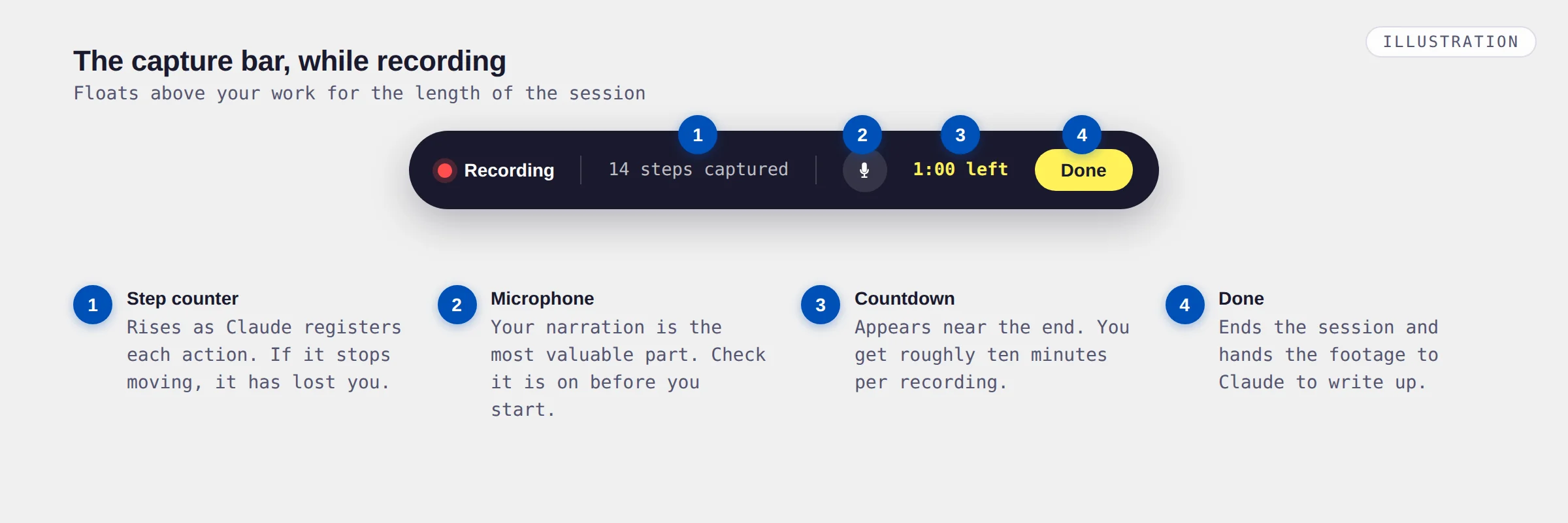
You get roughly ten minutes per recording. A countdown appears in the capture bar when about a minute remains. That's tight, so do a dry run first. A fumbling take produces a fumbling skill.
Your blog post, newsletter, or draft. Open it from its actual folder or database, not from a file already sitting on your desktop, so the path becomes part of the skill.
Say which one and why the format differs. Pull out the hook. Cut it to length. Show what you strip and what you keep.
This is where the real teaching happens. Two examples let Claude see what changes between them, which teaches far more than one example done perfectly.
Open your scheduler, paste it in, pick the channels, queue it. Skip this and you get a skill that writes but never ships.
No hashtags on LinkedIn. Never post the affiliate link on Instagram. Always run the image through the branded template. These are the parts a screen can't show.
The narration rule that decides everything
If you take one thing from this article, take this.
Most people narrate like a sports commentator. "Now I'm clicking export. Now I'm opening the spreadsheet. Now I'm selecting column B." That's useless. Claude can already see all of it. You're describing the one thing it doesn't need described.
An early user posting as Kavya put the better approach into one sentence:
Her example: don't say "now I click export as CSV." Say "I export as CSV because our importer rejects Excel files." The click is specific to today. The reason generalises to every future run, including runs where the button has moved or the menu has been redesigned.
"Okay so I'm opening the doc. Copying this bit. Going over to the other tab. Pasting it in. Now I'll shorten it a bit. Right, and scheduling it for tomorrow."
"I'm pulling this week's post from the drafts folder. Anything marked Published is off limits, only Ready goes out.
For Instagram I take the strongest single line as the hook, because the caption gets cut off after about two lines in the feed. I drop the links entirely, they don't work there.
For LinkedIn I keep it long, three or four short paragraphs, and I never use hashtags, they suppress reach on that platform for our account.
I'm scheduling for 8am local because that's when our audience opens the app. If the post mentions a client by name, I stop and check with them first instead of scheduling it."
Read those two again. The first produces a skill that clicks buttons. The second produces a skill that makes decisions, including on inputs it has never seen. Same ten minutes.
Say the exceptions out loud. Every time you'd normally pause and think, narrate the thinking. "If there's no image attached, I skip Instagram entirely." "If the post is over 1,200 words, I split it across two days." Those sentences are worth more than anything your mouse does.
Read it before you save it, then test it
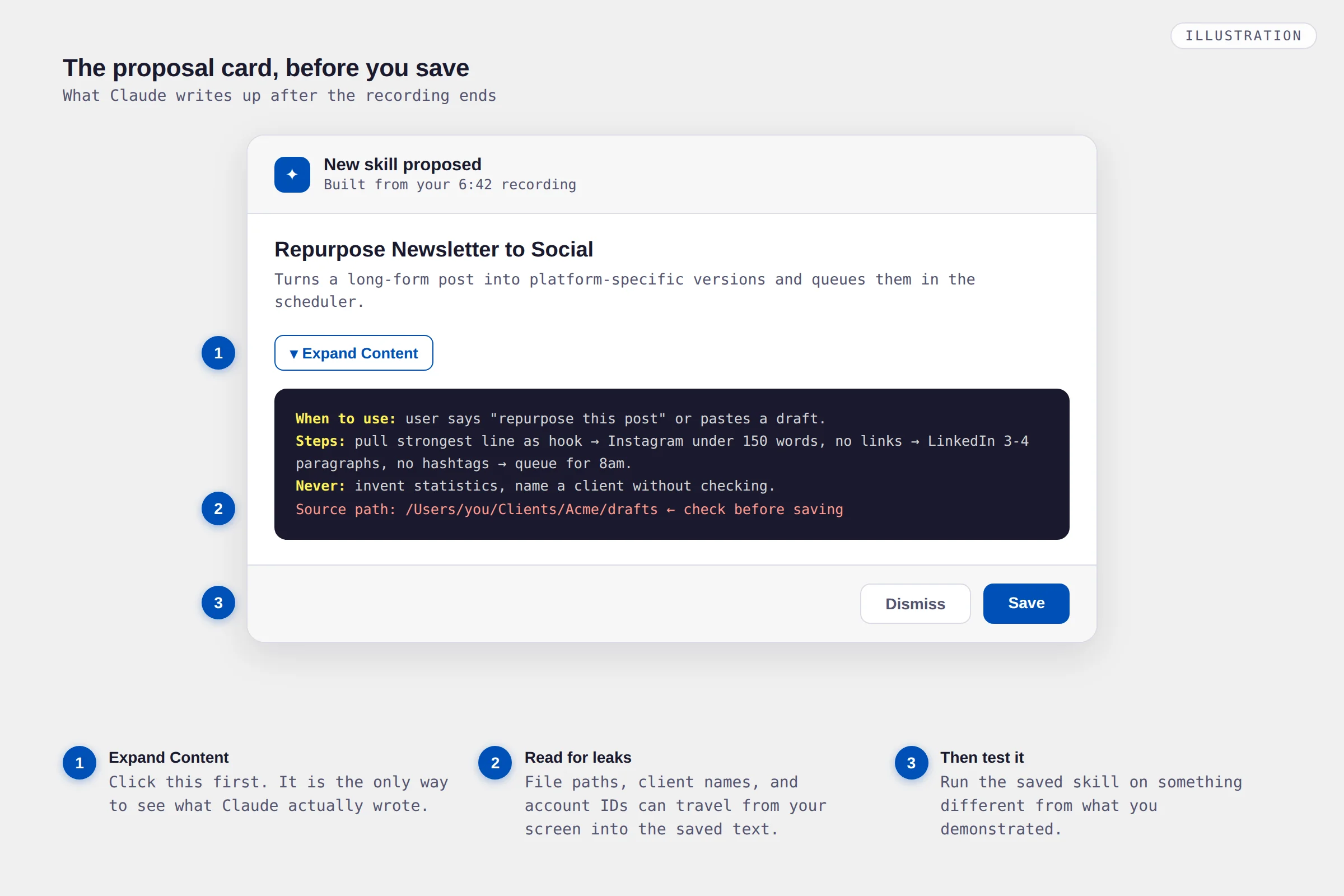
When you hit Done, Claude reviews the recording and proposes either a new skill or an update to an existing one. You get a card with Save and Dismiss.
Don't click Save yet. Click Expand Content first and actually read what it wrote.
Two reasons. Quality, obviously: this is your chance to catch a misunderstanding before it becomes a habit. But also security. The recording itself gets discarded, but the skill generated from it can carry things across without you noticing. File paths that reveal your folder structure. A client name that happened to be on screen. An account ID sitting in a URL. Read it the way you'd read a document before emailing it to a stranger.
Then run it on something different from what you demonstrated. Different length, different topic, missing an image, whatever varies in real life. This is where you find out whether you taught a process or just a performance.
Expect to edit. Saved skills live in Customize, then Skills, and you can open and rewrite them as text. That isn't a failure of the recording, it's the intended workflow. The recording gets you a solid first draft in ten minutes instead of an hour of writing. You finish the job by hand.
On Windows? Write the skill instead
Recording isn't the only way to make a skill, and it isn't even the most reliable one. Skills work on every plan and every platform. Only the recording is Mac-only.
So write it. The trick is writing it the way you'd narrate it, not the way you'd document it. Reasons, rules, and exceptions, in plain language. Here's a template to adapt.
What this is for: Turning one long-form post into platform-specific social versions, ready to schedule.
When to use it: Any time I say "repurpose this post," "make socials for this," or paste a blog draft and ask for posts.
What I need first: The source post, and which platforms. If they don't say, assume Instagram, LinkedIn, and X.
The steps:
1. Read the source and pull out the single strongest line. That becomes the hook everywhere.
2. Instagram: hook in the first two lines, no links, under 150 words, casual.
3. LinkedIn: three to four short paragraphs, no hashtags, professional but not stiff.
4. X: one tight post under 280 characters, or a thread only if the idea genuinely needs it.
5. Present all versions together in one message so I can approve them in one pass.
Rules I never break:
Never invent statistics that aren't in the source.
Never use hashtags on LinkedIn.
Never name a client without flagging it to me first.
Never use em dashes.
When something's off:
If the source is under 300 words, tell me it's too thin rather than padding it.
If there's no image, say so and suggest one instead of silently skipping the platform.
Save that in Customize, then Skills. Give it a clear name and a description containing the phrases you'd actually type, because that's how Claude decides when to pull it up.
The honest comparison: a written skill is often better than a recorded one, because writing forces you to think about the exceptions. Recording is faster and captures details you'd forget. If you have a Mac, record for the draft then edit it into shape as text. If you don't, you're only missing the draft step.
Where this breaks
Now the part the press coverage skipped entirely.
Recordings sometimes just don't become skills
One of the only people to publish a genuine hands-on test, a data writer who goes by Gencay, built a working market-intelligence dashboard from a recording in about fifteen minutes. It worked. But he also reported something nobody else has documented: "Many of my recordings never turned into skills, and I don't know why."
No error, no explanation, just nothing. Budget for retries, and don't record something irreplaceable expecting it to stick first time.
One recording is one happy path
The deepest problem, and someone posting as Okazaki said it better than anyone:
Think about what makes you good at your own job. It isn't the steps. It's knowing what to do when the file's the wrong format, the client hasn't replied, the number looks off, or the page won't load. A single take shows Claude the version where nothing went wrong. Everything else has to come from your narration, or from editing afterwards. Which is exactly why Section 10 matters as much as it does.
It copies your bad habits at full fidelity
Charlie Hills again, and this is the line to remember: "It copies exactly what you do, the clean parts and the sloppy ones." If your current process contains a step that exists only because you've never questioned it, congratulations, that step is now automated and permanent.
Record a workflow you'd be happy handing to a new hire. If you wouldn't, fix the workflow first.
It's the old automation problem, again
Here's something nobody writing about this feature has mentioned. Business software has been trying "record a demo, replay it forever" since the early 2010s. That whole category, robotic process automation, has one famous failure mode: the recording breaks the moment the interface changes. A button moves, a menu gets renamed, a site redesigns, and the automation quietly does the wrong thing.
Claude is far more adaptable than those tools, because it reads the screen rather than clicking fixed coordinates. But the risk is reduced, not removed. So check the output of a recorded skill periodically, and don't run one unattended on anything expensive to get wrong.
Scheduled runs need the machine on and signed into the apps involved. It fails gracefully rather than half-publishing, but it does fail.
Longer workflows have to be split into several skills, which means more to manage and keep in sync.
One heavy user mentioned managing 252 separate skill files. Name them clearly from day one.
Several people reported hitting plan limits before finishing their testing. Cowork uses more allowance than chatting does.
What to record first, and what to leave alone
The hardest part isn't the recording. It's picking the right thing to record. As one early user, Bojidar Danchev, framed it: the bottleneck is no longer writing a good prompt, it's knowing which tasks are worth recording at all.
Good candidates share three traits. You do them repeatedly, you do them the same way every time, and getting one wrong is annoying rather than catastrophic.
The proven case. Same shape every week, low stakes, immediate time back.
Pull the same numbers, run the same checks, format the same way. Ideal fit.
Applying your brand rules to a file. Visual, repetitive, and obvious when it goes wrong.
Same sources, same structure, same summary format, different topic each time.
What to leave alone for now:
- Anything needing real judgment per case. If you'd make a different call depending on the client, a recording flattens that into one rule.
- Anything touching regulated or confidential data. Medical records, legal files, anything under a confidentiality agreement. Not until Anthropic publishes clearer retention documentation.
- Anything where being wrong is expensive. Sending money, publishing to a large audience unreviewed, or anything you can't undo.
- Any process you already know is broken. Automating a bad process just makes it fail faster.
The thing worth sitting with
For the last few years, getting good work out of AI has been a writing problem. You had to describe what you wanted, in the right words, in the right order. That skill had a name and people sold courses in it.
This feature quietly moves the goalposts. You don't need to describe the work anymore. You need to do the work, once, out loud, with your reasoning attached. That's a completely different ability, and it favours people who are genuinely good at their job over people who are good at explaining things.
Worth noticing even if you can't use this particular feature yet. Windows support will almost certainly arrive. The narration technique in Section 10 works right now regardless, because a written skill built from "here's why I do it this way" beats one built from "here are the steps" every single time.
So here's your next step, and it takes ten minutes either way. Open a notes app. Write down the task you did most often last month, the one that's identical every time and slightly annoying every time. Underneath it, write three sentences: why you do it that way, what you never do, and what you do when something's missing.
That's the raw material for your first skill. Whether you record it or type it up is a detail.
One last thing. Both of these launched within days of each other and things are still moving. Anthropic hasn't published proper documentation for Record a Skill yet, which means details like retention policy and platform support could change without much announcement. Check the help pages before you build anything you'd depend on.