
Zero-Shot vs Few-Shot Prompting
Discover how the number of examples you give an AI can completely change its performance. This article breaks down zero-shot vs few-shot prompting, showing when to use each for the best, most accurate results.
Sometimes, you need to show AI exactly what you want with examples, and other times it just gets it without any help. That's the difference between zero-shot and few-shot prompting, and knowing when to use each one is seriously useful.
Don't let the fancy names throw you off. Zero-shot means asking without examples. Few-shot means showing a few examples first. That's literally it. Knowing when and how to use each approach? That's where things get interesting.
Let's dig into both approaches, see them in action, and figure out when each one works best. By the end, you'll know exactly when to show examples and when to skip them entirely.
What's Zero-shot Prompting?
Zero-shot is the default way most people use AI. You ask for something, you get something back. No examples, no hand-holding, just straight to the point.
When Zero-shot Works Like Magic
Perfect for:
- Common tasks AI already understands
- Standard formats everyone knows
- Quick questions with obvious answers
- When you want the AI's natural style
Example that works great with zero-shot:
Write a professional email declining a meeting invitation for next Tuesday
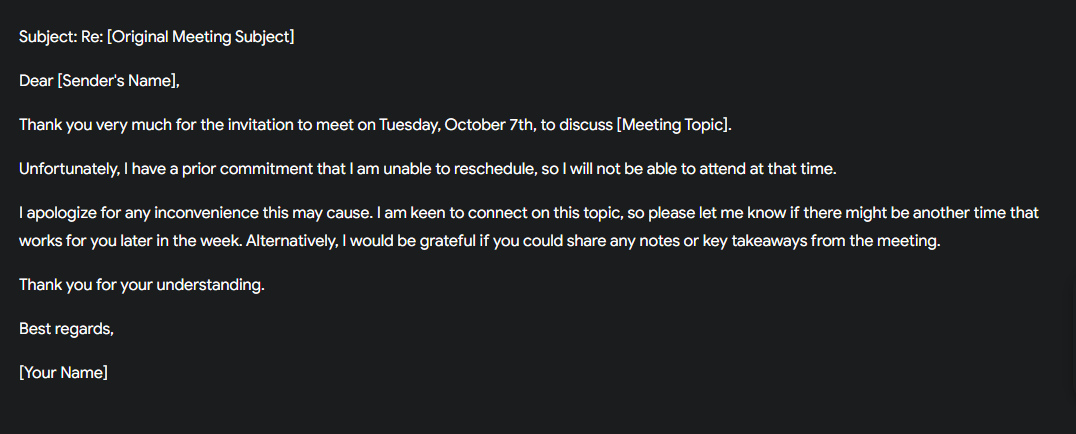
The AI knows what professional emails look like. It knows how to decline politely. You'll get something perfectly usable without showing any examples.
When Zero-shot Falls Apart
Zero-shot struggles when:
- You need a very specific format or style
- The task is unusual or creative
- You want consistent output across multiple prompts
- Your requirements are super particular
Example that probably won't work with zero-shot:
Write a product description in the style of a 1920s carnival barker
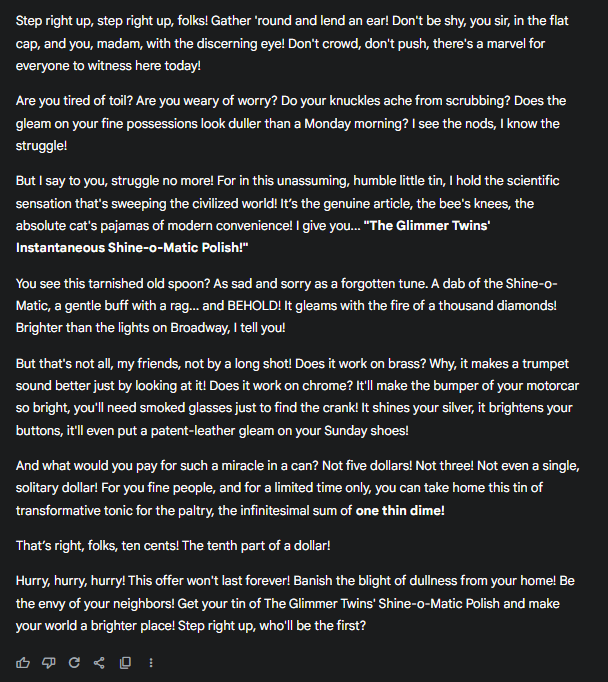
Unless you show examples, you'll probably get something that's... not quite right.
What's Few-shot Prompting?
Few-shot prompting means you provide examples before making your actual request. You're basically saying "Here's what I want, let me show you exactly what I mean."
The Power of Showing, Not Just Telling
If someone asked you to write "in the style of a technical manual," you might have ten different interpretations. Show them three examples first? Now you know exactly what they want.
Here's few-shot in action:
Convert these casual sentences to corporate speak:
Casual: "This is taking forever"Corporate: "The timeline has extended beyond initial projections"
Casual: "Nobody knows what's going on"Corporate: "There's an opportunity to enhance organizational communication clarity"
Casual: "This idea won't work"Corporate: "We have concerns about the feasibility of this approach"
Now convert this:
Casual: "The client is really angry"
See how those examples set up exactly what you want? The AI now knows the pattern and tone you're looking for.
Side-by-Side Comparison: See the Difference
Let's test the same task with both approaches:
Task: Create a customer review response
Zero-shot attempt:
Write a response to a negative customer review about slow shipping
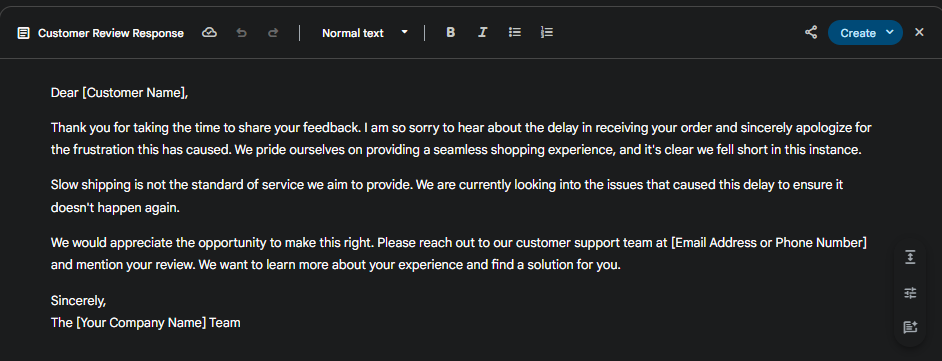
Result: You'll get something generic, probably overly apologetic, might not match your brand voice at all.
Few-shot attempt:
Respond to customer reviews using this style: Review: "Product broke after one day"Response: "Hey there! That's definitely not the experience we want you to have. We've sent you a direct message to make this right immediately. - Jamie from Support" Review: "Took 3 weeks to arrive"Response: "Three weeks is way too long, and we totally understand your frustration. We've messaged you directly to sort out what happened and ensure it doesn't happen again. - Alex from Support" Now respond to this review:Review: "Package arrived damaged and customer service won't respond"
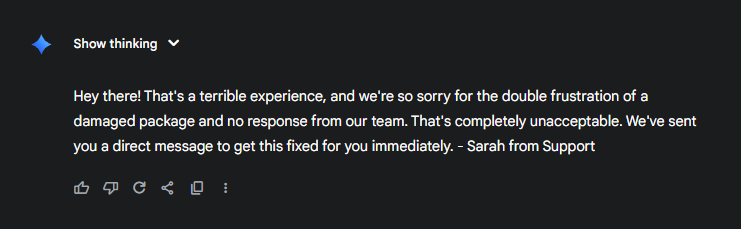
Result: The AI matches your exact tone - friendly but professional, acknowledges the issue without over-apologizing, includes a name sign-off, promises action.
Night and day difference, right?
When to Use Each Approach
Use Zero-shot When:
The task is straightforward:
- Translate this to Spanish
- Summarize this article in three bullet points
- Write a thank you note
You want natural variety:
- Brainstorming where different approaches are good
- Creative writing where you want AI's interpretation
- When you're exploring possibilities
Speed matters more than precision:
- Quick drafts you'll edit anyway
- Rapid prototyping of ideas
- One-off tasks
The format is universally understood:
- Business letter
- Recipe
- Meeting agenda
Use Few-shot When:
You need specific formatting:
- Custom templates
- Brand-specific voice
- Unusual structures
Consistency is crucial:
- Multiple items that should match
- Maintaining tone across content
- Following strict guidelines
The task is unique or complex:
- Industry-specific jargon
- Creative formats
- Niche styles
You've tried zero-shot and it failed:
- If the first attempt is way off
- When explanations aren't working
- After multiple failed iterations
The Magic Number: How Many Examples?
What actually works:
1 example: Usually not enough. The AI might think that specific example is what you want, not the pattern.
2-3 examples: The sweet spot for most tasks. Shows the pattern without overwhelming.
4-5 examples: Great for complex patterns or when there's variation you want to demonstrate.
6+ examples: Rarely necessary and might actually confuse things. If you need this many, maybe the pattern isn't clear enough.
Pro tip: Quality over Quantity
Three great examples beat ten mediocre ones every time. Make your examples:
- Clearly different from each other (shows range)
- Exactly what you want (no "almost right" examples)
- Representative of common cases you'll encounter
Building Effective Few-shot Prompts
The Anatomy of a Great Few-shot Prompt
- Clear introduction of the task
- Examples that show the pattern
- Consistent formatting
- Your actual request
Template that works every time:
[Task description]
Input: [Example 1 input]Output: [Example 1 output]
Input: [Example 2 input]Output: [Example 2 output]
Input: [Example 3 input]Output: [Example 3 output]
Now process this:Input: [Your actual input]
Real Example: Creating Social Media Captions
Create Instagram captions that match our brand voice: Image: Coffee cup on deskCaption: Monday motivation loading... What's fueling your hustle this week? Drop a comment below! #MondayMood #CoffeeFirst #WorkVibes Image: Team celebrationCaption: This is what crushing Q3 goals looks like! Huge shoutout to our incredible team for making magic happen. What wins are you celebrating today? #TeamWork #GoalGetters #CelebrationTime Image: New product launchCaption: IT'S HERE! Been working on this for months and we're beyond excited to share it with you. First 50 customers get 20% off with code LAUNCH20. Who's ready? #NewProduct #LaunchDay #ExcitingTimes Now create a caption for:Image: Behind-the-scenes office photo
The AI now knows: upbeat tone, emojis, call-to-action questions, relevant hashtags, similar length. You'll get exactly what you need.
Common Mistakes to Avoid
Zero-shot Mistakes
Being too vague because you assume AI "knows":
- Wrong: Write something motivational
- Right: Write a 50-word motivational message for a sales team that just missed their target
Not realizing you need examples: If you're spending five paragraphs explaining what you want, you probably need few-shot instead.
Few-shot Mistakes
Examples that don't match what you actually want: Showing formal examples then asking for casual output confuses everything.
Inconsistent example patterns: If your examples follow different rules, the AI won't know which pattern to follow.
Too many examples for simple tasks: Don't show five examples of how to write an email subject line. That's overkill.
Examples that are too similar: Three examples of thank you notes to customers who loved your product won't help when you need to respond to complaints.
Advanced Strategies
The Hybrid Approach
Sometimes you want mostly zero-shot freedom with just a touch of guidance:
Write a creative story about time travel. Here's the kind of opening I like: "The clock struck thirteen, and Jennifer knew her day was about to get weird." Now write your own story with a similar punchy, intriguing opening.
You're showing style without constraining the entire output.
The Negative Example Technique
Sometimes showing what NOT to do is just as powerful:
Write product descriptions that sell. AVOID this style: Bad example: "This is a blue widget. It has various features. It might be useful for some tasks." Instead, focus on benefits, specific use cases, and emotional appeal.
The Progressive Few-shot
Start with simple examples, build complexity:
Example 1: [Basic version]Example 2: [Slightly more complex]Example 3: [Full complexity]
This helps AI understand not just the pattern but the range of possibilities.
Your Decision Framework
Not sure which to use? Run through these questions:
- Have you tried zero-shot yet? Start there unless you know you need examples.
- Did zero-shot get you 80% of the way? Maybe just refine with better instructions rather than switching to few-shot.
- Is the task standard or unique? Standard = zero-shot. Unique = few-shot.
- Do you need consistency across multiple outputs? Few-shot ensures consistency.
- Are you spending more time explaining than showing would take? Switch to few-shot.
- Is the AI misunderstanding what you want or how to do it?
- Misunderstanding what = clarify with zero-shot
- Misunderstanding how = show with few-shot
The Bottom Line
Zero-shot and few-shot aren't competing approaches - they're different tools for different jobs. Zero-shot is your quick, versatile everyday tool. Few-shot is your precision instrument for specific results.
Most of the time, you'll start with zero-shot. It's faster, simpler, and often good enough. But when you need something specific, when consistency matters, or when zero-shot just isn't getting it? That's when you pull out the examples.
The real skill isn't choosing one over the other. It's knowing when to switch from one to the other. Start simple with zero-shot. If it's not working, don't keep tweaking the instructions endlessly. Just show what you want with a few good examples.
Remember: every prompt doesn't need to be perfect. Sometimes "good enough" with zero-shot beats spending ten minutes crafting the perfect few-shot prompt. But when precision matters? Those examples are worth their weight in gold.
Now go experiment! Take a task you do regularly and try both approaches. You might be surprised which one works better.