
Build a YouTube Channel With Claude
Turn Claude into your YouTube co-founder. This beginner-friendly 9-prompt chain takes you from a blank channel to a realistic 90-day plan for hitting monetization, with the exact prompts to copy at every step.
One prompt won't build a channel
Most people open Claude, type "help me start a YouTube channel," and get a wall of advice they've read a hundred times. Pick a niche. Post consistently. Make good thumbnails. Thanks for nothing.
The problem isn't Claude. It's the ask. Starting a channel isn't one job, it's a dozen jobs stacked on top of each other: research, positioning, packaging, scripting, production, growth, money, and a plan to hold it all together. When you cram all of that into a single request, you get shallow answers about everything and useful answers about nothing.
A prompt chain fixes this. Instead of one giant question, you run a sequence of focused prompts, and each one hands its output to the next. Step one sets your strategy. Step two picks your niche using that strategy. Step three builds your content system around that niche. By the end you have a channel plan where every piece fits the pieces around it, because Claude built them in order, with memory of what came before.
This guide hands you the whole chain: a setup step almost everyone skips, then eight prompts that take you from a blank channel to a 90-day action plan. Copy them, run them in order, and treat Claude like the strategist you can't yet afford to hire.
What you'll walk away with: a positioning statement, a scored niche pick, a repeatable video system, a growth playbook, a production workflow, a monetization plan, an analytics routine, and a week-by-week 90-day calendar. All specific to your channel, not generic.
Set up your workspace first
Before the prompts, spend two minutes on setup. This is the difference between Claude remembering your channel and you re-explaining yourself in every chat.
Go to claude.ai and open Projects (claude.ai/projects). Click New Project, name it something like "My YouTube Channel," and add a short description. A Project is a workspace that keeps everything in one place: your chats, any files you add, and a set of custom instructions Claude follows in every conversation inside it. Anything you save to the project knowledge is available to every chat in that project, so Claude stops forgetting who you are.
Good news if you're on a budget: you don't need a paid plan to start. Free accounts can create up to five Projects, which is more than enough for this. The Pro and higher plans mainly give you more room and larger knowledge files.
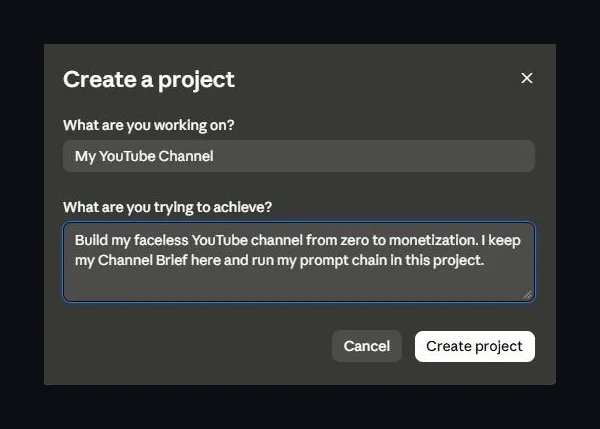 Creating a dedicated Project keeps your channel's context in one place.
Here's why this matters for a channel. The chain works because Claude carries context from one step to the next. A Project makes that context permanent. You'll drop a single document in there in the next step, and every prompt after it gets sharper for free.
Do this once: after the next step, paste your finished Channel Brief into the project's custom instructions or knowledge. Then every stage of the chain reads it automatically and you never have to repeat yourself.
The setup step almost everyone skips
This is the step that makes or breaks the whole thing, and it's the one people ignore.
Most "build a channel" prompts tell the AI to "analyze my niche, my audience, my goals," but they never actually ask what those are. So the AI makes them up, and you get advice written for a channel that doesn't exist. The fix is a setup prompt that interviews you first, then writes a Channel Brief you reuse everywhere.
Paste this into your Project as the very first message. It's Step 0, your foundation.
Answer its questions honestly. Claude hands you back a tidy Channel Brief. Save that Brief into your project knowledge, and paste it at the top of every prompt that follows. This one habit is the reason your outputs will be built for you instead of for a generic beginner.
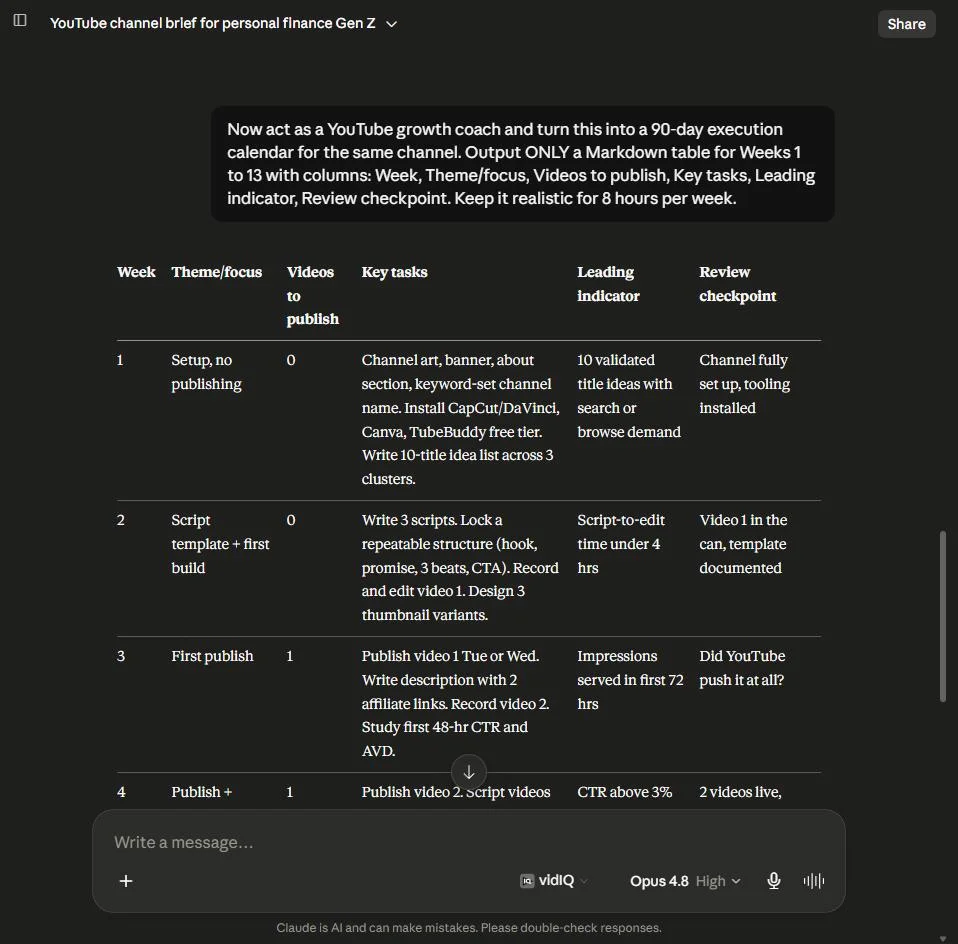 Step 0 produces a reusable Channel Brief that makes every later prompt specific to you.
Pick your lane on purpose: the long-form path (watch hours) and the Shorts path (views) need different content strategies. Choosing one in your Brief keeps every later stage pointed in the same direction. Trying to do both at once is how new channels stall.
The chain at a glance
Here's the full sequence. You run these in order, feeding each result into the next. Stage 8 pulls everything together, so resist the urge to jump ahead.
| Stage | What it produces | What you feed it |
|---|---|---|
| 1. Roadmap | Your full zero-to-monetization game plan and weekly rhythm | Channel Brief |
| 2. Niche | A scored niche pick and your positioning angle | Brief + Stage 1 |
| 3. Video system | Titles, thumbnails, hooks, and a repeatable script formula | Brief + niche |
| 4. Growth | The 5 highest-impact growth levers and a test plan | Brief + roadmap + stats |
| 5. Production | An AI-assisted workflow and templates for faster videos | Brief + your format |
| 6. Money | A stage-by-stage revenue plan tied to real milestones | Brief + niche |
| 7. Analytics | A diagnostic ruleset and a weekly review template | Brief + your metrics |
| 8. 90-day plan | A week-by-week calendar that ties it all together | Everything above |
Now let's walk through each one. Every prompt below starts with a role, then pulls in your Brief, then asks for a specific, formatted result. Copy them exactly, and swap in the bracketed pieces as you go.
Stages 1 and 2: strategy and niche
These two set your direction. Stage 1 builds the master plan. Stage 2 locks the niche that plan will live in. Get these right and the rest of the chain almost writes itself.
Stage 1: Your monetization roadmap
This prompt turns your Brief into a phased plan with a weekly rhythm and a realistic timeline. Notice it forces honesty about how long things take, which is rare in YouTube advice.
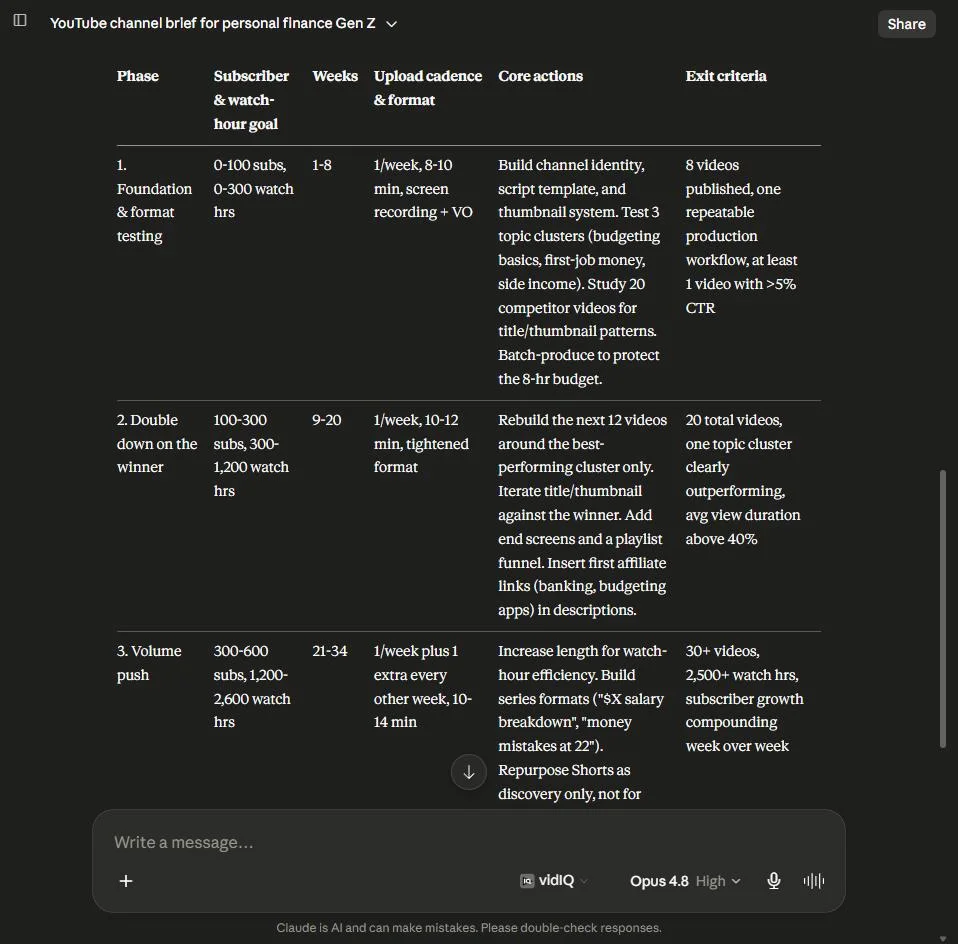 Stage 1 returns a phased roadmap with realistic goals for your available hours.
Stage 2: Niche domination
Here Claude compares real niche options against each other and recommends one, with the specific angle that sets you apart. The scoring table is the useful part, it forces a decision instead of a vague "follow your passion."
Pro tip: when Claude gives you the "Locked niche + angle" line, copy it into your project knowledge next to your Channel Brief. Every stage after this points at that one sentence, so it's worth keeping visible.
Stages 3 and 4: content and growth
Now you turn strategy into videos people click and finish. Stage 3 builds your packaging and script system. Stage 4 gives you the levers that actually move a small channel.
Stage 3: Your viral video system
Packaging comes first here, meaning the title and thumbnail, because that's what earns the click. Claude gives you formulas and ten ready-to-make concepts, not just abstract theory.
Stage 4: Growth and the algorithm
Instead of a lecture on how YouTube works, this prompt demands a ranked, testable playbook for your exact channel size. The hypotheses format is what separates real testing from guessing.
Stages 5 and 6: production and money
These two make the channel sustainable. Stage 5 builds a workflow so you can actually keep up. Stage 6 maps how the channel pays you, in the right order.
Stage 5: Your AI production system
This is where you go from "I have ideas" to "I can ship a video a week without burning out." Claude designs a stage-by-stage pipeline around your budget and tools, with templates you reuse.
Stage 6: The monetization machine
Money on YouTube isn't one switch, it's a sequence. This prompt orders your revenue streams by channel stage and is honest that ad money can't start until you're accepted into the Partner Program.
Best practice: notice how every prompt asks Claude to state its assumptions and flag anything it isn't sure about. That's deliberate. It keeps the AI from confidently inventing numbers, and it shows you exactly where to go verify the real data yourself.
Stages 7 and 8: analytics and your 90-day plan
The last two stages turn the plan into a habit. Stage 7 teaches you to read your numbers and react. Stage 8 drops everything into a dated calendar you can actually follow.
Stage 7: Analytics optimization
This builds a simple "if this, then that" system so you always know what to fix next. No dashboards to stare at, just clear rules tied to the numbers that matter.
Stage 8: Your 90-day execution plan
This is the capstone. It pulls every earlier output into one week-by-week calendar and, importantly, tells you the truth about what 90 days can realistically produce for your schedule.
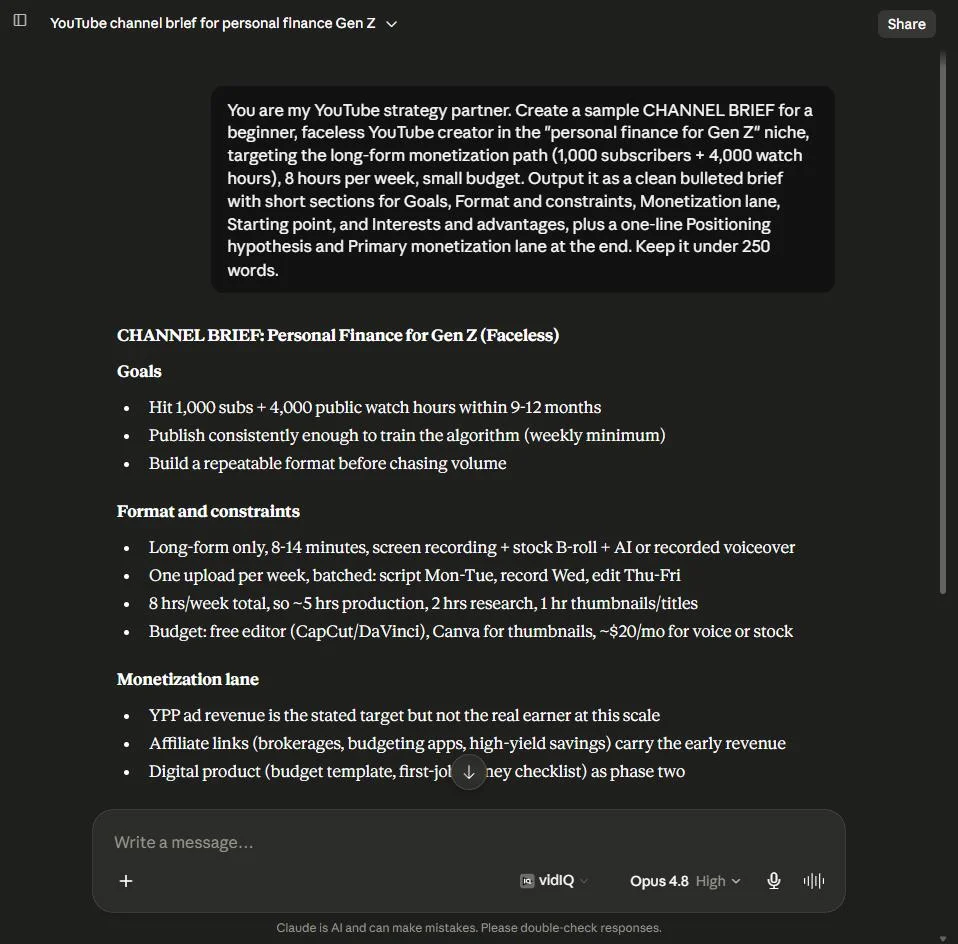 Stage 8 ties every earlier output into a dated, week-by-week 90-day calendar.
What to actually expect
The internet is full of "monetize in 90 days" promises, so let's be honest about the finish line. To turn on YouTube's ad revenue through the YouTube Partner Program, you need 1,000 subscribers plus one of two things: 4,000 valid public watch hours in the past 12 months, or 10 million valid public Shorts views in the past 90 days.
Those are two different games. The watch-hours path rewards longer videos people genuinely sit through. The Shorts path rewards volume and viral reach. That's exactly why you picked a lane back in Step 0, because the content strategy for each is different.
Can you hit that in 90 days? Sometimes. If you go all in on Shorts and something catches, or you already have an audience to bring over, it's possible. For most people starting a long-form channel from scratch, monetization is more like a six to twelve month project. That's not a knock on you or the chain. It's the honest range, and a plan built on real numbers beats a fantasy every time.
The plan is the easy part. These prompts hand you a professional-grade system in an afternoon. Showing up to run it week after week is the actual work. Claude can be your strategist, your editor, and your analyst. It can't press record for you.
One more thing worth saying plainly. Claude doesn't have live access to your specific channel's private analytics or the day's trending data unless you paste it in. That's a feature, not a bug. When a prompt asks you to pull numbers from YouTube Studio or verify a trend on the platform, do it. The chain is designed to work with your real data, which is what makes its advice yours instead of generic.
Your next move
You now have what most new creators never get: a complete operating system, not a pile of tips. So don't let it sit in a browser tab.
Do this today. Open Claude, create your "My YouTube Channel" project, and paste in Step 0. Answer the questions. Ten minutes from now you'll have a Channel Brief and a reason to run Stage 1 tomorrow. Then work down the chain, roughly one stage a day, and by the end of the week you'll have a strategy, a niche, a content system, and a 90-day plan that all fit together.
The creators who make it aren't the ones with the best camera or the biggest head start. They're the ones who begin with a real plan and keep showing up. You've got the plan now. The showing up is yours.
Save the chain: keep all nine prompts in a note or in your project knowledge so you can rerun any stage as your channel grows. A prompt chain isn't a one-time thing. It's a system you come back to every time you level up.