
3 New Gemini Models. Which One to Use?
Google dropped three new Gemini models on July 21. Here's what each one actually does, and which to use for your business without overpaying.
On July 21, 2026, Google quietly did something a little strange. Instead of releasing one big new AI model with a splashy keynote, it released three smaller ones at the same time, and skipped the flagship everyone was waiting for. If you saw the headlines fly by and thought "wait, which one am I supposed to care about," you're not alone. The names alone are a mess. One is called 3.6, two are called 3.5, and one of those has the word "Cyber" bolted onto the end.
So let's cut through it. This guide walks through all three new models in plain terms, tells you honestly what each is good and bad at, and gives you specific ways to use them in a real business. No hype, no benchmark worship. Just what these tools do and where they save you time or money.
Here's the short version if you only have thirty seconds: two of these models are cheap, fast workhorses you can start using today for content, customer support, and data grunt work. The third is a security specialist you almost certainly can't access yet, but it tells you something important about where business software is heading. By the end of this, you'll know exactly which one to reach for and when.
What Google Actually Launched
Google's Gemini models come in tiers. "Pro" models are the big, smart, expensive ones for hard problems. "Flash" models are the smaller, faster, cheaper ones built for everyday volume work. "Flash-Lite" is cheaper and faster still. Think of it like engine sizes. Most of your daily driving doesn't need a race car.
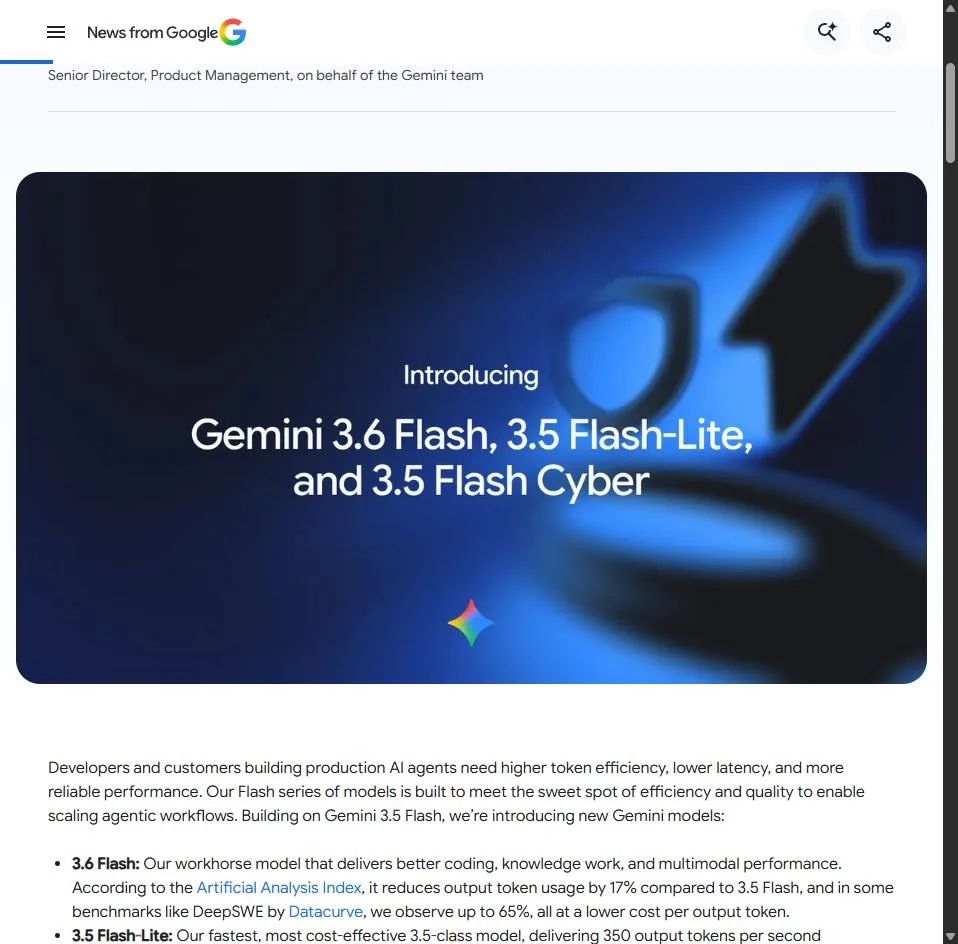
All three of the new July models are Flash-tier. That's the first thing worth understanding. Google did not release a new top-end brain this time. It released new versions of its practical, high-volume models. Here's the lineup:
Gemini 3.6 Flash
The new everyday workhorse. Good all-rounder for content, documents, images, and simple automation. Cheaper and about twice as fast as the model it replaces.
Gemini 3.5 Flash-Lite
The cheapest and fastest of the bunch. Built for doing simple tasks thousands of times over at almost no cost. This one got a real quality bump.
Gemini 3.5 Flash Cyber
A security specialist that hunts for software vulnerabilities. Not available to the public. Locked to governments and vetted partners.
The missing one: 3.5 Pro
Google's big flagship model was expected here and didn't show. Reporting points to it missing internal targets. Google says it's "testing with partners."
That missing flagship matters more than it looks. In the same announcement where Google admitted its top model isn't ready, it also said it has started training Gemini 4, the next generation. Announcing the next big thing while the current big thing is late told a lot of people in the AI world that Google is under real pressure right now. For you as a business owner, the takeaway is simpler: the models you can actually use today are the two cheap Flash ones, so that's where we'll spend our time.
Don't get fooled by the version numbers. "3.6" being higher than "3.5" does not make it the smartest of the group. The number is just a version tag on that specific model line. Flash-Lite at 3.5 is newer and better than the 3.1 Flash-Lite it replaced. Ignore the math and look at what each model is for.
Gemini 3.6 Flash: Your Everyday Workhorse
Available now · General purposeThis is the one most small businesses will use most often. Google calls it a "workhorse," and that's a fair description. It handles text, images, audio, video, and PDFs, it has a huge memory for long documents, and it's cheap enough to run all day without watching the meter.
Here's the honest part, though, and you won't read this in most write-ups. Independent testing found that Gemini 3.6 Flash is not actually smarter than the model it replaced. Its scores on a respected independent intelligence test came out identical to the old 3.5 Flash, and one hard reasoning test actually dropped a little. So what did Google improve? Two things that matter a lot for business: it's about twice as fast, and it uses roughly 17% fewer words to do the same job, which makes it cheaper per task. It's the same brain, running leaner and quicker. For repetitive business work, that's often exactly what you want.
What it's genuinely good at for your business
Content at volume
Draft blog posts, product descriptions, email sequences, and social captions. Cheap enough to generate ten versions and pick the best.
Reading long documents
It can hold about 1,500 pages of text in memory at once. Drop in a contract, a report, or a competitor's whitepaper and ask questions.
Working from photos
Snap a picture of a receipt, an invoice, or a handwritten note and have it pull out the numbers into clean text or a table.
Customer support drafts
Summarize a messy support thread and draft a calm, on-brand reply. Fast turnaround keeps a small team responsive.
The document memory is the underrated feature here. Most people don't grasp how big a 1-million-token memory really is. It means you can hand this model an entire client's worth of emails, a full year of meeting notes, or a 200-page supplier agreement, and it can answer questions about the whole thing at once without losing the plot. For anyone who drowns in paperwork, that alone is worth learning.
Here's a concrete way to put it to work. Say you run a small e-commerce shop and you've got a long, boring supplier contract you don't fully understand. You could paste the whole thing in and ask:
"Here is my full supplier agreement. Read all of it, then answer in plain English: What are my payment terms? What happens if a shipment is late? Am I locked into any minimum order amounts? List anything in here that could cost me money unexpectedly, with the section number for each."
That's the kind of task where 3.6 Flash shines. It's not solving a math olympiad. It's reading a long, dull document carefully and pulling out what you need, cheaply, in seconds.
Pro tip: When you want the model to read something long before answering, tell it to read the whole thing first, then answer. It sounds obvious, but asking it to "read all of this, then respond" produces noticeably more careful answers than just pasting text and firing a question.
What it's not good at
Serious coding. If you're hoping to build a real software product with this model writing the code, independent tests put it behind the current top models from OpenAI, xAI, and Anthropic, and even behind some cheaper open-source models. It can help a non-programmer patch a small script or fix a website snippet, but for anything a developer would call "real work," it's not the sharpest tool available. Its strengths are speed, price, long documents, and reading images and charts. Play to those.
Gemini 3.5 Flash-Lite: The Volume Machine
Available now · High volume, low costIf 3.6 Flash is the everyday workhorse, Flash-Lite is the assembly-line robot. It's the fastest model in the family and the cheapest by a wide margin. It's not built to give you the single best answer to a hard question. It's built to give you a good-enough answer thousands of times before lunch, for pennies.
And here's the good news that makes it worth your attention: unlike 3.6 Flash, this model actually did get meaningfully smarter than the version before it. On that same independent intelligence test, it jumped a solid amount over the old Flash-Lite. So you're getting a real quality upgrade in the cheap tier, which is rare.
Where Flash-Lite earns its keep
The trick with this model is to stop thinking about single tasks and start thinking about batches. Any time you have hundreds or thousands of small, similar jobs, this is your model. A few examples that map cleanly onto real businesses:
Sorting incoming leads
Feed it every new inquiry and have it tag each one as hot, warm, or cold, or route it to the right person automatically.
Reading all your reviews
Summarize a thousand customer reviews into the top five complaints and top five compliments. That's a market research report for cents.
Cleaning messy data
Pull names, dates, and amounts out of thousands of raw text entries and drop them into tidy, structured rows.
Powering a chat widget
Run a website chatbot where fast replies matter more than deep reasoning. Speed keeps visitors from bouncing.
Let's talk about the actual cost, because this is where it gets fun for a small business. Flash-Lite is priced at about 30 cents per million words of input and $2.50 per million words of output (in AI terms, "tokens," which are roughly three-quarters of a word each). That sounds abstract, so here's what it means in practice. Say you want to read and summarize 1,000 customer reviews, each around 150 words. That's roughly 200,000 words going in. Reading all of that costs you somewhere around six cents. Not six dollars. Six cents. The AI-written summaries on top might push it to well under a dollar total.
The mindset shift: Stop asking "should I bother running AI on this?" for high-volume tasks. At these prices, the answer is almost always yes. The old instinct to ration AI use because it feels expensive doesn't apply to Flash-Lite. Run it on everything.
One honest catch worth knowing: while Flash-Lite is cheap in absolute terms, it's actually a little more expensive than the older version it replaced. Google raised the price a touch because the quality went up. You're still paying pennies, but if you were using the old Flash-Lite in a tool, your bill may tick up slightly. For almost everyone, the better answers are worth it.
Gemini 3.5 Flash Cyber: The One You Can't Use (Yet)
Restricted access · Security specialistNow for the odd one. Flash Cyber is a version of Gemini 3.5 Flash that Google specially trained to do one thing: find, confirm, and patch security holes in software. It is not a general chatbot. You won't be writing emails with it. And you almost certainly can't get access to it, because Google is only handing it to "governments and trusted partners" through a limited pilot. There's no public sign-up, no pricing page, nothing to click.
So why should a small business owner care about a model they can't touch? Two reasons, and both are worth a few minutes.
Reason one: the software you rely on is getting safer
Every business today runs on software you didn't write. Your website platform, your payment processor, your booking system, your email tool. When there's a hidden security flaw in one of those, criminals can exploit it, and your customer data is what's at risk. Finding those flaws has always been slow, expensive, specialist work.
What makes Flash Cyber notable is that it doesn't just guess where a flaw might be. It writes a working attack to prove the flaw is real, then helps write the fix. In Google's own testing on a widely-used piece of Chrome's code, it found 55 genuine issues, beating both the standard Gemini model (47) and a top model from Anthropic (36), and it caught 10 problems the others missed entirely. In another internal test, it uncovered serious flaws in a live production system in about two hours. The big platforms you depend on are starting to use tools like this to harden their software before criminals get there. That's quietly good news for you.
Reason two: it's a preview of a real tension
A tool that's brilliant at finding ways to break into software is, by definition, also a tool an attacker would love to have. Google knows this, which is exactly why it locked the model away instead of selling it to everyone. This "it cuts both ways" problem is going to define AI security for the next few years. As a business owner, the practical lesson is unglamorous but real: keep your software updated. When your website platform or your point-of-sale system pushes a security update, install it. The pace of both finding flaws and fixing them is speeding up, and staying current is your side of that bargain.
If you build software or apps: This is the clearest signal yet that AI-assisted security review is becoming standard practice. If you ship code, or pay someone who does, ask how AI is being used to check it for holes. Within a year or two, "we don't do that" won't be an acceptable answer.
Which Model for Which Job
Here's the whole thing on one screen. Match the job on the left to the model on the right and you'll rarely go wrong.
| Your job | Best model | Why |
|---|---|---|
| Thousands of small, similar tasks (tagging, sorting, extracting) | 3.5 Flash-Lite | Cheapest and fastest. Built for volume. |
| Everyday content, long documents, reading images | 3.6 Flash | Best all-round value. Big memory, twice as fast. |
| Customer support drafts and summaries | 3.6 Flash | Handles context well, quick enough for live use. |
| Serious coding or the hardest reasoning | None of these | These are efficiency models. Use a top-tier Pro model or a rival instead. |
| Auditing software for security holes | 3.5 Flash Cyber | Purpose-built, but only if you qualify for the pilot. |
The one line to remember: Flash-Lite for cheap volume, 3.6 Flash for everyday quality, and neither of them when you need the smartest possible answer. These are tools for doing ordinary work faster and cheaper, not for solving your hardest problems. Knowing that boundary will save you frustration.
How to Actually Start Using Them Today
You don't need to be technical to try these. There are three doors in, depending on how hands-on you want to be.
Door 1: The Gemini app (easiest)
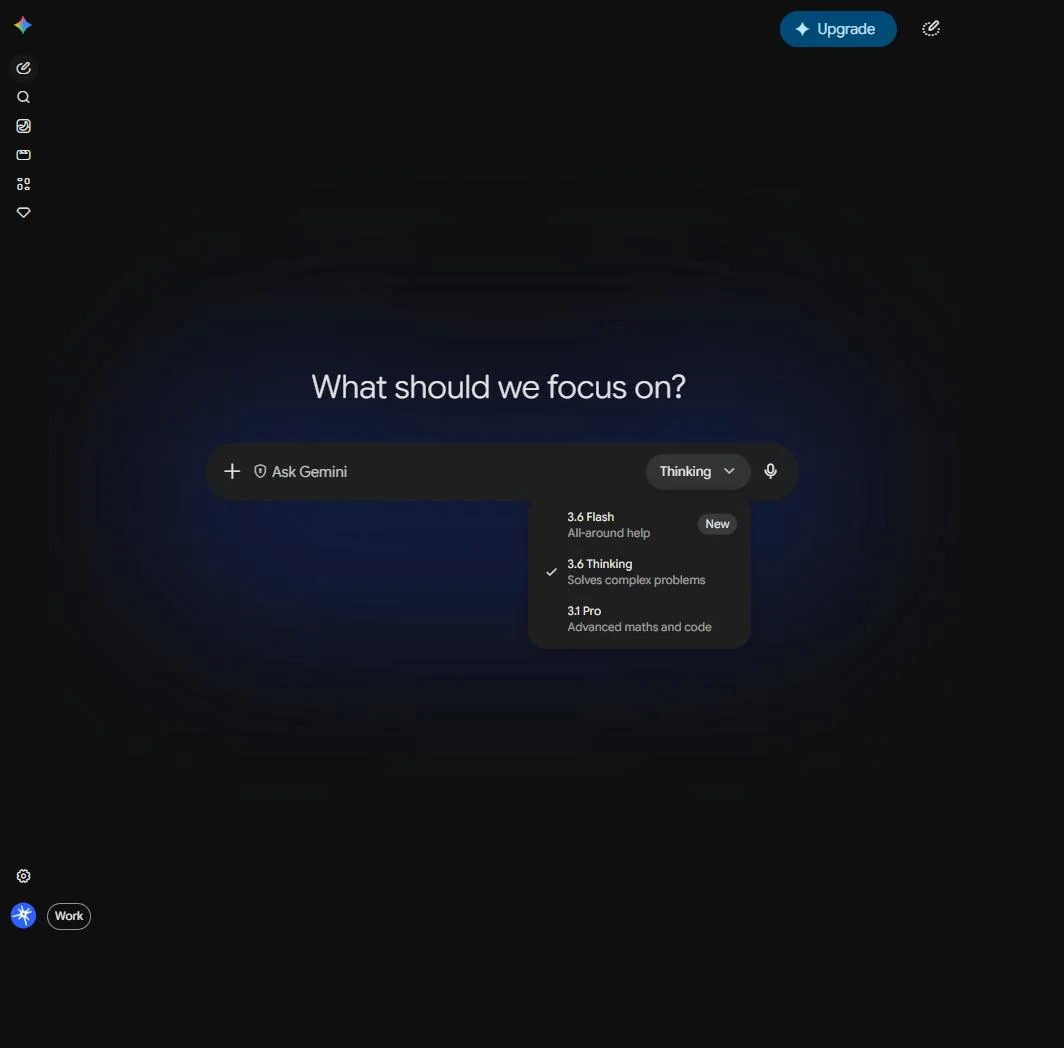
If you just want to chat with the model, drop in documents, or work from photos, the free Gemini app is the simplest route. The new models are rolling out there for regular users. This is the right starting point for most business owners. No setup, no code, just a chat box. Try feeding it one real task from your week and see how it does.
Door 2: Google AI Studio (free testing)
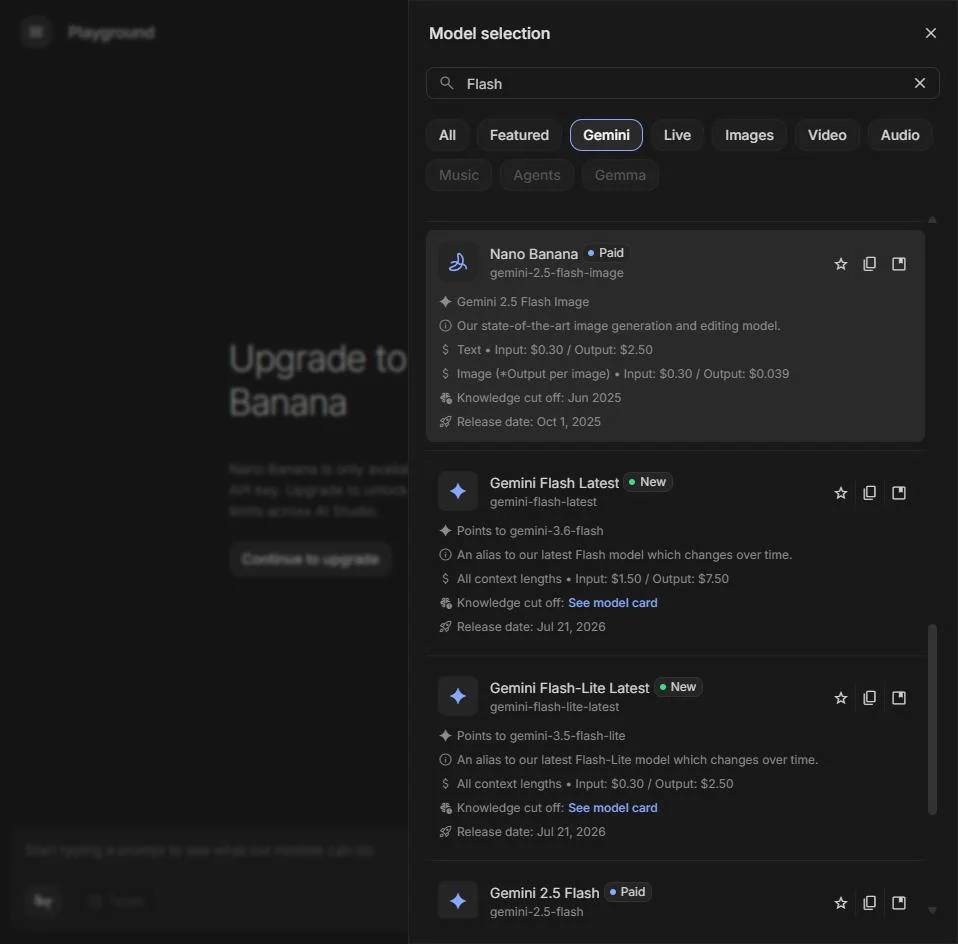
When you want to experiment more seriously, test different prompts, or see exactly what each model costs, Google AI Studio is a free web tool built for that. You can switch between models, tune settings, and get a feel for the differences before you commit to building anything. It's the sandbox. Search for "Google AI Studio" and you'll find it.
Door 3: The API (for automation)
This is the one that plugs the models into your actual business systems: your website, your customer database, your automation tools like Zapier or Make. It needs a bit of technical setup, or a developer, but it's where the real time savings live. This is how you'd build a system that automatically tags every incoming lead or summarizes every support ticket without you lifting a finger.
Here's what the two usable models cost through that third door, so you can budget:
| Model | Cost to read (per 1M tokens) | Cost to write (per 1M tokens) |
|---|---|---|
| Gemini 3.6 Flash | $1.50 | $7.50 |
| Gemini 3.5 Flash-Lite | $0.30 | $2.50 |
A token is about three-quarters of a word. So a million tokens is roughly 750,000 words. For most small businesses running normal volumes, we're talking a few dollars a month, not a few hundred. The cost is almost never the thing that should stop you. The thing that stops most people is simply not sitting down to set it up.
A simple first project: Pick one repetitive task you do every week. Sorting emails, summarizing calls, drafting the same kind of reply. Start in the free Gemini app, get the wording right by hand a few times, and only then think about automating it through the API. Nail the prompt before you build the machine.
The Honest Caveats
AI Black Magic exists to give you the real picture, not the press release. So before you go all-in, here are the things worth keeping in the back of your mind.
These are efficiency updates, not breakthroughs. The headline story of this launch, once you strip away the marketing, is that Google made its cheap models cheaper and faster rather than smarter. That's genuinely useful for business, but don't expect a leap in what the AI can actually figure out. The 3.6 Flash model scored the same on independent intelligence tests as the version before it.
They're behind on coding. If your business idea depends on AI writing high-quality software, these particular models aren't your best pick. Independent testers were clear that rivals lead on code. Gemini's real edge remains reading long documents and understanding images and charts.
Some numbers are still Google's own. A lot of the benchmark figures floating around came from Google itself, and outside experts hadn't fully re-tested everything at the time of writing. Where independent testers have weighed in, we've used their numbers here. Treat any single dramatic stat with a little healthy caution.
The smart play: Use these models for what they're demonstrably great at, which is cheap, fast, high-volume work and reading long or visual content. For your hardest thinking tasks, keep a top-tier model in your back pocket and don't assume the newest release is automatically the best one for the job.
Where This Leaves You
Strip away the confusing names and the missing flagship, and this launch hands small businesses two practical gifts. A fast, capable everyday model in 3.6 Flash, and a dirt-cheap volume model in Flash-Lite that finally got good. The third model, Flash Cyber, you can't use, but it's a clear sign that the software running your business is getting harder to break into, which is worth knowing.
The businesses that get value out of AI aren't the ones chasing every new release. They're the ones who pick one boring, repetitive task, hand it to a cheap model, and free up an afternoon a week. Both of these new models are built precisely for that. So here's your next step, and it's a small one: think of the single most repetitive text or document task in your week. The one you dread. That's your first candidate. Open the Gemini app, hand it that task, and see what happens. You might be surprised how much of your week you can quietly give away.
Your move: Reply or make a note of the one task you're going to test first. The act of naming it is usually the hardest part. Everything after that is just typing.