
The E-Commerce Seller Plugin
A complete walkthrough of The E-Commerce Seller plugin for solo store operators. Covers all 15 skills, the 5 connectors, the shared-cache system that lets the skills work together, and a first-day flow to get you running by tomorrow morning.
What This Plugin Actually Is
Running an online store on your own means wearing 15 hats before lunch. You write the listings. You shoot the ads. You answer customer email. You email the supplier in Shenzhen. You panic about inventory. You wonder why this morning's revenue dropped. You repeat the whole thing tomorrow.
The E-Commerce Seller is a Claude plugin built for exactly this situation. It's a persona plugin, which is a fancy way of saying that activating it shifts Claude into the role of your in-house copywriter, ad buyer, email strategist, supplier negotiator, customer service lead, and ops analyst. All at once. All sharing the same brand voice and the same store context.
The current version is 0.15.0. It ships 15 distinct skills, 5 MCP connectors to tools you probably already use, and a shared memory layer that lets every skill build on what the others have already learned about your store. We're going to walk through all of it, but here's the headline up front: this plugin is built like a system, not a catalog. The skills talk to each other.
If you sell physical products on Shopify, Amazon, Etsy, eBay, Walmart, or TikTok Shop (any combination), this is built for you.
Who Should Install This
This isn't for SaaS founders, agencies, or B2B operators. It's for people who sell things you can hold. Specifically, the plugin assumes you're one of these:
DTC Brand Owner
Private label, Shopify-first, running paid social, scaling past six figures.
Dropshipper
Iterating fast on creative and listings, testing winners across multiple stores.
Handmade Maker
Started on Etsy, ready to scale to a Shopify storefront and proper email flows.
Amazon FBA Seller
Brand Registered or working toward it, juggling listings, PPC, and A+ Content.
Plus the multi-channel operator who's running two or three of these at once. What the plugin doesn't assume is your niche, your revenue band, or your brand voice. It learns those things the first time you run any skill and stores them in a shared config so you never have to explain yourself twice.
If you've ever paid an agency four figures a month to handle copy, ads, email, and supplier comms, the value comparison is obvious.
The Connectors That Power Everything
The plugin wires up five MCP connectors out of the box, plus one optional API key for image generation. Here's what each one brings to the table:
| Connector | What it does | Which skills use it |
|---|---|---|
| Shopify | Pulls product, order, customer, and review data | Almost every skill (it's the spine) |
| Klaviyo | Reads and writes email + SMS flows and campaigns | Email Flow Architect, Campaign Calendar Planner, Daily Store Digest |
| Gmail | Reads inbox messages, sends drafted replies | Customer Service Reply Bot, Supplier Negotiation, Influencer Outreach |
| Canva | Pulls templates and design assets | A+ Content Creator, Ad Creative Generator |
| Supermetrics | Aggregates marketing data (Meta Ads, GA4, others) | Daily Store Digest |
The optional one is a Fal AI API key. Add it to your plugin config and skills like A+ Content Creator and Ad Creative Generator will generate real images for you instead of just writing Canva briefs. Without the key, you still get detailed image specs that a designer or freelancer can build from. Either way you ship.
Key point: Every skill in this plugin works even if you haven't connected anything yet. The skills check what's available and gracefully fall back to manual input or pasted data. You always get a finished deliverable.
The Shared Cache Mesh
This is the part that makes the plugin a system instead of just a collection of skills, and it's worth understanding before you start running things.
When you run Listing SEO Optimizer on a product, it doesn't just hand you back an audit. It writes the keyword research to a shared cache file inside the plugin folder. The next time you run Product Description Writer on that same product, it checks the cache first and weaves those keywords into the copy automatically. Same goes for Landing Page Copywriter, A+ Content Creator, Ad Creative Generator, and even the Email Flow Architect's subject lines.
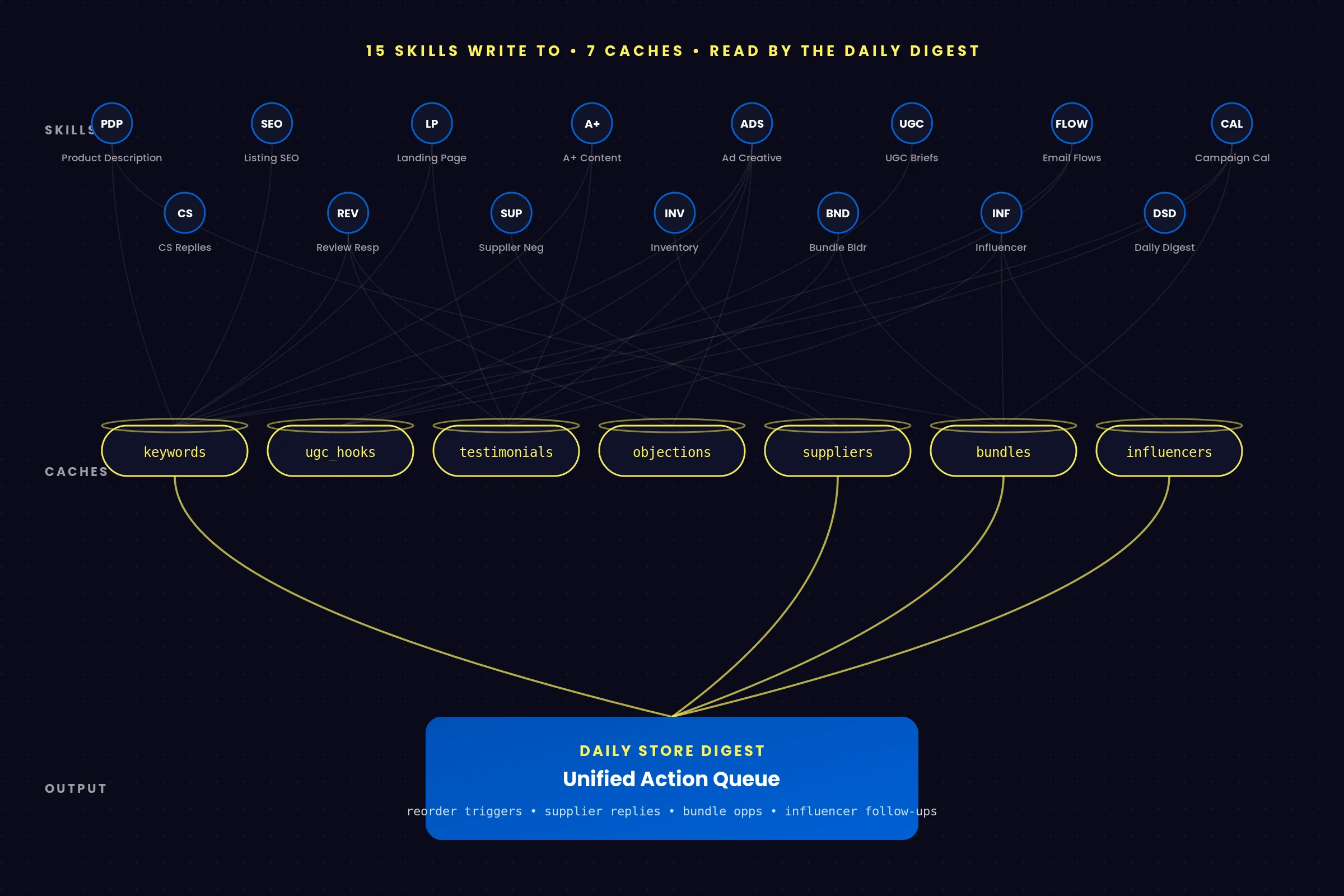
There are seven of these caches in total, each producing data that other skills read:
- keywords: written by Listing SEO Optimizer, enriched by Review Response Writer when recurring praise phrases show up
- ugc_hooks: bidirectional between Ad Creative Generator and UGC Creator Brief Writer (your ads and your creator scripts share the same hook library)
- testimonials: written by Review Response Writer from your 4-5 star reviews
- objections: written by Review Response Writer from your 1-2 star reviews
- suppliers: written by Supplier Negotiation Assistant, with full relationship history per vendor
- bundles: written by Bundle Builder, consumed by half a dozen other skills
- influencers: written by Influencer Outreach Pro, with relationship state per creator
Plus a reorder triggers cache written by Inventory Forecaster and read by Supplier Negotiation Assistant, and a small SKU-to-supplier index that maps your products to who manufactures them.
The keystone of the whole mesh is the Daily Store Digest. It reads from four of those caches every single morning to surface a unified "needs attention today" list. Overdue supplier replies, influencer follow-ups due, undeployed bundle opportunities, stockout-risk SKUs, all rolled into one briefing.
You don't see any of this plumbing. You just notice that your ad copy uses phrases lifted from real customer reviews. Or that your supplier reorder letter already knows the lead time and current MOQ for the product you're reordering. That's the cache mesh at work.
Important: The shared config means you set your brand voice, audience, and platforms exactly once. Every skill uses the same source of truth, so your copy stays consistent across listings, ads, email, supplier letters, and morning briefings.
Skills for Listings and Product Pages
Four skills cover everything that lives on a product page or a marketplace listing. These are usually the first skills people run.
Product Description Writer
This is the skill most users run first, and it's the one that triggers the plugin's one-time onboarding flow. Hand it a product (pasted specs, a Shopify handle, a URL, or even just a photo) and it writes two distinctly different descriptions per platform across Shopify, Amazon, Etsy, eBay, Walmart, and TikTok Shop. It respects every platform's character limits, shows inline counts so you can verify nothing got truncated, and applies your brand voice from the shared config.
Single mode outputs a polished .docx with all the variants. Bulk mode takes a CSV of products and outputs an .xlsx with one row per product per platform, plus a separate sheet that flags any cell over the character limit.
Listing SEO Optimizer
Run this one before Product Description Writer if you care about organic search. It combines three keyword sources (LLM inference, Amazon autocomplete scraping via the Chrome connector, and Google Suggest), clusters them by intent, then scores your existing listing against a 100-point rubric covering keyword coverage, title strength, bullet quality, backend fields, and completeness.
The audit reads like an agency report. The kicker is that the keywords get written to the shared cache, so every downstream skill (Product Description Writer, Landing Page Copywriter, A+ Content Creator, Ad Creative Generator, Email Flow Architect) uses them automatically the next time you run it on the same product.
Landing Page Copywriter
Builds full page architectures and copy for product detail pages, collection pages, marketing landing pages, and About pages. It picks from six conversion frameworks (PAS, AIDA, BAB, JTBD, FAB, PASTOR) based on what you're building and how aware your audience is of the problem you solve.
Every run produces a main page plus three alternate hero blocks tuned to different angles (problem-aware, outcome-aware, and social-proof-aware) so you can A/B test the single most important section of any page. You get a .docx brief for your designer and a ready-to-paste Tailwind HTML sections file you can drop into Shopify or PageFly directly.
A+ Content Creator
For Amazon Brand Registered sellers only. It smart-picks the strongest 4 to 5 modules from Amazon's full A+ library for your specific product (Hero module always, one Benefits module always, Comparison if your product has clear advantages, Brand Story if you have one worth telling, FAQ if your reviews show recurring objections), drafts the copy within Amazon's strict character limits, runs a built-in compliance check (no FDA claims, no external URLs, no competitor mentions), and either generates the module images via Fal AI (if you've added the key) or writes detailed Canva briefs.
You get a .docx brief plus an HTML mockup of the assembled page so you can see how it'll look before publishing.
Heads up: A+ Content requires active Amazon Brand Registry. The skill halts at the very start of the run if you confirm you're not registered, and redirects you to the Landing Page Copywriter for a Shopify brand-story page instead. No wasted output.
Skills for Paid Acquisition
Two skills handle paid media: the copy that runs on the ad accounts, and the briefs that go to the creators shooting the content.
Ad Creative Generator
Writes paid ad creative across Meta (Facebook + Instagram), TikTok, and Google Ads. Every run produces five concepts across five angle archetypes: problem-aware, social-proof, outcome-led, curiosity-gap, and contrarian. Each concept comes with platform-specific copy that respects exact character limits (125/27/27 for Meta, the longer formats for TikTok captions, and 15-character headlines plus 90-character descriptions for Google RSAs).
You get a .docx creative brief plus paste-ready CSV files for Meta Ads Manager, TikTok Ads Manager, and Google Ads Editor. Bulk-upload the CSVs and you've saved 30 to 45 minutes of manual ad entry per campaign.
UGC Creator Brief Writer
Writes briefs for the creators you're paying (or gifting) to shoot content for you. It covers three brief types (organic, paid Spark Ads, affiliate) across four platforms (TikTok, Reels, Stories, YouTube Shorts). Every brief includes 10 hooks across the same 5 angle archetypes the Ad Creative Generator uses, so your ad copy and your creator content speak the same language without you doing any extra coordination work.
Single mode produces one brief. Campaign mode produces a master brief, per-creator briefs (each with their assigned hooks so no two creators shoot the same video), and an .xlsx assignment workbook for tracking deliverables across the roster. The hook cache is bidirectional with the Ad Creative Generator, which is the kind of small detail that matters when you're running paid and UGC at the same time.
Skills for Email and Retention
Two skills cover the part of your stack that converts existing traffic into repeat revenue.
Email Flow Architect
Builds Klaviyo-ready email and SMS automation flows. It covers eight flow types: Welcome, Abandoned Cart, Post-Purchase, Browse Abandonment, Win-back, Birthday, Replenishment, and Back-in-Stock.
The default build is the three essentials (Welcome 5 emails + 2 SMS, Abandoned Cart 3+2, Post-Purchase 4+2) but you can ask for any combination. Every step in every flow gets a subject line, preview text, body copy, send-timing logic, segmentation filter, and an A/B test plan. Outputs are a .docx brief plus per-message paste-ready .txt blocks formatted exactly the way Klaviyo's email editor expects them. There's a built-in deliverability check too (DKIM, SPF, DMARC verification reminders, spam-trigger word flagging, SMS opt-in compliance).
Campaign Calendar Planner
Builds a 90-day rolling marketing calendar across four channels: email and SMS, paid social, organic social, and site updates. It's holiday-aware for US (default), UK/EU, and Canada/AU/NZ regions, with regional holidays mapped to retail-relevant playbooks (BFCM, Mother's Day, Lunar New Year, Boxing Day, and so on).
The calendar combines three campaign sources: holiday-driven, your specific campaigns (product launches, restocks, brand anniversaries), and evergreen tentpole campaigns. You get a 3-sheet .xlsx with conditional formatting (chronological view, campaign view, monthly heatmap) plus a .docx with per-campaign topic briefs and copy starters across all 5 angle archetypes for each campaign. It also conflict-checks: no flash sale during BFCM week, no product launch during a major holiday.
Skills for Customer Operations
Two skills handle the work that protects your reputation and your retention: support tickets and public reviews.
Customer Service Reply Bot
Drafts replies to support tickets across four categories: shipping issues, returns and refunds, defects and damages, and pre-purchase questions. It's sentiment-aware (angry customer gets a more apologetic tone, friendly customer gets matched warmth) and pulls order context from Shopify when a ticket mentions an order ID, so the reply is specific instead of generic. The difference between "we're so sorry your order is delayed" and "we're so sorry order #1024 is delayed, UPS shows it left the facility Tuesday" is the difference between a soothed customer and a refund request.
Every reply comes paired with a recommended business action (no action needed, reship, partial refund, full refund, full refund plus store credit, escalate to founder) and a one-line rationale. Batch mode produces a 3-sheet .xlsx with the reply queue, a category breakdown, and a systemic-issues sheet that flags recurring patterns (five shipping complaints in one week probably means it's time to look at your carrier).
Review Response Writer
Drafts public-facing replies to reviews across nine platforms (Judge.me, Loox, Yotpo, Stamped, Reviews.io, Amazon, Etsy, Google Business Profile, Trustpilot, Facebook). It uses a three-tier framework based on star rating: 1-2 stars get a recovery reply with an offline handoff, 3 stars get a clarifying reply that asks what would have made it 5 stars, and 4-5 stars get an amplification reply that seeds a referral or repeat purchase.
The sentiment override layer flags abusive or fake competitor reviews and drafts a removal request to the platform automatically. But the real long-term value is what happens behind the scenes: 4-5 star reviews get mined into a testimonial cache that Landing Page Copywriter, A+ Content Creator, and Ad Creative Generator all read. 1-2 star reviews get mined into an objection cache that informs proactive FAQ copy and objection-handling ads. And recurring praise phrases enrich the keyword cache from Listing SEO Optimizer.
Skills for Supply and Inventory
Two skills handle the back-of-house work that nobody enjoys but every store needs.
Supplier Negotiation Assistant
Drafts supplier letters across five types (MOQ reduction, pricing tier request, payment terms, sample request, dispute) and five regional playbooks (China, India, Vietnam, North America, EU). Each region's playbook handles opening conventions, ask pacing, numeric specificity, honorifics, and even the holiday windows you should avoid sending during (Lunar New Year, Golden Week, Diwali, EU summer holidays).
It maintains a per-supplier memory file that tracks every letter you've sent, every MOQ they've quoted, every payment term in force, and the stage of the relationship (new, established, or strained). The next letter you send reads like a continuing conversation, not a cold email.
Bulk RFQ mode sends the same ask to N suppliers and produces a 4-sheet .xlsx that auto-ranks suppliers by total landed cost once you fill in the quotes that come back. Saves a couple of hours and surfaces the actual cheapest supplier, which is rarely the one with the lowest unit price.
Inventory Forecaster
Forecasts 30, 60, and 90-day inventory needs per SKU. It auto-picks the forecast method based on how much sales history you have: rolling 14-day average for under 60 days, Holt exponential smoothing for 60 to 179 days, Holt-Winters seasonal model for 180+ days when seasonality gets detected via autocorrelation.
It reads from the supplier cache to pull real lead times and MOQs, then computes reorder dates that account for payment-term timing (100% upfront vs. 30/70 TT vs. NET 30 all produce different deposit dates). Any SKU needing a reorder gets written to a triggers cache that the Supplier Negotiation Assistant reads on its next run, so you can literally ask "what do I need to reorder this week?" and it knows.
Single mode outputs a deep-dive .docx per SKU with P10/P50/P90 confidence bands and three scenarios (conservative, base, aggressive). Bulk mode produces a 5-sheet .xlsx covering the whole catalog plus a stockout-risk view and a chronological reorder calendar.
Skills for Growth and Strategy
Three skills cover the higher-impact work: finding bundle opportunities, recruiting creators, and getting the morning briefing that ties everything together.
Bundle Builder
Suggests product bundles using a three-layer hybrid discovery engine. Layer one is Apriori market-basket analysis, mining your actual co-purchase data for "people who bought X also bought Y" patterns with statistically meaningful support, confidence, and lift thresholds. Layer two is categorical complementarity, using pre-built use-case mappings (coffee dripper plus filters plus carafe, skincare cleanser plus toner plus serum, and so on). Layer three is margin optimization, favoring bundles where the math works out for you instead of just discounting your hero SKU.
Outputs five bundle types (Frequently-Bought-Together, Complementary, AOV-Lift calibrated to your free-shipping threshold, Gift Sets, Starter Kits) each with three pricing tiers (conservative, standard, aggressive) and three positioning copy variants (benefit-led, story-led, social-proof-led). The social-proof variant pulls a real testimonial from the cache when one's available.
Influencer Outreach Pro
Drafts personalized cold DMs and outreach emails to creators across six platforms (Instagram, TikTok, YouTube, X/Twitter, LinkedIn, Pinterest). It supports four follower tiers (nano 1K-10K, micro 10K-100K, mid 100K-500K, macro 500K+) with three payment frameworks per tier (gifted, hybrid, paid) and rate guidance baselines you can use as a starting point.
You paste a few recent posts from the creator and the skill extracts content themes, voice signals, and brand alignment cues, then writes a personalized opener that references something specific from their content (no "love your stuff!" energy). Every outreach comes with three pre-drafted follow-up variants (soft nudge, reframed offer, final ask) timed by tier convention. Nano follow-ups are tighter (5/12/21 days), macro follow-ups are looser (10/21/45 days).
The skill maintains a per-creator memory file with relationship stage, prior outreach history, deliverables, and pending follow-up dates. The Daily Store Digest reads this cache to remind you when follow-ups are due.
Daily Store Digest
The keystone of the whole plugin. Every morning it pulls yesterday's data from Shopify (revenue, orders, AOV, top SKUs), Klaviyo (campaign + flow performance), Meta Ads via Supermetrics (spend, ROAS, frequency for fatigue detection), and GA4 (sessions, funnel). It runs statistical anomaly detection against a 7-day rolling baseline, flagging anything more than 2 standard deviations off as an anomaly and anything more than 3 as critical.
Then it reads from four other skill caches (reorder triggers, supplier pending responses, undeployed bundles, influencer follow-ups due) and rolls everything into a unified action queue.
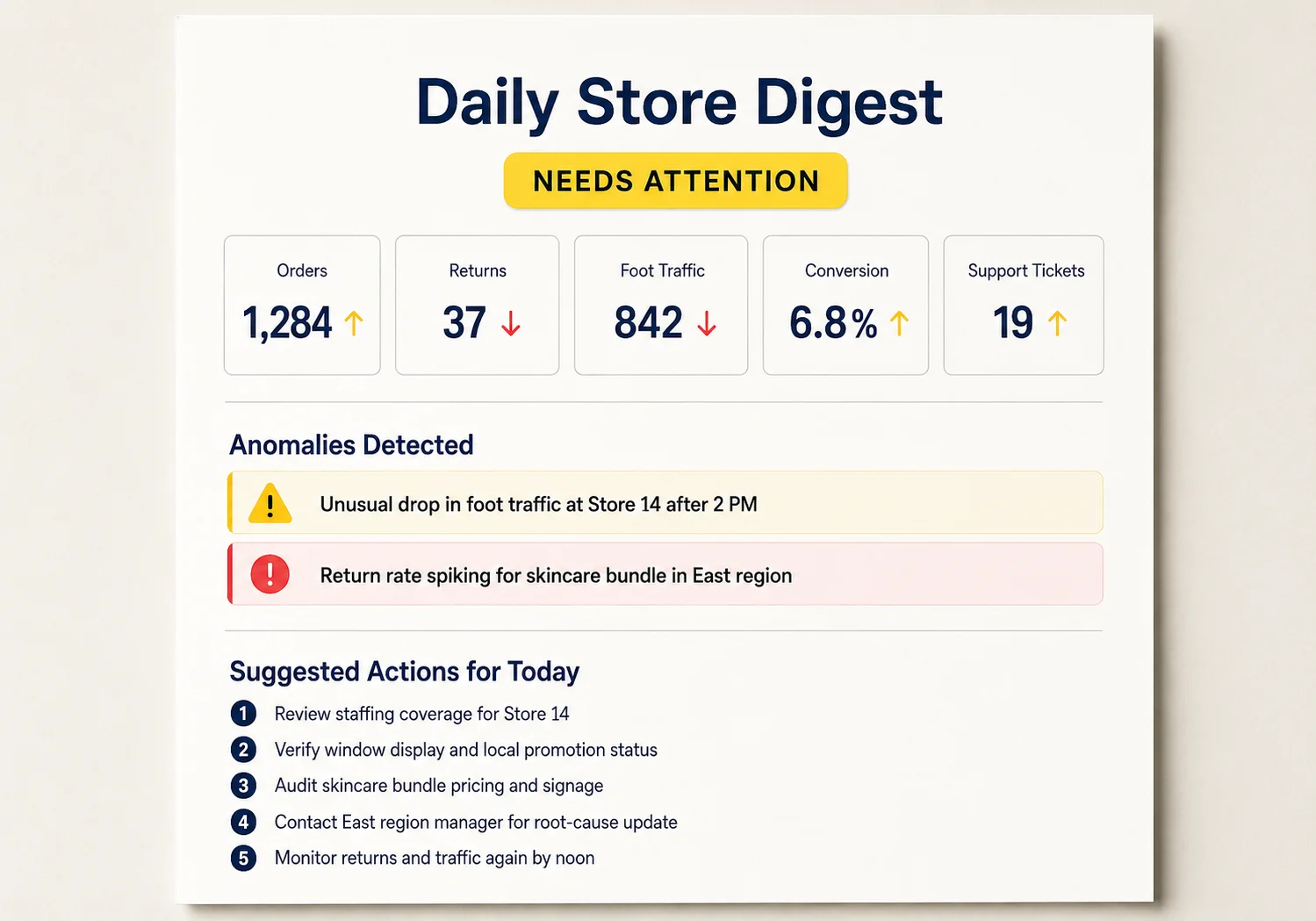
You get a 3-5 page narrative .docx briefing with a verdict (Healthy, Needs Attention, or Critical), the numbers vs. baselines, an explanation of any anomalies it spotted, and a ranked list of Suggested Actions for Today. Pair it with the scheduler and you wake up to a fresh briefing at 7am.
This is the wow-moment skill. It's where you feel the cache mesh paying off, because what would otherwise be five separate apps and five separate tabs becomes one document with five concrete things to do today.
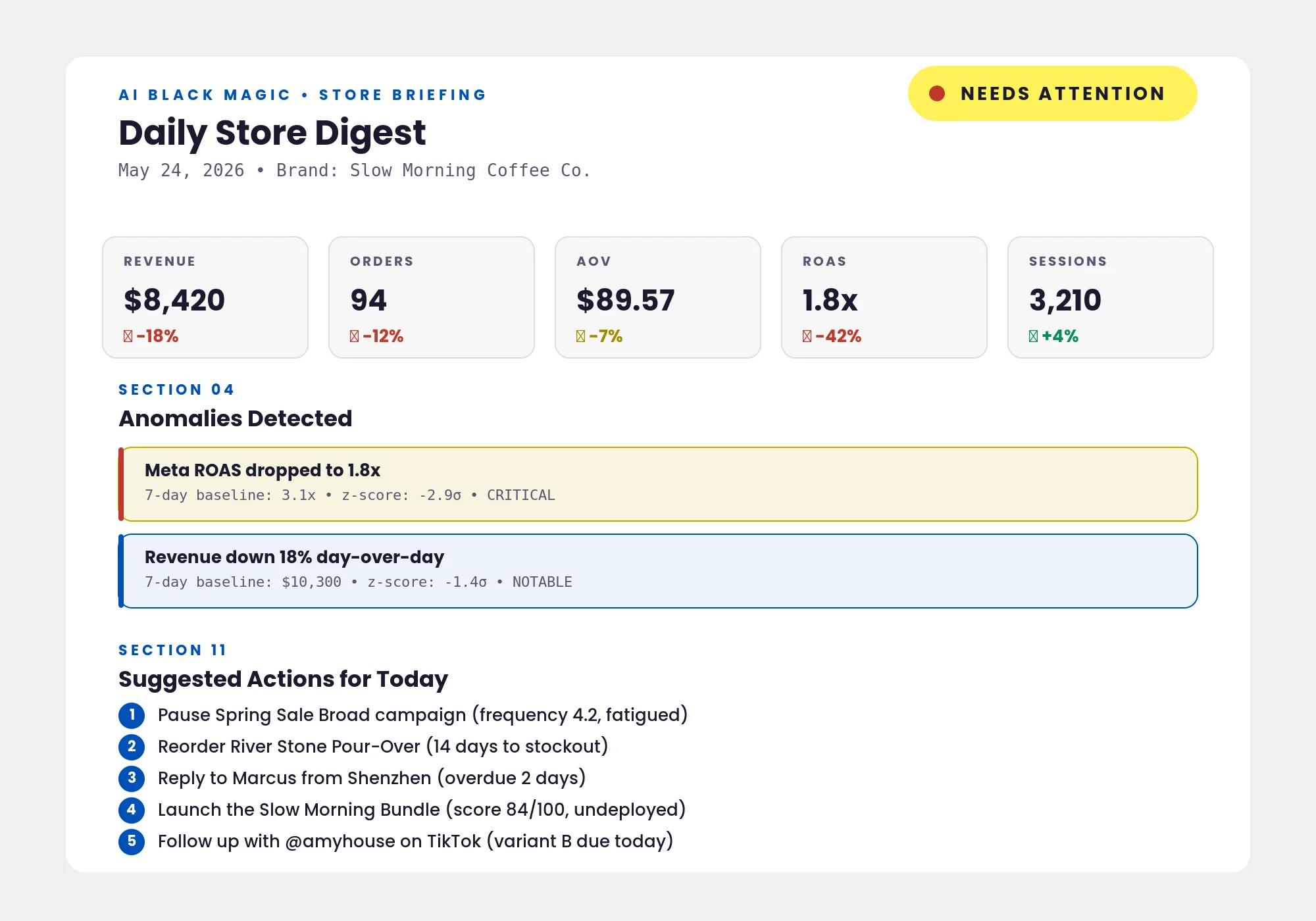
Power tip: Schedule the Daily Store Digest to auto-run every morning at 7am. You wake up, open the .docx, and you've already got the day's priorities ranked before your first coffee. It's the single highest-impact scheduled task in the plugin.
Your First Day With the Plugin
Once it's installed, the order in which you run things matters. Not because anything will break if you do it differently, but because the cache mesh gets richer with every run, and certain skills make every other skill better. Here's the recommended first-day flow:
- Install the plugin via Cowork's plugin browser. It shows up in the plugin list as "The E-Commerce Seller."
- Connect Shopify first. It's the spine that 13 of the 15 skills use. The connector handshake takes about 60 seconds.
- Run Product Description Writer on your bestselling product. This triggers the one-time onboarding flow that captures your brand voice, audience, primary platforms, and vocabulary preferences. The whole onboarding takes 2 to 5 minutes and seeds the shared config that all 14 other skills read.
- Run Listing SEO Optimizer on the same product. Now the keyword cache has real data in it, and every future copy run on this product (or any other) benefits.
- Run Email Flow Architect for the 3 essentials. Welcome, Abandoned Cart, Post-Purchase. Connect Klaviyo first if you can, but the skill outputs paste-ready text blocks either way.
- Schedule the Daily Store Digest. Set it to run at 7am every weekday. You're now waking up to a briefing instead of scrolling Shopify on your phone.
That's roughly 30 to 45 minutes of work the first day, and at the end of it your store has its keyword research, its core copy, its essential email flows, and a recurring morning briefing on autopilot. The agency comparison gets uncomfortable fast.
Pro tip: Don't skip the onboarding. Filling out brand voice, audience, and vocabulary preferences once means every skill, forever, sounds like your brand. Skipping it means you'll be hand-correcting tone in every output.
Where to Go From Here
After your first day, the next skill to run depends on what's hurting most. Pick the path that matches your actual pain:
"My listings aren't ranking."
Run Listing SEO Optimizer on your top 10 SKUs (bulk mode, one .xlsx). Then re-run Product Description Writer on the lowest-scoring ones using the freshly enriched keyword cache. If you're Amazon Brand Registered, finish with A+ Content Creator on your hero ASIN. Three skills, one weekend, listings that are measurably better.
"My ads aren't converting."
Run Ad Creative Generator first to get five concepts across five angles. Then run UGC Creator Brief Writer so your creator content speaks the same hook language (the hook cache is bidirectional, remember). Finally, run Landing Page Copywriter to make sure your destination page actually delivers on what the ad promised. Most ad performance problems are landing-page problems wearing a creative-problem costume.
"I'm drowning in tickets."
Run Customer Service Reply Bot in batch mode on your unread queue (or connect Gmail for auto-fetch). The systemic-issues sheet will tell you which problems are worth fixing once instead of replying to forever. Then run Review Response Writer in bulk to catch up on your public review queue, which has the bonus side effect of populating the testimonial and objection caches for every other skill.
The honest pitch for this plugin isn't that it replaces every specialist. It's that it gets the routine work out of your way so you can focus on the parts of your business that genuinely need your judgment. The 15 skills, the 5 connectors, and the shared cache mesh exist for one reason: to give a solo operator the operational coverage of a real team without the salary line items.
Install it. Connect Shopify. Run the Product Description Writer on your bestseller. The rest follows.
Final thought: Don't try to run all 15 skills in your first week. Run two or three, let the caches fill up with real data, then add a skill at a time as you find the next bottleneck. The plugin gets noticeably smarter the more you use it because the shared mesh is doing more work in the background.