
Claude for Small Business: The Hidden Anthropic Plugin
There's a free Anthropic plugin almost no one knows about. It bundles 31 small business workflows into one Cowork toggle: payroll, invoices, campaigns, contracts, and more. Here's everything inside it and how to start using it this week.
If you run a small business, you already know the rhythm. The week ends, the books need closing, the payroll spreadsheet is open in one tab, three overdue invoices are sitting in another, the campaign you wanted to launch never went out, and one customer just emailed asking for a refund. Most of that work happens at night, after everyone else has logged off, because you couldn't get to it during the day.
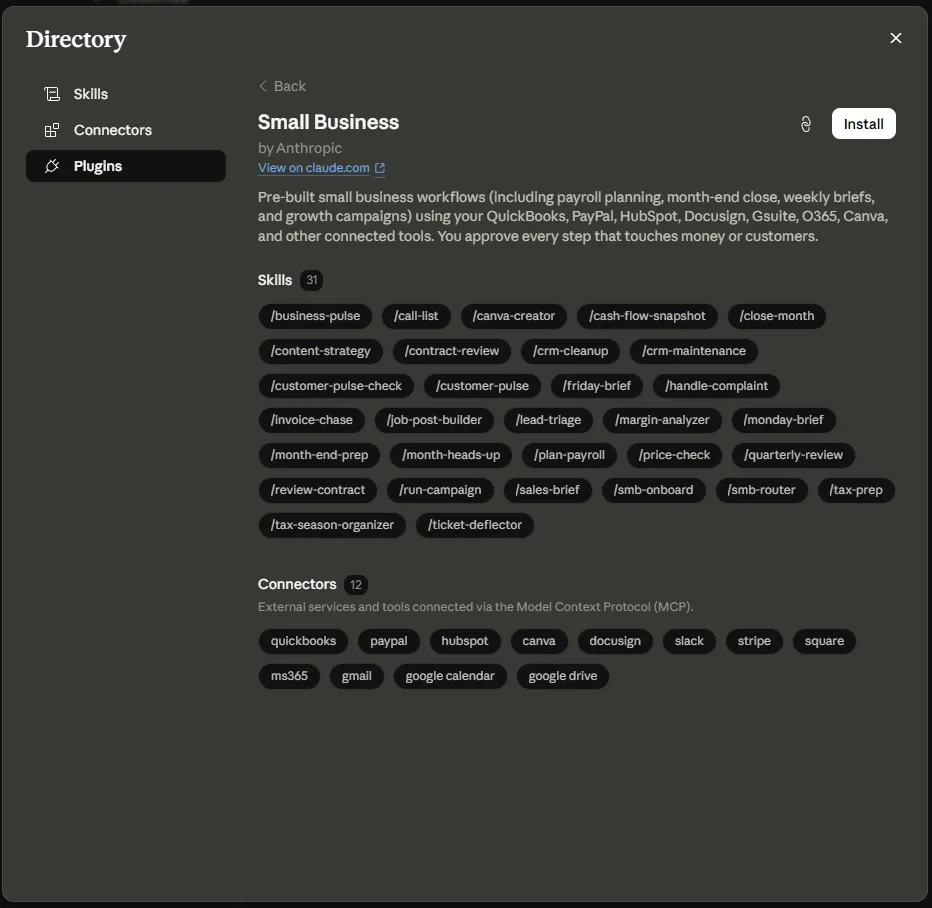
Anthropic shipped something on May 13, 2026 that takes a real shot at that pile. It's called Claude for Small Business, and it's a free plugin for Claude Cowork that bundles 15 ready-to-run workflows, 15 atomic skills, and 12 native connectors to the tools small businesses actually live in: QuickBooks, PayPal, HubSpot, Canva, DocuSign, Slack, Stripe, Square, Microsoft 365, Gmail, Calendar, and Drive.
Here's the catch, and it's why so few people know about it: this plugin doesn't show up by default in Cowork's Customize panel. You have to find it. Once you do, the contents are genuinely useful, well-architected, and built by Anthropic themselves. This article walks you through what it is, what every piece inside it does, and how to actually start using it this week.
The short version: One toggle inside Claude Cowork installs an entire small business operating system. The skills fire automatically when you describe a task in plain English. Nothing sends, posts, or pays without your explicit approval.
What Claude for Small Business actually is
It's a single plugin, not a separate product. Anthropic released it inside an open-source marketplace called knowledge-work-plugins, which lives on GitHub and contains 11 plugins covering different jobs. The Small Business one is built for the person running a 5-to-50 person company who wears every hat in the same week.
Under the hood, the plugin has three layers working together. Understanding this matters because it shapes how you use it.
/plan-payroll or /close-month. These are multi-step recipes with approval checkpoints baked in.The reason the Cowork UI shows "31 skills" when you preview the plugin is that it counts everything addressable from the chat box as a skill. That's 15 commands + 15 skills + the smb-router itself. The README on GitHub splits them into separate categories because they behave differently. Same plugin, two ways of counting.
The bigger picture: the knowledge-work-plugins marketplace
Small Business is one of 11 plugins in the same marketplace, and your users should know the rest exist because they're free and they install the same way. Think of this article as a tour of one gem on a shelf that has 10 other gems on it.
Here's the full lineup. Each plugin targets a specific job and brings its own set of connectors:
| Plugin | What it does |
|---|---|
| small-business | Whole-business operator workflows. The one this article covers. |
| productivity | Personal task, calendar, and context wrangling across Slack, Notion, Asana, Linear, Jira, Monday, ClickUp. |
| sales | Prospect research, call prep, pipeline review, outreach, competitive battlecards. Wires up HubSpot, Close, Clay, ZoomInfo, Fireflies. |
| customer-support | Ticket triage, response drafts, escalation packets, knowledge base articles. Built around Intercom, HubSpot, Guru, Jira. |
| product-management | Spec writing, roadmap planning, user research synthesis. Hits Linear, Asana, Figma, Amplitude, Pendo. |
| marketing | Content drafting, campaign planning, brand voice enforcement, channel reporting. Canva, Figma, HubSpot, Ahrefs, Klaviyo. |
| legal | Contract review, NDA triage, compliance navigation, risk assessment. Box, Egnyte, Jira, MS365. |
| finance | Journal entries, reconciliation, statements, variance, close, audit. Snowflake, Databricks, BigQuery. |
| data | SQL queries, statistical analysis, dashboards, validation. Hex, Definite, Amplitude, the major warehouses. |
| enterprise-search | Single search across email, chat, docs, and wikis. |
| bio-research | Preclinical R&D toolkit. PubMed, BioRender, ClinicalTrials.gov, ChEMBL, Benchling. |
You can install any of these alongside Small Business. They don't conflict. If you also run sales calls yourself, install the sales plugin too. If you do content marketing, grab marketing. They all coexist.
Why this marketplace is hidden: Cowork's default Customize panel doesn't surface every marketplace. You access this one by going to claude.com/plugins, picking the plugin, and clicking Install, or by adding the marketplace explicitly in Claude Code. Once installed, the plugin shows up in your Customize panel like any other.
How to install it (the hands-on part)
Setup takes about 30 to 45 minutes for a typical 10-person business with clean QuickBooks data. If your books are messy, plan more time for data hygiene than for Claude itself. Garbage data produces confident-sounding garbage outputs. Claude can't fix categories you've been ignoring.
Step 1: Get the desktop app
Claude for Small Business runs only inside Claude Cowork on the desktop, not the web version of claude.ai. If you don't already have the desktop app installed, grab it from claude.com/download and sign in with a paid plan. You'll need Pro at minimum; Team or Max if you're rolling it out to staff.
Step 2: Install the plugin
Go to claude.com/plugins/small-business in your browser. You'll see a big Install button. Click it. The browser will hand off to your Cowork desktop app, ask you to confirm the install, and add the plugin to your Customize panel. That's the whole installation.
If you prefer the terminal route, Claude Code users can run:
Step 3: Run smb-onboard
Open a fresh Cowork chat. Type "set me up" or "get me started". This triggers the smb-onboard skill, which is the day-one entry point Anthropic designed for this plugin.
What happens next: Claude walks you through connecting your first two tools (usually QuickBooks and Gmail), confirms the OAuth permissions you're approving, captures a few sentences about your business, and runs a demo workflow end-to-end so you see real value before you've connected everything else.
Start with just QuickBooks and PayPal. You'll get most of the financial workflow value from those two alone. Add HubSpot if you do sales, Canva if you do marketing, the rest as you need them. The plugin tells you when connecting another tool would add more.
Step 4: Pin the workflows you'll use weekly
Cowork's composer supports favorites. Pin /monday-brief, /call-list, and whichever 3 or 4 other commands fit your week. You don't need them all visible. The router will find any of the 15 even if it's not pinned.
The 12 connectors and what each one adds
Connectors are the bridge between Claude and your real business data. Each one is an OAuth connection to an MCP server hosted by either Anthropic or the tool's vendor. You log in once, approve the scopes, and Claude can read and write through the API.
Three are core. Connect these first and most workflows light up. The rest are optional and add depth as you go.
| Connector | Tier | What it powers |
|---|---|---|
| QuickBooks | Core | Cash forecasts, margin analysis, month-end close, tax prep, reconciliation. The financial backbone of the plugin. |
| PayPal | Core | Settlements, invoicing, disputes, refunds. Pairs with QuickBooks for reconciliation. |
| HubSpot | Core | CRM, lead triage, campaign attribution, customer support tickets. |
| Canva | Optional | Generates on-brand social and email assets, stages a posting calendar. |
| DocuSign | Optional | Sends contracts for signature, tracks status, files executed copies. Used by contract review and hiring. |
| Slack | Optional | Posts Monday and Friday briefs to a channel. Notifications. |
| Stripe | Optional | Payment and subscription data. Alternative to PayPal for cash-flow inputs. |
| Square | Optional | POS transaction data. Useful if you run a physical location. |
| Microsoft 365 | Optional | Outlook, Word, Excel, PowerPoint, Teams. Pick this if you're a Microsoft shop. |
| Gmail | Optional | Email drafts, ticket handling, contract pull-ins. Pick this if you're a Google shop. |
| Google Calendar | Optional | Meeting prep, call blocking, weekly commitments in briefs. |
| Google Drive | Optional | File storage, templates, exported close packets. |
You don't need all twelve. A working setup is QuickBooks + PayPal + HubSpot + Gmail or Outlook. That's four connectors, and it gets you roughly 80% of what the plugin does.
The 15 commands, organized by what they actually do
Commands are the workflows you invoke explicitly. Each one chains multiple skills together with approval checkpoints, so you see what's about to happen before anything sends, posts, pays, or files. Anthropic groups them into five categories. Here's every command, what it does, and when to use it.
Money and finance
| Command | What it does | Best for |
|---|---|---|
/plan-payroll |
Reads QuickBooks cash position, settles it against PayPal or Stripe inflows, builds a 30-day forecast, ranks overdue invoices, and drafts reminder emails for your approval. | The Friday-before-payroll panic. |
/month-heads-up |
30-day cash outlook with risk flags. Designed to run automatically on the 25th of each month so you have time to react before month-end. | Heading off a cash crunch. |
/close-month |
Reconciles QuickBooks against your payment processors, flags mismatches, writes a plain-English P&L narrative, and exports a close packet you can forward straight to your accountant. | Owner-operators doing their own books. |
/price-check |
Margin-by-product table plus three pricing scenarios with revenue impact. Shows you what a 5% price rise costs in volume before you make the call. | Quarterly pricing reviews. |
/tax-prep |
Quarterly estimated tax calc or year-end 1099-NEC prep with accountant handoff packet. | Pre-April-15 sanity check or 1099 season. |
Sales and marketing
| Command | What it does | Best for |
|---|---|---|
/call-list |
Top 5 HubSpot leads to call today, ranked by engagement and fit, with talking points pulled from your email history and calendar blocks set aside. | Monday morning sales sprint. |
/run-campaign |
End-to-end campaign: finds the slow stretch in your revenue, drafts a promo strategy, generates Canva assets, stages a HubSpot send. The headline launch demo. | Filling a known slow season. |
/sales-brief |
Top sellers and slow movers with a 2-week content brief tied to what's actually moving. | Weekly content planning. |
Customers and operations
| Command | What it does | Best for |
|---|---|---|
/customer-pulse-check |
Themes from disputes, tickets, emails, and reviews with a "do these three things this week" list and reply templates. | Weekly customer health review. |
/handle-complaint |
Pulls order and customer context, drafts a tone-matched reply, suggests an operational fix so the same problem doesn't recur. Can issue PayPal refunds with your approval. | Inbound angry customer email. |
/crm-cleanup |
Scans HubSpot for stale deals, duplicates, and missing fields. Fixes only what you approve, never something silent. | Quarterly HubSpot hygiene. |
/review-contract |
Plain-English review of an NDA, MSA, or vendor contract with red flags, severity ratings, and a marked-up redline DOCX. | Vendor contract you'd otherwise sign blind. |
Business intelligence
| Command | What it does | Best for |
|---|---|---|
/monday-brief |
One-page Monday: cash position, sales this week vs last, pipeline movement, calendar for the week, and your top 3 to-dos. | The single most useful command. If you only run one, run this. |
/friday-brief |
End-of-week pulse: revenue vs. prior week, wins, things to watch. | Team wrap-up. |
/quarterly-review |
Full QBR narrative: revenue, margin, customer health, opportunities, risks. As a deck or PDF. | Board calls, investor updates. |
Pro tip: You don't have to type a slash command. The router understands plain language. Say "I'm worried about cash this month" and you'll get /month-heads-up. Say "a customer is upset, here's their email" and you'll get /handle-complaint. The commands are there for when you know exactly what you want.
The 15 atomic skills (what fires automatically)
Skills are the building blocks. You don't usually invoke them by name. They fire when the conversation needs them, either because a command is chaining them, or because something you said matched their trigger. Knowing what's in the toolbox helps you understand what Claude can actually do.
Money and finance skills
Sales and marketing skills
Customers and operations skills
Hiring skill
Onboarding skill
One thing worth knowing: these skills are designed to degrade gracefully. The business-pulse skill, for example, will produce a useful brief even if only one connector is wired up. It just tells you which additional connector would add more depth. That's a real engineering choice, not marketing copy.
A weekly routine you can copy this Monday
A library of 30 workflows is useless without a rhythm to run them on. Here's the cadence that works for most owner-operators. Use it for your first month, then keep what stuck and drop what didn't.
Monday morning, 10 minutes
Run /monday-brief. Read it with coffee. Cash, sales, pipeline, top three to-dos. If anything looks off, drill in with /month-heads-up or /call-list.
Tuesday, sales day
Run /call-list first thing. Make the five calls. Run /crm-cleanup at end of day to log what you touched into HubSpot without leaving Claude.
Wednesday, customers
Run /customer-pulse-check. Three fixable issues, three reply templates, done in under 30 minutes.
Thursday, cash and invoices
Run /plan-payroll if it's payroll week, otherwise use the invoice chase skill directly. Read every draft reminder before approving. Send the ones that read right.
Friday, wrap and plan
Run /friday-brief for yourself and your team. If you're touching socials next week, run /sales-brief too.
25th of the month, auto
The month-heads-up workflow surfaces a 30-day cash outlook automatically. If anything is red, you have about a week to fix it before month-end.
Don't auto-send anything that touches a customer. Every invoice reminder, complaint reply, and campaign email should pass your eyes before it goes out. Claude doesn't know about the customer who had a death in the family last week. You do. Read everything before you approve it.
What it doesn't do (the honest limits)
The plugin's README itself says this in the opening notes, and it's worth repeating because it's easy to forget when something looks polished: "This plugin assists with small business workflows but does not provide financial, tax, legal, or HR advice."
Three real limits to keep in mind:
- Garbage in, confident garbage out. Cash-flow snapshots are only as good as your QuickBooks categories. CRM cleanup only helps if your HubSpot stages mean something. The first week with this plugin should be data hygiene, not feature exploration.
- It's preparation, not professional advice. Tax prep makes your accountant faster. Contract review makes your lawyer faster. Both make you faster at handing them clean inputs. Neither replaces the professional.
- Read every draft. Tone-matched invoice chases and complaint replies look right even when they're wrong about context only you have. The product makes you fast, not infallible.
The teams who get the most value from this plugin are the ones who treat it as a workflow accelerator with a human in the loop, not as automation that runs unattended.
Pricing, security, and trust
The plugin itself is free. What you pay for is a Claude plan that includes Cowork, plus whatever your connected SaaS tools cost. There's no extra Anthropic charge for the plugin or for any specific workflow inside it.
Security-wise, three commitments are baked into how the plugin works, not bolted on after:
This matters because Anthropic's own survey of small business owners found that half named data security as their single biggest hesitation about AI. The architecture of this plugin is a direct response to that.
Your next step
If you've read this far, you already know whether this is worth your time. The owners who win with Claude for Small Business are the ones who treat it as a craft worth learning, the same way they once learned to read a P&L or close a sale. The plugin gives you a serious head start on the workflows. It doesn't replace the judgment.
Three actions that take less than an hour combined:
- Install the plugin. Open Claude Cowork on desktop, go to
claude.com/plugins/small-business, click Install. - Run
smb-onboard. Type "set me up" in a new chat. Connect QuickBooks and Gmail or Outlook. Run the demo recipe it offers. - Pin
/monday-brief. Then run it once before you close the laptop. Tomorrow morning, you'll see what the plugin actually does for you.
The first hour pays for itself the first week. Almost every owner who installs this plugin underestimates how much busy work they were doing late at night until it stops. Run it for a month, keep the workflows that stuck, drop the ones that didn't, and you'll have built something custom to how your business actually operates.
Bonus: Once you're comfortable with Small Business, take a look at the other plugins in the same marketplace. The productivity plugin is a strong second install for anyone juggling task lists across Slack and Notion. The marketing plugin gives you channel-by-channel reporting that pairs well with Canva. They all install the same way, and they're all free.