
Google Stitch Website Redesign
Drop a URL, get back a redesigned static site in HTML and Tailwind. Or hand Claude a full brief and watch it build a cohesive multi-page site with one shared design system, page by page. Built on Google Stitch and the Stitch MCP. Two modes, real production code, deploy anywhere.
Stitch Website Builder is the most ambitious skill we've shipped so far. It connects two powerful tools that don't talk to each other out of the box, then automates the boring parts so you can focus on the work that matters.
Used wisely, this is one of the more lucrative skills we've put out. Web designers and freelancers routinely charge $1,500 to $4,000 for a small landing page or marketing site. With this skill, you can deliver one in under an hour. A handful of clients a week, and you're at around ten thousand dollars a month. The setup pain is a one-time cost. The output keeps coming.
The setup is a little more involved than most skills because you need to plug Claude into Google Stitch via something called an MCP server. Don't let that scare you. We've built a way for Claude to install everything for you while you watch. By the end of this guide, you'll have a working website builder that takes a single URL and a sentence of direction, and gives you back a polished static site you can deploy anywhere.
What it is
One folder: stitch-website-builder. Inside are the brain (SKILL.md), six reference files that teach Claude exactly how to use Stitch well, two helper scripts that handle setup and verification, and a configuration file that remembers your brand details so you never have to repeat them.
Once installed, the skill gives Claude two new abilities, both running on Google Stitch underneath:
Rapid Redesign. Drop a URL, answer three or four quick questions, get back a single static page rebuilt from scratch in HTML and Tailwind. Two to four minutes total.
Premium Multi-Page Build. Sit through a richer brief, then watch Claude orchestrate two of Google's own skills to build a cohesive multi-page site, page by page, all sharing the same design system. Fifteen to thirty minutes.
Both modes produce real, deployable code. Not Figma files. Not screenshots. Actual HTML you can drop into Netlify, Vercel, Cloudflare Pages, or your own server.
What you need
Before we install anything, here's the lay of the land. Some of these you almost certainly already have.
Claude with Cowork mode, or Claude Code CLI on your computer.
A Google account that can sign in to Stitch. Stitch is free in 2026, no credit card needed.
An internet connection. The skill talks to Stitch over the network on every generation.
Node.js installed. If you've ever installed anything via the terminal, you probably already have it.
Comfort with terminal commands. Helpful if you want to install the manual way, not needed if you take the easy path.
Design experience, coding skills, paid Stitch tier, Figma, Adobe XD, or any other design tool. The skill brings everything it needs.
About Stitch credits: Stitch is free, but it runs on a daily credit budget. As of April 2026, you get 400 design credits and 15 redesign credits per day, reset at midnight UTC. A Mode A redesign uses one redesign credit. A Mode B build of five pages uses around fifteen to twenty design credits. You'll almost never hit the limit unless you're building several full sites in one sitting.
Install it
Three paths to the same destination. The first is the easiest. The other two exist for people who like to know exactly what's happening on their machine.
Let Claude install everything for you
This is the path we recommend if your goal is to get to the fun part fast. The skill bundle includes a file called STITCH-SETUP-GUIDE.md. You hand that file to Claude, ask Claude to follow it, and Claude does the entire installation while you approve a few prompts.
Download the bundle
Grab the stitch-website-builder folder. It includes the skill itself plus the setup guide.
Open Cowork or Claude Code
Either works. The setup guide is written so Claude can act on it the same way in both environments.
Drop in the setup guide
Drag STITCH-SETUP-GUIDE.md into the chat window, or upload it through the attachment menu.
Ask Claude to follow the guide
A message like the one below works. Claude will read the file, ask permission to run each command, and walk you through the Google login step in your browser.
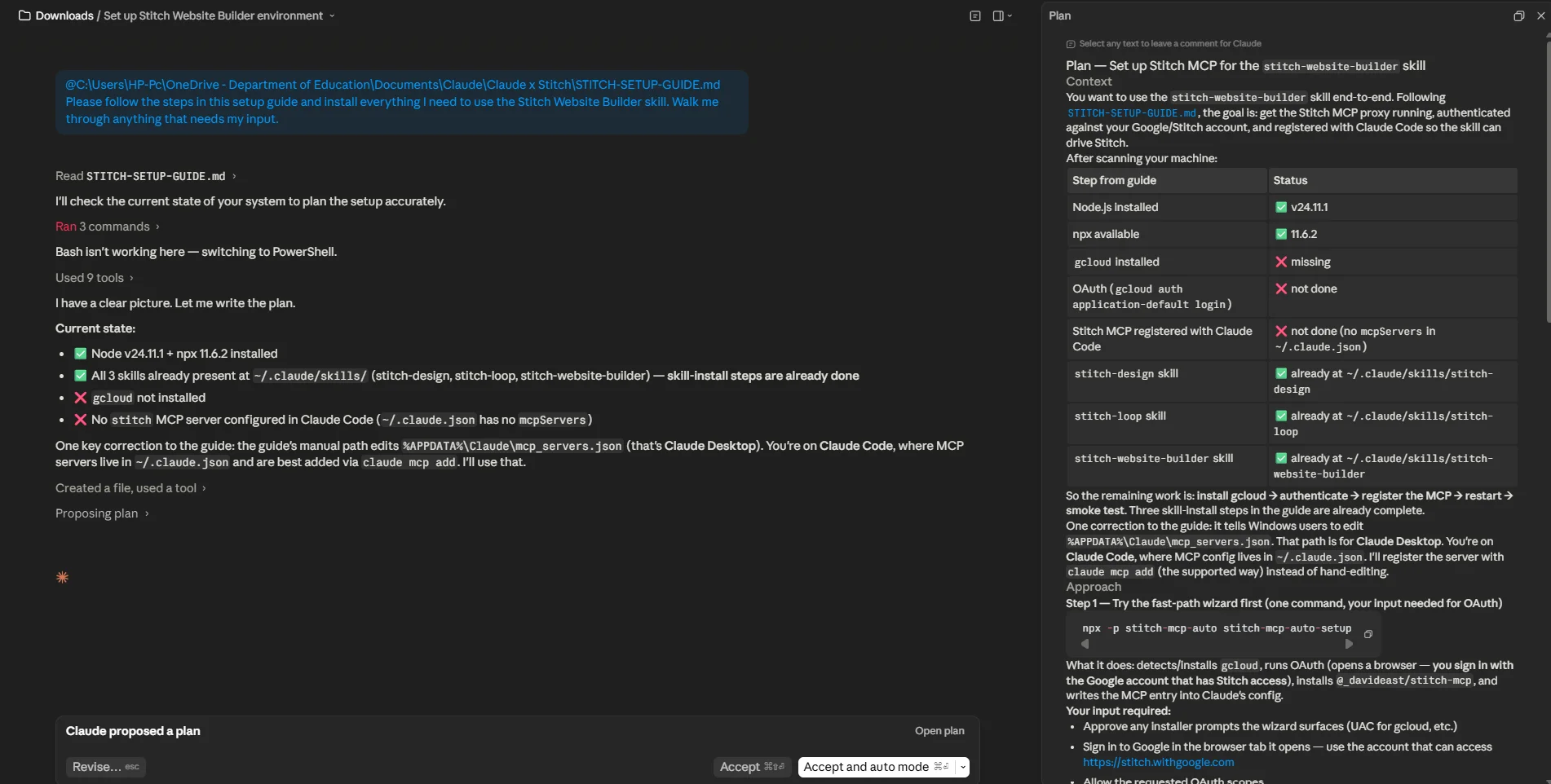
You'll see Claude open a terminal, run the wizard, install gcloud if you don't have it, open a browser tab for Google login, and configure the MCP at the end. Total clicks on your end: usually three or four. Total time: five to ten minutes depending on what's already installed.
Why this works: Claude can run terminal commands when you give it permission. The setup guide is written specifically for Claude to read and execute. You stay in the chat the whole time and approve the steps. No copy-pasting commands you don't understand.
Manual install in Cowork
If you'd rather install the skill yourself and let Claude only handle the Stitch connection, this is the middle path.
Open the Customize menu
Click the Customize button in Cowork to open your skills and plugin settings.
Click Upload skill
Pick the stitch-website-builder folder from your file picker. If your version of Cowork only accepts .skill files, zip the folder first and rename it to stitch-website-builder.skill.
Confirm install
Cowork installs the skill and lists it in your library. The skill is loaded but Stitch isn't connected yet.
Trigger the skill
Say something like "Use Stitch Website Builder to redesign my site." On first run, the skill checks your setup, sees Stitch isn't connected, and offers to install the MCP for you. Say yes.
Manual install in Claude Code CLI
For developers who want to know exactly where every file goes.
Move the folder into your skills directory
Global install: ~/.claude/skills/stitch-website-builder/. Per-project: your-project/.claude/skills/stitch-website-builder/.
Restart Claude Code
Quit and reopen so the skill loads. A reload from inside isn't always enough.
Run the bundled setup script
From the skill folder: bash scripts/install_stitch_stack.sh --all. This runs the same installer the easy path runs, but you trigger it yourself.
Same result, three paths. All three end with the same thing: the skill loaded, Stitch connected via MCP, and Claude ready to build websites. Pick the one that matches how you like to work.
First-run setup
The first time you trigger the skill after install, it runs a quick onboarding so it knows who you are. Five questions. Your answers save to a config file inside the skill folder, and you won't be asked again unless you ask for a redo.
2. Audience. One sentence on who the website is for. Example: "Specialty coffee drinkers who care about origin and roast date".
3. Voice. Pick one of: Punchy & casual, Polished & professional, Warm & conversational, Editorial & premium, Technical & precise, or describe your own.
4. Default design direction. Your standing visual preference when you don't specify per project. Example: "Editorial restraint with serif headings and lots of whitespace".
5. Code preference. Static HTML and Tailwind in a single file, multi-file, or decide each time. Single file is easiest for most users.
After you answer, the skill writes everything to config.json and runs a setup check. If the Stitch MCP needs installing and you took the easy path above, this step is already done. If you installed the skill manually, this is where Claude offers to wire up Stitch for you.
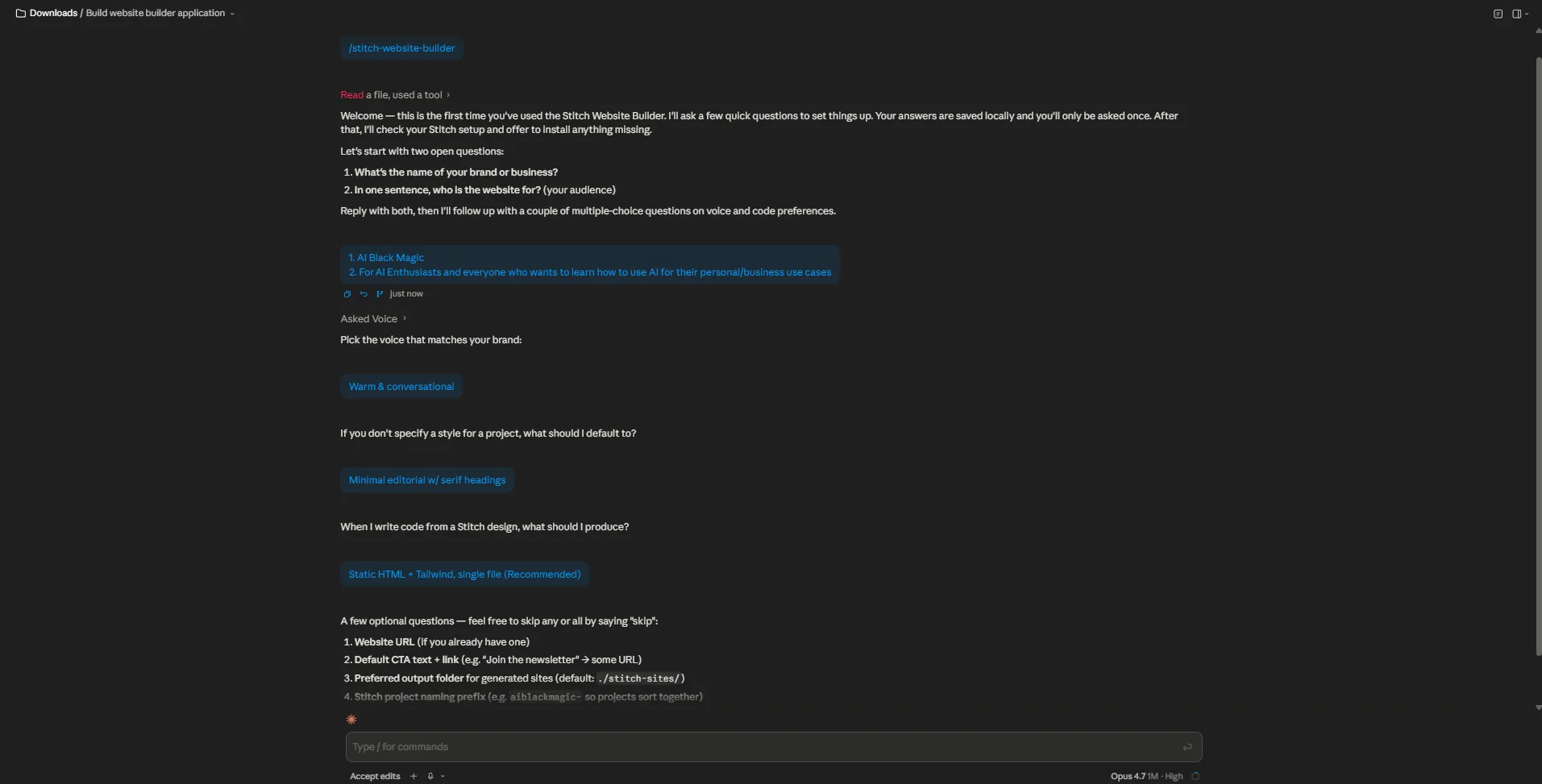
Want to change something later? Just say "redo my Stitch Website Builder setup" or "change my voice to editorial premium." Claude updates only the field you mentioned. You don't have to redo the whole thing.
Start here: Mode A, the Rapid Redesign
Mode A is where everyone should start. It's fast, it's forgiving, and it gives you a feel for how the skill thinks before you commit to a longer multi-page build. We'll walk through a real example so you can see exactly what it looks like.
Imagine you run a small specialty coffee roaster called Folio Coffee. Your current website was built five years ago and looks it. You want to see what a redesign could look like before you commit to hiring a designer. Here's the entire interaction.
Claude pulls your brand, voice, and default direction from the config file. Then it asks just the three or four things it doesn't already know.
Q: "What about the current page is bothering you most?"
A: "Hero is too busy. The product photography deserves more space. Headlines feel like marketing-speak."
Q: "Use your default direction (editorial restraint with serif headings) or something different for this one?"
A: "Default is fine, but lean even more into the magazine feel. Pull quotes, generous whitespace, one accent color."
Q: "What's the one thing this page should make a visitor do?"
A: "Browse the current month's coffees and add one to their cart."
Q: "Roughly how many sections?"
A: "Medium. Hero, current month feature, four to five coffee tiles, a story section about the roaster, footer."
That's the entire interview. Sixty seconds. Claude takes the answers, builds a dense prompt for Stitch, and sends it.
What happens next happens fast. Claude calls the Stitch MCP, generates the redesigned page in Stitch (this takes twenty to forty seconds on Stitch's side), pulls the design data back, downloads any images Stitch generated, and writes a single index.html file with the layout, typography, and Tailwind classes that match the Stitch design.
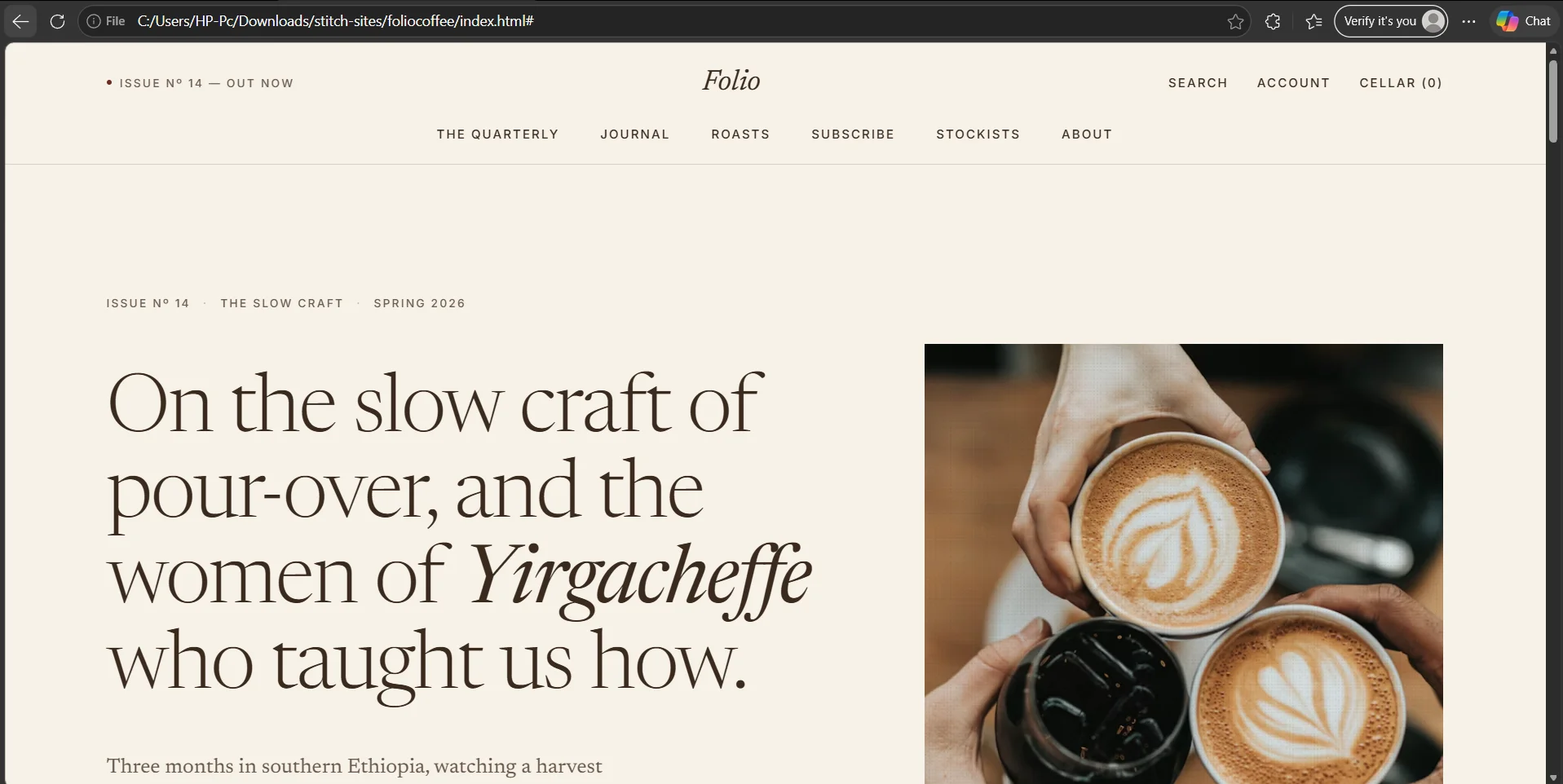
You get back a link to the file, a two-sentence summary of what got built, and the Stitch project URL so you can open the design in Stitch and tweak it visually if you want. Total elapsed time, from your first prompt to a working HTML file: usually three to four minutes.
Why Mode A works: The skill is doing two things you'd otherwise do by hand. First, it's writing a sharp prompt for Stitch from a vague human description. Second, it's translating Stitch's visual output into shippable code. Both are tedious. Both are now invisible.
What Mode A is not great for
Mode A is single-page only. It doesn't try to keep cohesion across multiple pages because it isn't designed to. If you ask Mode A to build you a full site by running it five times, you'll get five pages that don't quite match each other. That's what Mode B is for.
Level up: Mode B, the Premium Multi-Page Build
Once you've run Mode A once or twice and you trust how the skill works, you can tackle the bigger workflow. Mode B builds full multi-page websites that share a design system, sitemap, and visual rhythm. It does this by handing off to two skills made by Google itself: stitch-design and stitch-loop.
Stitch Website Builder installs those automatically when you choose Mode B for the first time. You don't have to know anything about them, but it helps to understand what each one does.
| Helper skill | What it does |
|---|---|
stitch-design |
Takes your brief and creates the design system file (DESIGN.md), the sitemap (SITE.md), and one prompt per page. |
stitch-loop |
Generates pages one at a time, in order, each one inheriting the design system so they all look like they belong together. |
Let's walk a real example. You're a small architecture firm called Maren Architects. You want a five-page site: home, about, projects, services, and contact. You want it to feel restrained, residential, expensive without showing off.
Claude collects a few more details (core offer, what to avoid, desired qualities) then hands the brief to stitch-design. A minute or two later, the .stitch/ folder appears in your project with three things in it.
DESIGN.md. The visual system. Mood, color palette, typography stack, spacing scale, component patterns. Everything Stitch needs to keep five pages looking like one site.
SITE.md. The sitemap and roadmap. Page list, each page's purpose, primary action, and order of priority.
pages/. One prompt file per page: home.md, about.md, projects.md, services.md, contact.md. Each prompt knows about DESIGN.md and SITE.md, so cohesion is enforced.
Claude shows you a summary of DESIGN.md (mood, primary colors, type stack) and the page list, and asks if you want to change anything before any pages get generated. This is the moment to make adjustments. Changes here propagate to every page.
The home page is the anchor
Mode B always generates the home page first, by itself, and asks you to approve it before continuing. The home page sets the visual tone every other page will follow. If it's off, every other page will be off in the same way. It's worth spending an extra two minutes here.
Once you approve the home, Claude triggers stitch-loop. The loop reads from a small file called next-prompt.md (the "baton"), generates the next page on the list, integrates it into the site folder, and writes the next instruction back to the baton. You'll see Claude work through the pages one at a time, calling out progress: "Generated about.html, three of five pages done."
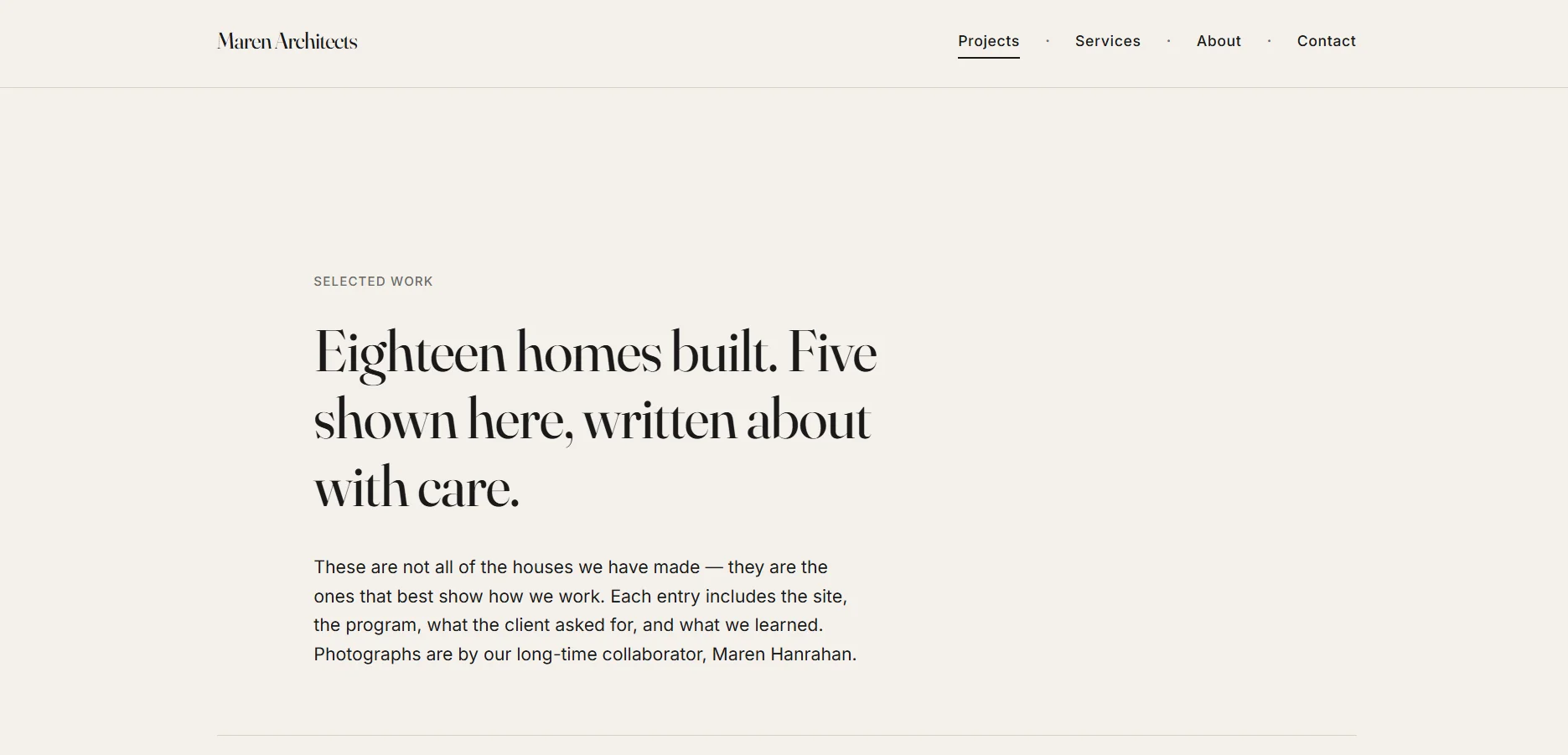
After the last page generates, Claude does a cohesion sweep. Same nav on every page with the active state correctly highlighted. Same footer. All cross-links resolve. Shared assets in one folder. Mobile breakpoints behave. Then it hands you the result.
For a five-page site, total elapsed time is usually fifteen to twenty-five minutes. Most of that is Stitch's generation time on Google's side, not anything you have to do.
The trick to Mode B: Lock the page list and the design direction before the loop starts. Adding a page or changing the design system mid-loop forces you to regenerate earlier pages to match. Get the brief right at the front, then let the loop run.
When something breaks
Most issues with Stitch Website Builder come down to the same handful of root causes. Here's the troubleshooting list, in rough order of how often you'll hit each one.
OAuth token expired
You use the skill in the morning, it works fine, you come back in the evening, and a Stitch call fails with an authentication error. Your Google login token expired, which they do every few hours. The fix is one terminal command.
Sign in with the same Google account you used originally, close the browser tab, and the skill works again. Or just ask Claude to refresh your Stitch login and it'll run the command for you.
"API keys are not supported by this API"
You see this if your install ended up using stitch-mcp-server instead of @_davideast/stitch-mcp. The first one uses API keys. The second uses Google OAuth. Stitch's actual API rejects API keys, so the first package doesn't work. The fix is to switch to the OAuth-based package. The bundled installer in the skill always picks the right one, so this only happens if you installed the MCP yourself the wrong way.
The Stitch MCP doesn't show up in Claude Code
You ran the install but Claude says it doesn't have a Stitch tool. Three things to check, in order.
- Did you fully restart Claude Code? Quit completely, then reopen. A window reload isn't always enough to reload MCP configs.
- Is the Stitch entry actually in your MCP config file? On Mac that's
~/Library/Application Support/Claude/mcp_servers.json. On Linux~/.config/claude/mcp_servers.json. On Windows%APPDATA%\Claude\mcp_servers.json. Open the file and confirm there's a"stitch"entry. - Is your JSON valid? A trailing comma will break the whole config silently.
"stitch-design not found"
Mode B specifically needs stitch-design and stitch-loop. If they're missing, the skill offers to install them. If the install fails, you can run it manually.
npx skills add google-labs-code/stitch-skills --skill stitch-loop --global
The bundled diagnostic script
If you're not sure what's wrong, run the preflight script. It checks every dependency and tells you what's missing in plain language.
The output lists each piece (Node, npx, gcloud, the MCP, OAuth, the Mode B helper skills) with an OK or MISS tag. Whatever has MISS, fix that.
One thing that actually breaks the proxy: a .env file in the directory the MCP is starting from. If you see an error like "invalid character 'd' looking for beginning of value," move or rename your .env file and restart.
What to try next
You've got a working website builder wired into Claude. Here's the order we'd suggest you try things in.
First, run Mode A on a real page. Not example.com, not a fake URL. A page you actually care about. Maybe your own outdated landing page, a competitor's site you've been meaning to copy and improve, or a friend's small business site. Seeing the skill work on something you have an opinion about is the fastest way to learn what it's good at and where it needs your judgment.
Second, experiment with the direction library. The skill ships with seven named directions: editorial restraint, bold modern SaaS, warm artisanal, quiet luxury, playful confident, dark mode brutal, and soft minimalism. Try the same source URL with three different directions and see how Stitch interprets each one. You'll start to develop intuition for what each direction actually looks like in practice.
Third, when you're ready, try Mode B with a small site. Three pages is fine for a first run: home, about, contact. The cohesion across pages is the part that genuinely surprises people the first time they see it.
Fourth, if you outgrow static HTML, look at Google's react:components skill from the same stitch-skills repo. It converts Stitch screens into React component systems with design tokens. We didn't include it in this bundle because most users don't need it, but it's there if you do.
The point of using AI-generated UIs: not to remove human judgment, but to compress the parts of the process that don't need it. Stitch is good at pixels. The skill is good at code. You're still the one who knows your audience, your brand, and what good looks like. Use the tools to spend less time on the tedious parts and more time on the parts that actually need you.
That's the install done. The hardest part is behind you. Now go build something.